
Random publishing is killing your blog. I know because I did it for years.
Wake up, think of something to write about, write it, publish it, repeat. No plan. No system. Just whatever felt interesting that day. The result was a scattered mess of content that didn’t build on itself, didn’t establish authority in any area, and didn’t give readers a reason to come back.
A topic strategy changes everything. It gives you clarity about what to write next, prevents burnout by making decisions in advance, and compounds your authority by building depth instead of breadth. This chapter shows you how to build one.
The Random Publishing Problem
I have a site with over 1,500 posts. About 400 of them get traffic. The other 1,100 just sit there, doing nothing. Most of those 1,100 were written randomly, chasing whatever seemed interesting in the moment.
That’s the cost of random publishing: wasted effort that compounds into a graveyard of content nobody reads.
Why “Write What You Feel Like” Fails
It feels great in the moment. You’re inspired, you write something, you hit publish. But inspiration is unreliable, and it doesn’t care about strategy.
Here’s what happens when you follow inspiration:
You chase trends that fade. That post about a viral news story got 500 visits in a week and zero since. Meanwhile, evergreen content about fundamentals gets traffic for years.
You scatter your authority. Search engines reward topical depth. A hundred posts across 20 topics builds less authority than 50 posts across 3 topics. Random publishing spreads you thin.
You confuse your audience. Readers subscribe expecting more of what they liked. When your next 5 posts are completely different, they leave.
You burn out faster. Starting from scratch every day is exhausting. Having a plan makes writing easier because half the decisions are already made.
The Scattered Authority Problem
Google measures topical authority. Not explicitly, but through signals like internal linking, topical depth, and related content clusters.
Here’s a simplified example. Imagine two sites:
Site A has 50 posts scattered across 15 topics: some WordPress, some marketing, some personal finance, some productivity, some recipes.
Site B has 50 posts across 3 topics: WordPress performance, WordPress security, WordPress hosting.
Both have the same total content. But Site B ranks better for WordPress queries because Google sees it as an authority on WordPress. Site A doesn’t rank for anything because it’s not an authority on any single topic.
I’ve seen this play out on my own sites and with clients. The focused sites consistently outperform the scattered ones, even with less total content.
How Readers Perceive Inconsistency
Put yourself in your reader’s shoes.
They find a great post about email marketing. They like your style. They subscribe to your email list expecting more email marketing content.
Your next email promotes a post about home organization. Then one about fitness. Then one about cryptocurrency.
They unsubscribe. Not because the content was bad, but because they signed up for email marketing advice and got a random assortment of topics instead.
Consistency isn’t boring. It’s how you build an audience that sticks around.
Pillars, Clusters, and Posts
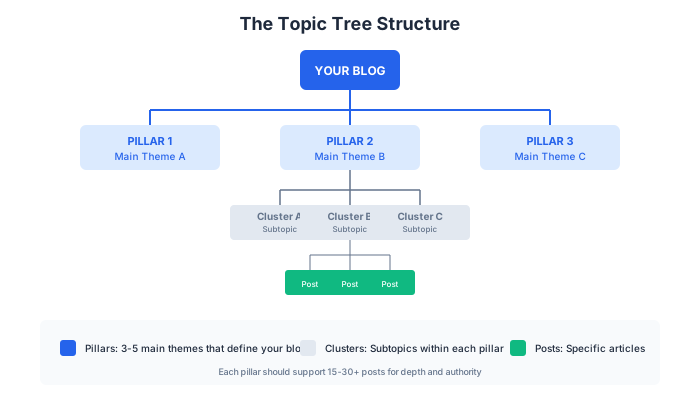
A topic strategy organizes your content into a hierarchy: pillars at the top, clusters beneath them, and individual posts at the bottom.
Pillar Topics
Pillars are your 3-5 main themes. They’re broad enough to support dozens of posts but specific enough to fit your positioning.
For this blog, my pillars might be:
- WordPress performance
- WordPress business (themes, plugins, hosting)
- SEO for bloggers
- Blogging monetization
- Content strategy
Everything I write falls under one of these pillars. If a topic doesn’t fit any pillar, I don’t write about it (anymore).
How to choose pillars:
- They should align with your positioning statement
- They should support your monetization goals (affiliate products, services you offer)
- They should have enough depth for 15-30+ posts each
- They should be topics you can write about for years, not months
Cluster Topics
Clusters are subcategories within each pillar. They group related posts together.
Under “WordPress performance,” my clusters might be:
- Caching (plugin reviews, setup guides, comparisons)
- Image optimization (tools, techniques, workflows)
- Core Web Vitals (LCP fixes, CLS fixes, INP fixes)
- Hosting performance (server optimization, hosting comparisons)
- Database optimization (cleanup, maintenance, migration)
Each cluster becomes a content hub. Posts within a cluster link to each other, building topical authority and keeping readers on your site longer.
How to identify clusters:
- Look at how your audience segments the topic
- Check what competitors organize as categories
- Think about the different problems within your pillar
- Consider the different products/solutions in that space
Individual Posts
Posts are the specific pieces of content within each cluster.
Under the “Caching” cluster:
- WP Rocket Review
- FlyingPress Review
- WP Rocket vs FlyingPress Comparison
- How to Set Up WP Rocket
- How to Set Up FlyingPress
- Best Caching Plugins for WordPress
- Does Your WordPress Site Need a Caching Plugin?
- Common Caching Mistakes and How to Fix Them
Each post serves a specific search intent or reader question. Together, they cover the topic comprehensively.
The Topic Tree Visualized
Think of your content like a tree:
BLOG
├── Pillar: WordPress Performance
│   ├── Cluster: Caching
│   │   ├── Post: WP Rocket Review
│   │   ├── Post: FlyingPress Review
│   │   ├── Post: WP Rocket vs FlyingPress
│   │   └── Post: Best Caching Plugins
│   ├── Cluster: Image Optimization
│   │   ├── Post: ShortPixel Review
│   │   ├── Post: How to Optimize Images for WordPress
│   │   └── Post: WebP vs AVIF: Which Format?
│   └── Cluster: Core Web Vitals
│       ├── Post: How to Fix LCP Issues
│       ├── Post: How to Fix CLS Issues
│       └── Post: Core Web Vitals Checklist
├── Pillar: SEO for Bloggers
│   └── (more clusters and posts)
└── Pillar: Blogging Monetization
    └── (more clusters and posts)
This structure makes planning easy. You can see gaps at a glance. You know what to write next. And readers can navigate your content logically.
Search-First vs. Audience-First Balance
Some content is written to rank on Google and bring new readers. Some content is written for your existing audience to provide value and build loyalty. You need both.
When to Write for Keywords
Keyword-targeted content brings in new readers who don’t know you yet. It’s your top-of-funnel, your discovery mechanism.
Write for keywords when:
- There’s search volume for the topic (people are looking for this)
- The keyword matches a cluster in your topic strategy
- You have something valuable to add (not just repeating what’s already ranking)
- The content has evergreen potential (won’t be outdated in 6 months)
Keyword-targeted posts tend to be:
- How-to tutorials for specific problems
- Reviews and comparisons of products
- “Best X for Y” roundups
- Answers to common questions in your niche
When to Write for Your Existing Audience
Not everything needs to rank. Some content serves people already on your email list, already following you, already trusting your perspective.
Write for audience when:
- You have an opinion or insight that doesn’t fit typical search queries
- You want to share a personal experience or case study
- You’re responding to questions from your community
- You’re building relationship and trust, not just traffic
Audience-targeted posts tend to be:
- Opinion pieces and hot takes
- Behind-the-scenes content
- Personal stories and lessons learned
- Responses to industry news
- In-depth case studies
The 70/30 Split
My recommendation for most bloggers: aim for about 70% search-targeted content and 30% audience-targeted content.
The 70% brings in new readers and builds your traffic foundation. The 30% builds loyalty and gives your email list a reason to stay subscribed.
If you only write for search, your blog feels like a collection of Wikipedia articles. No personality, no reason to follow you specifically.
If you only write for your existing audience, you stop growing. You’re talking to the same people forever.
The mix matters. Adjust the ratio based on your stage:
- New blogs (under 1,000 monthly visitors): Lean more search-heavy (80/20) to build traffic first
- Growing blogs (1,000-20,000 visitors): Standard 70/30 mix
- Established blogs (20,000+ visitors): Can shift toward 60/40 as audience value increases
The 12-Week Topic Map
Planning your content in 12-week blocks hits the sweet spot between structure and flexibility.
Why 12 Weeks
- Short enough to stay relevant: Industry changes, your interests evolve, new opportunities appear
- Long enough to build momentum: You can complete meaningful clusters and see results
- Matches quarterly rhythms: Easy to align with business planning
Building Your Map
Here’s my process:
Step 1: Choose 2-3 clusters to focus on this quarter.
Don’t try to build all clusters at once. Pick 2-3 that are most important for your goals right now. Maybe you’re launching an affiliate relationship and need supporting content. Maybe you have a service to promote. Maybe one cluster is already showing traction and you want to double down.
Step 2: List 4-6 posts per cluster.
For each cluster, identify the specific posts you’ll write. Include a mix:
- 1-2 cornerstone posts (comprehensive guides, “best of” roundups)
- 2-3 supporting posts (specific tutorials, reviews, comparisons)
- 1 opinion/audience piece (your take on the topic)
Step 3: Assign posts to weeks.
Spread the posts across 12 weeks based on your publishing cadence. If you publish twice a week, that’s 24 posts. If you publish once a week, that’s 12 posts.
Don’t front-load everything. Leave some flexibility for trending topics or unexpected opportunities.
Step 4: Note the content type and target.
For each post, mark:
- Search-targeted or audience-targeted
- Affiliate potential (which products could you mention?)
- Internal links (which existing posts should link here? Where should this post link?)
Example 12-Week Map
- Week: 1 | Post Title: Best Caching Plugins for WordPress (2024) | Cluster: Caching | Type: Search | Affiliate Potential: WP Rocket, FlyingPress
- Week: 2 | Post Title: How I Fixed a 4-Second LCP on a Client Site | Cluster: Core Web Vitals | Type: Audience | Affiliate Potential: Hosting, Perfmatters
- Week: 3 | Post Title: WP Rocket vs FlyingPress: Which Is Actually Faster? | Cluster: Caching | Type: Search | Affiliate Potential: Both
- Week: 4 | Post Title: The Image Optimization Workflow I Use on Every Site | Cluster: Images | Type: Audience | Affiliate Potential: ShortPixel
- Week: 5 | Post Title: How to Set Up FlyingPress (Step-by-Step) | Cluster: Caching | Type: Search | Affiliate Potential: FlyingPress
- Week: 6 | Post Title: ShortPixel vs Imagify: Complete Comparison | Cluster: Images | Type: Search | Affiliate Potential: Both
- Week: 7 | Post Title: Core Web Vitals Checklist for WordPress | Cluster: Core Web Vitals | Type: Search | Affiliate Potential: Multiple
- Week: 8 | Post Title: Why I Stopped Using WP Rocket | Cluster: Caching | Type: Audience | Affiliate Potential: FlyingPress
- Week: … | Post Title: … | Cluster: … | Type: … | Affiliate Potential: …
This map isn’t a prison. Things change. But having it means you never stare at a blank screen wondering what to write next.
Built-in Flexibility
I leave about 20% of my calendar open for:
- Trending topics that are too good to ignore
- Requests from my audience
- Updates to old posts that need refreshing
- Sponsored content opportunities
- Posts that take longer than expected
If you plan every single slot, you’ll constantly feel behind. Build in buffer room.
Sustainable Publishing Cadence
Publishing more isn’t always better. Publishing consistently at a sustainable pace beats burning out trying to hit an arbitrary number.
Quality vs. Quantity: The Real Math
A common debate: should you publish more frequently or focus on fewer, better posts?
Here’s what I’ve learned after publishing over 1,800 posts:
More posts only help if they’re meeting a quality threshold. Fifty mediocre posts won’t outrank 20 excellent ones. Google doesn’t reward volume for volume’s sake.
But more posts can compound faster. If every post meets your quality threshold, more posts means more chances to rank, more internal linking opportunities, and faster topical authority.
The right answer: Publish as frequently as you can while maintaining quality. For most solo bloggers, that’s 1-2 posts per week. For teams, it can be more.
Finding Your Minimum Effective Dose
What’s the minimum publishing frequency that keeps your blog growing?
For SEO purposes, I’ve found that:
- 1 post per week is enough to maintain momentum and show Google the site is active
- 2 posts per week accelerates growth meaningfully
- 3+ posts per week has diminishing returns unless you have a team
For audience building:
- Weekly email is enough to stay in subscribers’ minds
- More than weekly can increase engagement but also increases unsubscribes
Find the pace you can maintain for years, not months. I’d rather you publish once a week for 3 years than daily for 3 months before burning out.
The Batch Creation Approach
Instead of writing and publishing in real-time, batch your content creation.
Here’s my process:
Week 1: Research and outline
- Do keyword research for the month’s posts
- Create detailed outlines
- Gather resources, screenshots, examples
Week 2-3: Write
- Draft all posts from outlines
- Focus on writing, not editing
- Get everything down before polishing
Week 4: Edit and schedule
- Edit all drafts
- Add images, links, formatting
- Schedule across the next month
This batching approach means:
- Better focus (you’re not context-switching between research, writing, and editing)
- More consistent quality (you can compare posts and improve before publishing)
- Buffer room (you’re always a month ahead, so emergencies don’t derail you)
- Less daily pressure (the work is done, you’re just watching posts go live)
Not everyone can batch this aggressively. But even batching 2-3 posts at a time helps.
Chapter Checklist
- [ ] Have I identified 3-5 content pillars that align with my positioning?
- [ ] Have I broken each pillar into 3-5 clusters?
- [ ] Do I understand the difference between search-targeted and audience-targeted content?
- [ ] Have I determined my sustainable publishing cadence?
- [ ] Have I created a 12-week topic map?
Chapter Exercise
Task: Create a 12-week topic map for your blog.
Time required: 2-3 hours
Deliverable: A spreadsheet or document with 12 weeks of planned content, including title, cluster, content type, and affiliate potential for each post.
Process:
-
Define your pillars (15 minutes)
- List 3-5 main themes that fit your positioning
- Make sure they support your monetization goals
-
Define your clusters (30 minutes)
- For each pillar, list 3-5 subcategories
- Think about the different angles, products, and questions within each pillar
-
Brainstorm posts (45 minutes)
- For each cluster, list 5-10 potential posts
- Include a mix of tutorials, reviews, comparisons, and opinion pieces
- Don’t filter yet, just generate ideas
-
Select and prioritize (30 minutes)
- Choose 2-3 clusters to focus on this quarter
- Select 4-6 posts from each chosen cluster
- Prioritize based on: search opportunity, affiliate potential, existing content gaps
-
Build the map (30 minutes)
- Create your 12-week calendar
- Assign posts to specific weeks
- Leave 20% buffer room for flexibility
- Note content type and affiliate potential for each
-
Review (15 minutes)
- Does the mix feel sustainable?
- Is there variety in content types?
- Are you building depth in your chosen clusters?
- Does this support your monetization goals?
Example output:
- Week: 1 | Title: Best WordPress Caching Plugins | Pillar: Performance | Cluster: Caching | Type: Search | Keywords: best caching plugins wordpress | Affiliate: WP Rocket, FlyingPress
- Week: 2 | Title: How I Reduced Load Time by 3 Seconds | Pillar: Performance | Cluster: Case Studies | Type: Audience | Keywords: N/A | Affiliate: Perfmatters
- Week: 3 | Title: WP Rocket Setup Guide | Pillar: Performance | Cluster: Caching | Type: Search | Keywords: wp rocket tutorial | Affiliate: WP Rocket
- Week: 4 | Title: [BUFFER] | Pillar: | Cluster: | Type: | Keywords: | Affiliate:
- Week: 5 | Title: FlyingPress vs WP Rocket | Pillar: Performance | Cluster: Caching | Type: Search | Keywords: flyingpress vs wp rocket | Affiliate: Both
Your 12-week map is now your content roadmap. Refer to it every time you sit down to write. Update it as you learn what performs and what doesn’t.