
Every blog post you write can generate revenue. Most don’t, and it’s not because you’re missing some secret tactic. It’s because the conversion elements are either missing entirely, placed badly, or so aggressive that readers run away.
Conversion isn’t about tricks. It’s about placing the right offer in front of the right person at the right moment. Do it well, and readers thank you for pointing them toward something useful. Do it badly, and you feel like a desperate salesperson.
This chapter is about finding the balance. Conversion that works because it’s helpful, not because it’s pushy.
What Conversion Actually Means for Bloggers
Conversion means getting readers to take an action you want them to take. But “conversion” isn’t just one thing. For bloggers, there’s a hierarchy of conversion goals.
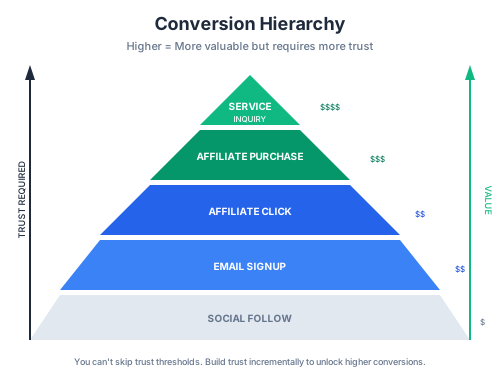
The Conversion Hierarchy
From easiest to hardest:
Social follow: Low commitment, low value. Someone follows you on Twitter. Nice, but doesn’t directly impact revenue.
Email signup: Medium commitment, high value. You now have direct access to communicate with them. They’ve trusted you with their inbox.
Affiliate click: Medium commitment, medium immediate value. They’ve clicked through to a product you recommended. If they buy, you earn.
Affiliate purchase: High commitment, high value. They actually bought something through your link. Direct revenue.
Service inquiry: High commitment, highest potential value. They’re interested in paying you directly for work.
Different content serves different conversion goals. A tutorial might aim for email signups. A review aims for affiliate purchases. A case study might drive service inquiries.
Know what conversion goal each piece of content is serving before you publish it.
Not Everything Needs to Sell
Here’s a mistake I see constantly: bloggers who try to monetize every single post.
Some content builds trust. It doesn’t need affiliate links. It doesn’t need aggressive email capture. It just needs to be useful and build your reputation.
My rough split:
- 60% of posts: Have clear monetization potential (affiliate links, service mentions)
- 30% of posts: Focus on email capture and relationship building
- 10% of posts: Pure value with minimal conversion asks
If every post is pushing for sales, readers feel it. They start tuning out your recommendations because everything is a pitch.
The Psychology of Blog Conversions
Understanding why people convert helps you convert them better without manipulation.
Trust Thresholds
Different actions require different levels of trust:
- Email signup: Low threshold. They just need to believe you’ll send useful content and not spam them.
- Affiliate click: Medium threshold. They need to believe your recommendation is genuine and relevant to their situation.
- Affiliate purchase: Higher threshold. They need to believe the product will solve their problem and that you’re not just pushing it for commission.
- Service purchase: Highest threshold. They’re trusting you with their money and their business outcomes.
You can’t skip thresholds. Someone who doesn’t trust you enough to sign up for your email list definitely won’t buy through your affiliate link.
Build trust incrementally. Some readers will convert immediately. Most need multiple touchpoints.
Decision Fatigue
Every choice you ask readers to make costs them energy. Too many choices and they make none.
Bad post: “Check out WP Rocket or FlyingPress or LiteSpeed Cache or W3 Total Cache. Or maybe SG Optimizer if you’re on SiteGround. Here are affiliate links for all five.”
Good post: “I recommend FlyingPress. Here’s why it’s my top choice, and here’s the link to get it.”
One recommendation is always more effective than five. If you must mention alternatives, still make a clear primary recommendation. “I use FlyingPress. If you’re on a budget, LiteSpeed Cache is free and excellent.”
The “Will This Help Me?” Filter
Every reader processes your recommendations through one filter: “Will this actually help me, or are they just trying to make money?”
The more your content demonstrates expertise and genuine intent to help, the more readers assume your recommendations are trustworthy.
Signs you’re helping:
- You explain the “why,” not just the “what”
- You mention downsides and limitations
- You include free alternatives when they exist
- You don’t recommend things unnecessarily
- Your recommendations align with the problem you’re solving
Signs you’re just selling:
- Every post has affiliate links regardless of relevance
- You only mention products with commissions
- You oversell benefits and hide downsides
- Recommendations feel forced into content that doesn’t need them
- You recommend expensive options when cheaper ones would work
Readers are smart. They can tell the difference.
CTA Placement Logic
Where you put conversion elements matters as much as what they are.
Above the Fold
The visible area before scrolling. This prime real estate should be used carefully.
When above-the-fold CTAs work:
- Email opt-ins on your homepage
- “Get [Resource]” on dedicated landing pages
- Direct answer posts where readers want quick action
When they don’t work:
- Product recommendations in tutorials (reader isn’t ready yet)
- Aggressive pop-ups that block content
- Multiple competing CTAs
The reader who just arrived hasn’t earned trust yet. Above-the-fold CTAs should be high-value and low-commitment. Email opt-ins work. “Buy this $200 product” doesn’t.
In-Content CTAs
The workhorse of blog conversion. CTAs placed naturally within the content, at relevant moments.
When to place in-content CTAs:
- Right after explaining a problem (before the solution): “Struggling with slow page speed? I’ve tested every caching plugin and FlyingPress consistently wins.”
- After demonstrating your recommendation in action: “Here’s the exact result I got with FlyingPress. [Screenshot] You can get it here.”
- Within comparison sections: “For most WordPress sites, I recommend FlyingPress. If you’re on a strict budget, LiteSpeed Cache is an excellent free alternative.”
Format of in-content CTAs:
Keep them natural. A text link within a paragraph converts better than a screaming banner. Save banners for when you really need to draw attention.
Good: “I use FlyingPress on all my client sites. It’s the best balance of performance and ease of use I’ve found.”
Aggressive:
🚀 GET FLYINGPRESS NOW! 🚀
THE BEST CACHING PLUGIN!
➡️ CLICK HERE ➡️
The second version might get clicks from people who skim, but it feels desperate. The first version converts readers who actually read your content, which are the ones most likely to buy.
End of Post CTAs
Readers who make it to the end are engaged. They consumed your entire piece. They’re the most likely to convert.
The end of post is perfect for:
- Summarizing your recommendation with a clear link
- Email opt-in related to the post topic
- Related content that moves them further down your funnel
Don’t waste the end-of-post position on generic asks. Make it specific to what they just read.
Generic (weak): “Subscribe for more tips!”
Specific (strong): “Want the full WordPress speed checklist I use on client sites? Grab it free below.”
Sidebar and Exit Intent
These have diminishing returns but still work in specific situations.
Sidebar: Works for evergreen offers (email signup, flagship product) but is increasingly ignored. Mobile readers don’t see it at all. Don’t rely on sidebar for primary conversion.
Exit intent pop-ups: Can boost email signups significantly but are annoying. Use sparingly, only when the offer is genuinely valuable.
My rule: one exit intent popup per session maximum, and only on posts where I have something truly valuable to offer. Not on every page.
Context Cues That Convert
The context around your recommendation affects whether people click and buy.
Natural Product Mentions vs. Forced Insertions
There’s a world of difference between mentioning a product because it solves the problem you’re discussing versus shoehorning it in for the commission.
Natural mention: You’re writing about WordPress caching. Recommending a caching plugin fits perfectly. The reader expects a recommendation. Your affiliate link feels helpful.
Forced insertion: You’re writing about choosing a blog niche. You randomly mention a hosting company because you want the affiliate commission. The reader didn’t need hosting advice. Your link feels salesy.
Only mention products when they genuinely fit the topic. If you’re tempted to mention an affiliate product that doesn’t fit, don’t.
The “I Use This” Signal
Personal endorsement matters. “I recommend FlyingPress” is okay. “I use FlyingPress on every site I build” is much stronger.
Readers know that what you personally use is what you actually trust. Saying you use something puts your reputation behind it.
But only say this if it’s true. Readers can often tell when you’re claiming to use something you’ve never actually set up.
Phrases that signal genuine endorsement:
- “I’ve used this on 40+ client sites”
- “This is what runs on my own blog”
- “I’ve tested these head-to-head; here’s the winner”
- “I switched from X to Y six months ago and haven’t looked back”
Phrases that feel hollow:
- “Many people say this is the best”
- “This is a popular choice”
- “You might want to consider this option”
Comparison Context vs. Review Context
Conversion rates differ based on content type.
Review context: Reader came to learn about one specific product. They’re considering it. Your job is to help them decide.
- Conversion rate: Higher (they’re already interested)
- Approach: Detailed pros/cons, honest opinion, clear verdict
Comparison context: Reader is deciding between options. They want help choosing.
- Conversion rate: Medium (split interest between options)
- Approach: Fair comparison, clear “who should choose what” guidance
Informational context: Reader came to solve a problem, not buy something.
- Conversion rate: Lower (not in buying mindset)
- Approach: Earn trust first, recommend naturally, focus on education
Match your conversion approach to the context. A tutorial reader needs helpful information first, then a gentle recommendation. A comparison reader is ready to decide and wants a clear verdict.
Trust Signals That Matter
Trust signals help readers believe your recommendations are genuine.
Specific Numbers and Results
Vague claims don’t convert. Specific results do.
Vague: “FlyingPress made my site faster.”
Specific: “FlyingPress took my load time from 3.4 seconds to 0.9 seconds. Here’s my WebPageTest results.”
Include screenshots, data, measurements. Show your actual dashboard, not stock images. Let readers see the evidence.
Numbers build credibility because they’re verifiable. If you say FlyingPress gives you sub-1-second load times, readers can check your site and confirm.
Honest Limitations
Nobody trusts a reviewer who says everything is perfect. Products have limitations. Mention them.
“FlyingPress is excellent but it’s not cheap at $60/year. If you’re on a tight budget, LiteSpeed Cache is free and gets 80% of the results. But if you can afford it, FlyingPress is worth the premium for the extra performance and cleaner interface.”
Mentioning limitations actually increases trust and conversion. Readers think, “This person is being honest about downsides, so I can trust their recommendation.”
Social Proof Without Fake Testimonials
Social proof helps, but it has to be real.
Legitimate social proof:
- Link to reviews from real users on third-party sites
- Reference case studies with identifiable clients (with permission)
- Mention awards or recognition the product has received
- Show your own email/DMs from readers who benefited from your recommendation
Illegitimate social proof:
- Made-up testimonials
- Anonymous “users say” claims
- Screenshots that could easily be fabricated
- Exaggerated claims about popularity
Fake social proof will eventually catch up with you. Readers share notes. One person catching a fake testimonial can destroy your reputation.
If you don’t have social proof, don’t fake it. Just rely on your personal experience and honest evaluation.
Chapter Checklist
- [ ] Do I know what conversion goal each of my posts serves?
- [ ] Am I placing CTAs at the right moments (after earning trust, not before)?
- [ ] Do my recommendations feel natural, not forced?
- [ ] Am I using specific results and honest limitations to build trust?
- [ ] Is my CTA placement varied based on content type?
- [ ] Am I avoiding overwhelming readers with too many conversion asks?
Chapter Exercise
Task: Audit the conversion elements on your top 10 highest-traffic posts.
Time required: 90 minutes
Deliverable: A spreadsheet mapping each post’s current conversion elements and your plan to improve them.
Process:
-
List your top 10 traffic posts (15 minutes)
- Pull from analytics
- These posts have the most opportunity for conversion optimization
-
For each post, document (5 minutes each):
- What conversion goal is this post serving (or should serve)?
- Current CTA placements: Above fold? In-content? End of post?
- Current offers: Email signup? Affiliate links? Service mention?
- Are the CTAs natural or forced?
- Are there specific numbers/results backing recommendations?
- Are limitations mentioned honestly?
-
Identify improvements (5 minutes each):
- Should you add any CTA that’s missing?
- Should you move any CTA to a better position?
- Should you make any recommendation more specific?
- Should you add honest limitations to build trust?
- Should you remove any CTA that feels forced?
-
Prioritize changes (15 minutes)
- Which posts have the highest traffic and lowest conversion?
- Which changes will have the biggest impact?
- Create a shortlist of 3-5 posts to update first
Example audit entry:
- Post: WordPress Speed Guide | Traffic: 4,200/mo | Current Conversion: 1 affiliate link buried at bottom | Issues: No in-content CTAs, no specific results shown | Improvement Plan: Add in-content CTA after explaining caching, add PageSpeed screenshot, add email opt-in for speed checklist
- Post: Best Caching Plugins | Traffic: 2,800/mo | Current Conversion: 5 affiliate links in listicle format | Issues: No clear recommendation, too many choices | Improvement Plan: Pick one winner, lead with that recommendation, move others to “alternatives” section
After the audit, implement your improvements. Then track conversion rates on those posts over the next 30 days to see the impact.
Disclaimer: This site is reader-supported. If you buy through some links, I may earn a small commission at no extra cost to you. I only recommend tools I trust and would use myself. Your support helps keep gauravtiwari.org free and focused on real-world advice. Thanks. - Gaurav Tiwari