
Four Simple Ways to Reduce Start-up Costs
You want to start an online business but every guide says you need $5,000 to $10,000 to get going. Website, email tools, design software, legal fees, courses. The numbers add up fast and you haven’t made a dollar yet.
Most of that spending is premature. You don’t need a $3,000 custom website before your first sale. You don’t need premium software when free tiers exist. Every dollar spent before revenue is a dollar of risk. And the longer you spend setting up, the longer you delay the only thing that matters: getting paid.
I’ve launched several online projects over the past 16 years, and the ones that worked all had one thing in common: I spent almost nothing upfront. The projects where I dropped $2,000 on tools before earning a cent? Those are the ones I shut down. So I put together a complete $500 bootstrap playbook. Every tool you actually need, the free alternative for each, where you absolutely can’t cut corners, and the revenue-first approach that gets you earning before you’re “ready.”
The $500 Starter Kit: What You Actually Need
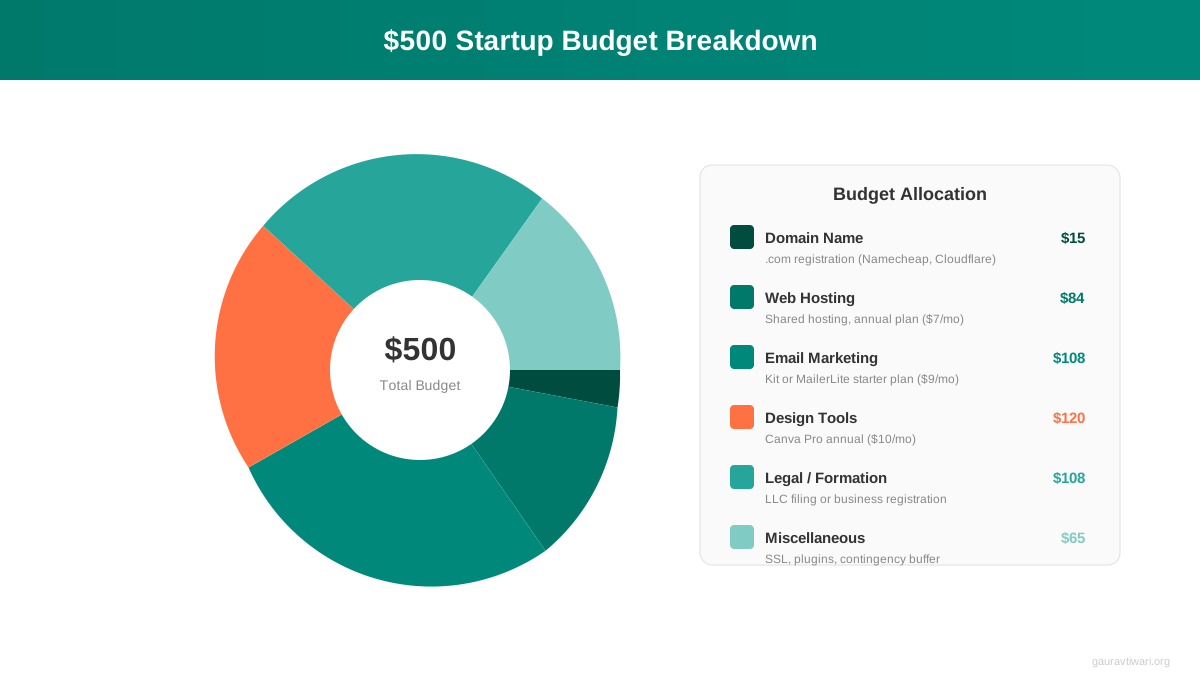
I’m going to break down every expense for launching a real online business. Not a side project. Not a hobby blog. A business that can generate income within 90 days. The total comes to under $500 for your first year, and most of it is optional.
Here’s the breakdown:
Domain name: $12/year. Buy from Namecheap or Cloudflare Registrar. Both charge close to wholesale. Don’t buy from GoDaddy where renewal prices jump 3x. A .com domain costs between $9 and $15 at honest registrars. Pick your business name, buy the .com, and move on. Don’t spend three weeks agonizing over the perfect domain. It matters less than you think.
Web hosting: $36/year. Shared hosting from Hostinger or similar providers starts at $2.99/month. That’s $36 for your first year. You get a server, SSL certificate, and one-click WordPress install. This handles everything until you’re getting 50,000+ monthly visitors. I’ve seen sites pulling $3,000/month on $3/month hosting. The server isn’t the bottleneck. Your content is.
WordPress: $0. Free and open source. Powers 43% of the web. You don’t need Squarespace at $16/month or Wix at $17/month. WordPress gives you full control, thousands of free themes, and 60,000+ free plugins. I’ve been building sites with WordPress since 2009 and it’s still my recommendation for anyone starting out.
Email marketing: $0. MailerLite’s free plan covers up to 1,000 subscribers. MailChimp’s free tier handles 500 contacts. You won’t hit these limits for months. When you do, you’ll have revenue to justify the $13 to $29/month upgrade.
Design: $0. Canva‘s free plan includes thousands of templates, a drag-and-drop editor, and basic brand kit features. You can create social media graphics, presentations, documents, and simple logos without spending a cent. I use Canva Pro now, but I ran on the free plan for my first two years in business.
Analytics: $0. Google Analytics and Google Search Console are free. They tell you who’s visiting, where they come from, and what they search for. That’s all the data you need at this stage.
Free Alternatives for Every Tool Category
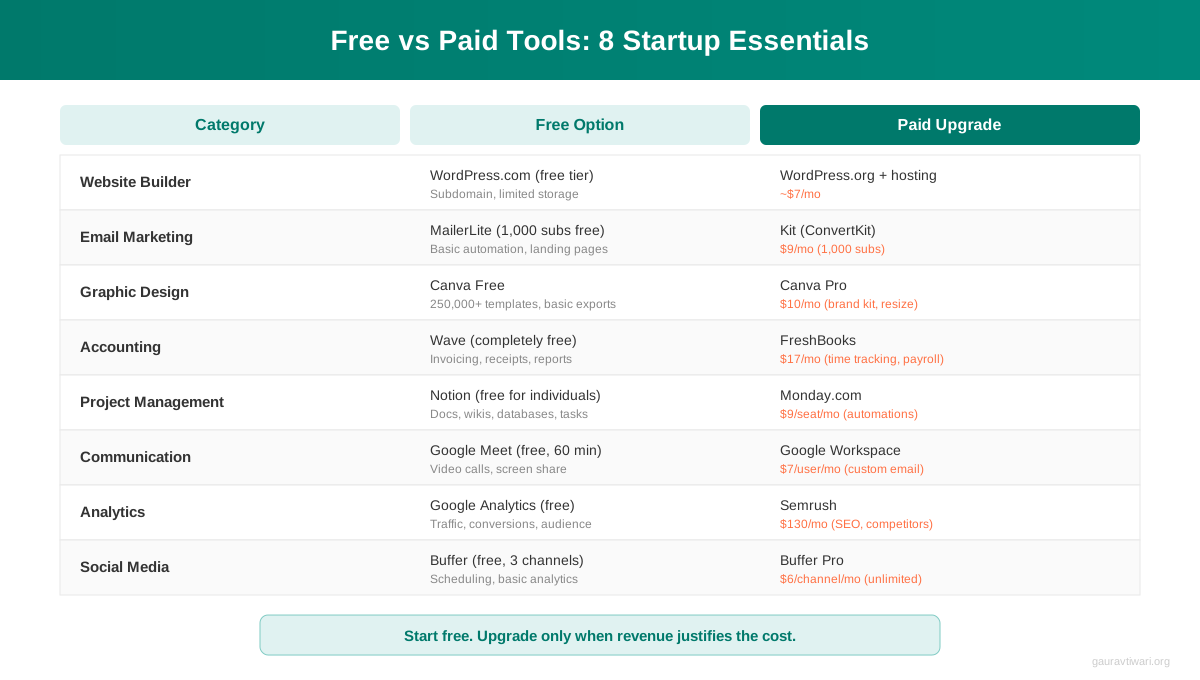
The SaaS industry has a dirty secret: almost every paid tool has a free alternative that covers 80% of what you need. Companies offer free tiers because they know a small percentage of users will upgrade. That works in your favor. Use the free tier. Upgrade when it makes financial sense, not when a marketing page tells you to.
Here’s what I use and recommend across eight categories:
| Category | Free Option | Paid Upgrade | Upgrade When… |
|---|---|---|---|
| Website | WordPress + free theme | Premium theme ($59 one-time) | You need specific features |
| MailerLite Free (1K subs) | MailerLite Growing ($13/mo) | You hit 1,000 subscribers | |
| Design | Canva Free | Canva Pro ($13/mo) | You need brand kit + resize |
| Project management | Notion Free | Notion Plus ($10/mo) | You collaborate with a team |
| Business email | Zoho Mail Free (5 users) | Google Workspace ($7/mo) | You need Google Drive + Meet |
| Accounting | Wave (free forever) | QuickBooks ($15/mo) | Revenue hits $3K/month |
| SEO | Google Search Console | Ahrefs ($99/mo) | Revenue hits $1K/month |
| Social scheduling | Buffer Free (3 channels) | Buffer Essentials ($6/mo) | You manage 5+ channels |
I want to be clear about this: you can run a profitable online business on $48/year. Domain and hosting. Everything else is a free tier or a free tool. I know because I’ve done it, and I’ve watched plenty of others do the same.
Three Product Boxes: Tools Worth Paying For (Eventually)
While the free tier strategy works for launch, three tools consistently prove worth the upgrade once revenue justifies it. I’ve used all three across multiple projects.
- Professional email with your domain name
- 30 GB cloud storage per user
- Google Meet, Docs, Sheets, Slides included
- Works on every device, no setup needed
- Starts at $7/month per user
- Free plan covers notes, docs, and basic databases
- Replaces Trello, Evernote, and Google Docs
- AI assistant built in (paid plans)
- Templates for everything from CRM to content calendars
- Plus plan at $10/month per user

- Free plan includes 250,000+ templates
- Drag-and-drop editor, no design skills needed
- Pro adds brand kit, background remover, resize
- 100 GB cloud storage on Pro plan
- Pro costs $13/month (billed annually)
Where You Absolutely Cannot Cut Costs
Frugal doesn’t mean cheap. There are three areas where cutting corners costs you more in the long run. I learned all three the hard way.
Your Domain Name
Don’t use a free subdomain like yourbusiness.wordpress.com or yourbusiness.wixsite.com. A custom .com domain costs $12/year. That’s $1/month for credibility. Free subdomains tell visitors (and Google) that you’re not serious. I’ve tested this: pages on custom domains get 3 to 4x more clicks in search results compared to identical content on free subdomains.
SSL Certificate
Every hosting provider includes free SSL now through Let’s Encrypt. If yours doesn’t, switch hosts. An SSL certificate gives you the padlock icon and HTTPS in your URL. Without it, Chrome literally warns visitors your site is “Not Secure.” That kills trust before anyone reads a word.
Backups
Free backup plugins exist. UpdraftPlus has a free version that backs up to Google Drive. Set it to weekly and forget it. I once lost three months of content because I didn’t have backups configured. The hosting provider’s server died and their “backup system” hadn’t worked in weeks. Took me 200 hours to rebuild. A free plugin would have prevented all of it.
The Revenue-First Approach
Most startup guides get the order wrong. They tell you to build everything first, then start selling. That’s backwards. The revenue-first approach means you sell something within your first 30 days, even if your website isn’t perfect.
Here’s why this matters: revenue validates your idea. I’ve watched people spend six months building the “perfect” website, designing a logo, creating social media profiles on eight platforms, and writing a 30-page business plan. Then they launch and nobody buys. All that time and money, wasted on assumptions.
The revenue-first timeline looks like this:
Week 1: Buy domain, set up hosting, install WordPress, pick a free theme. Create three pages: Home, About, and one service/product page. That’s it. Don’t touch anything else.
Week 2: Write five blog posts related to your service or product. Publish them. Share on one social platform (pick where your audience actually is). Set up Google Search Console.
Week 3: Reach out to 20 potential customers or clients directly. Email, LinkedIn DMs, community forums. Ask what they struggle with. Offer to help.
Week 4: Close your first sale. Even if it’s $50. Even if it’s discounted. Revenue on the books changes everything about how you approach the business.
The businesses that survive aren’t the ones with the best tools. They’re the ones that make money first and upgrade later.
I started my content marketing work with a $2.99/month hosting plan and a free WordPress theme. My first client paid $200 for three blog posts. That $200 funded the next three months of hosting and gave me proof that people would pay for what I offered. Everything grew from there.
Lean Validation: Test Before You Invest
Before you spend $500 on your startup kit, spend $0 to validate the idea. I’ve seen too many people build an entire business around an assumption, only to discover nobody wants what they’re selling.
Lean validation costs nothing and takes two weeks. Here’s the process I use:
Step 1: Search demand check. Open Google Trends and type your product or service idea. Is the trend stable or growing? Then search the main keywords in Google. How many results show up? Competition means demand. Zero competition usually means zero demand, not an untapped goldmine.
Step 2: Community validation. Find three online communities where your target customers hang out. Reddit, Facebook Groups, niche forums, Slack communities. Look for people asking questions related to your offering. If nobody’s asking, they don’t have the problem you think they do.
Step 3: Pre-sell. Describe your product or service in a social media post or community thread. Include a price. Ask people to comment or DM if interested. You don’t need a website for this. You need a clear offer and a way to collect payment (PayPal, Stripe link, even Venmo).
Step 4: Minimum viable offer. Create the simplest version of your product. If it’s a service, offer one specific deliverable. If it’s a digital product, create a 10-page version instead of a 100-page version. If it’s physical, start with one SKU. Test the market response before scaling.
I validated my WordPress development service by posting in a single Facebook Group. Three people messaged me within 48 hours. That told me more than any market research report could.
Financial Tracking From Day One
Most solopreneurs don’t track finances until tax season. Then they spend two days in panic mode, digging through bank statements and email receipts. Don’t be that person.
Set up Wave (free accounting software) on day one. Connect your business bank account. Categorize every expense as it happens. This takes 5 minutes per week and saves you 20+ hours at tax time.
Track these four numbers monthly:
Revenue: Total money coming in. Include everything: client work, product sales, affiliate income, ads.
Tool costs: Every subscription, every software purchase. If it touches your business, log it.
Tool-to-revenue ratio: Your monthly tool costs divided by monthly revenue. Keep this under 25%. If you’re spending $200/month on tools and making $400/month, something’s wrong. Either cut tools or increase prices.
Profit margin: Revenue minus all costs, divided by revenue. A healthy online business runs at 60 to 80% margins because overhead is so low. If yours is below 50%, audit every expense.
I keep a simple spreadsheet alongside Wave. One tab for monthly revenue, one for expenses, one for subscriptions with renewal dates. When a subscription comes up for renewal, I ask one question: “Did this tool directly contribute to revenue in the last 90 days?” If not, I cancel it.
When to Scale Your Expenses
This is where most bootstrap founders go wrong. They either stay too cheap for too long (missing growth opportunities) or upgrade too fast (burning cash before the revenue supports it). The solution is revenue-triggered upgrades.
Here’s the upgrade ladder I recommend, based on running my own projects and advising several brands on their operations:
$0 to $100/month revenue: Spend nothing on tools. Use free tiers for everything. Your only expenses should be domain and hosting ($4/month combined). Focus 100% on getting customers and creating content. Don’t window-shop for premium tools. That’s procrastination disguised as “research.”
$100 to $500/month revenue: Add professional email and one premium tool. Google Workspace at $7/month gives you credibility. Pick one premium tool that directly affects revenue. For most people, that’s either a Canva Pro subscription for better marketing materials or a paid email plan for larger subscriber lists. Spend no more than $30/month total.
$500 to $1,000/month revenue: Add productivity and automation. This is where Notion Plus, accounting software, and social scheduling make sense. You’re busy enough that these tools save real time. Budget $90 to $120/month on tools.
$1,000 to $3,000/month revenue: Invest in growth tools. SEO tools like Ahrefs ($99/month) become worthwhile because you have enough content to analyze. Managed hosting makes sense because downtime now costs real money. Your first freelancer hire (a VA at $400 to $600/month) frees up 15 to 20 hours per week for revenue-generating work.
$3,000+/month revenue: Build the team. Paid advertising, specialized freelancers (designers, writers, developers), CRM software, and premium plugins. At this stage, time is more valuable than money. Spend to save time.
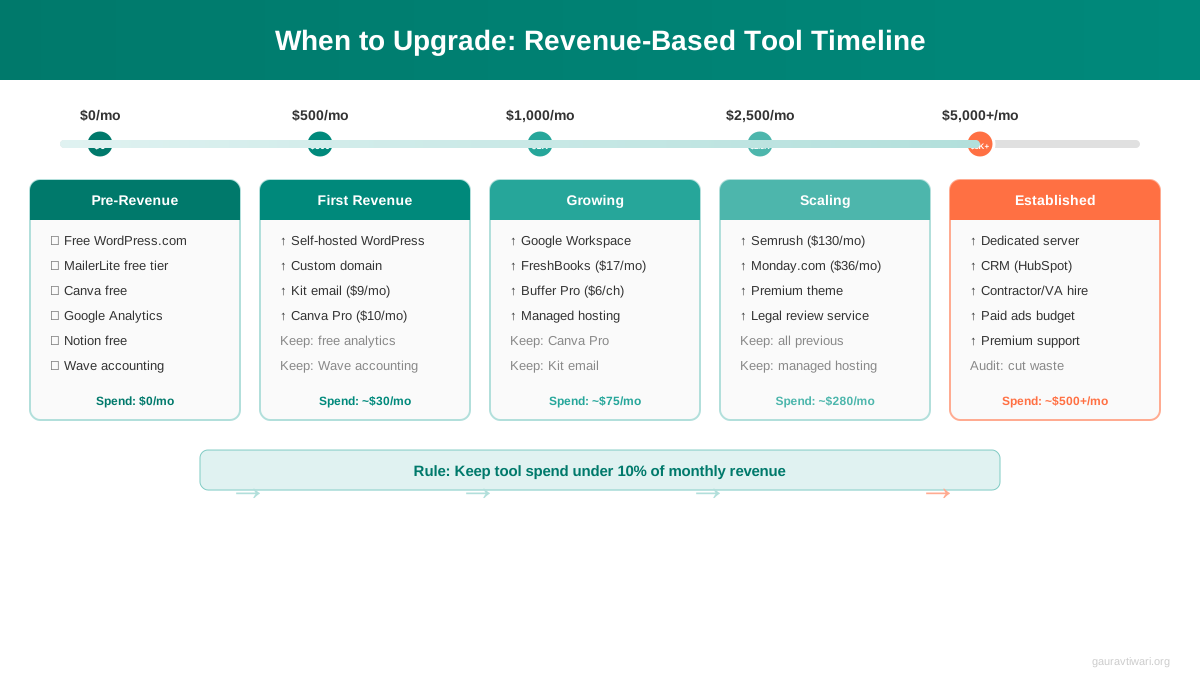
Upgrade when the tool pays for itself. Not when the free trial ends. Not when a competitor uses it. When it directly makes or saves you money.
Common Money Traps That Kill Startups
I’ve watched dozens of bootstrapped businesses fail not because of bad ideas, but because of bad spending. These are the traps I see repeatedly:
The Logo Trap
People spend $500 to $2,000 on a logo before they’ve made their first sale. Your logo doesn’t generate revenue. A text-based logo from Canva works fine until you’re making $3,000+/month. Nike didn’t start with the swoosh. They started by selling shoes out of a car trunk.
The Course Trap
Buying $997 courses before starting. I’ve bought my share of expensive courses. The ones I bought before having a real business? I never finished them. The ones I bought after hitting a specific wall? Those changed my trajectory. Buy courses to solve problems you’re actively facing, not problems you imagine you’ll face someday.
The Premium Theme Trap
Your website theme doesn’t matter until you have traffic. I’ve seen people spend weeks choosing between $59 themes when they have zero visitors. Pick a free theme that loads fast, publish your first 10 posts, then worry about design. Content attracts visitors. Themes just hold the content.
The Tool Stacking Trap
Signing up for 15 tools in week one. Each one seems cheap at $9 to $29/month. But 15 subscriptions at $15 average = $225/month = $2,700/year. That’s more than 5x your entire starter kit. I audit my subscriptions quarterly and I’m always surprised by what I find. Last quarter I cancelled four tools I’d been paying for but hadn’t logged into in months. That’s $67/month I was lighting on fire.
The LLC-First Trap
You don’t need an LLC to start. Depending on your state, filing costs $50 to $500 plus annual fees. Operate as a sole proprietor until you’re earning consistent revenue, then form the LLC when you actually need liability protection. Talk to a tax professional when you’re making $1,000+/month, not when you’re making $0. And yes, protecting your business income matters, but only after you have income to protect.
What was your biggest startup expense?
Building a Content Engine on Zero Budget
Content marketing is the cheapest customer acquisition channel that exists. A blog post costs you nothing but time, and it can drive traffic for years. I have articles I wrote in 2015 that still bring in 500+ visitors per month. No ad spend. No ongoing costs.
Here’s how to build a content engine with no budget:
Write two blog posts per week. Each one targets a specific keyword your audience searches for. Use Google’s “People Also Ask” boxes and autocomplete suggestions for topic ideas. Both are free. I’ve written about building a content marketing plan in detail before, so I won’t repeat the full process here. But the short version is: answer questions your customers actually ask.
Repurpose everything. One blog post becomes a LinkedIn post, three tweets, an email newsletter, and an Instagram carousel. Use Canva‘s free plan for the carousel graphics. This isn’t creating a lot of content from scratch. It’s getting maximum reach from content you’ve already created.
Show up in one community. Don’t try to be everywhere. Pick one platform where your customers hang out and be genuinely helpful. Answer questions. Share your blog posts when they’re relevant (not spammy). Build relationships with people in that community. My first 20 clients came from being active in two WordPress Facebook Groups. I didn’t advertise. I just answered questions for free, and people hired me because they’d seen me help others.
The $500 Bootstrap Checklist
Here’s the action plan. Follow this order. Don’t skip ahead.
Phase 1: Validate (Week 1-2, Cost: $0)
Check Google Trends for your idea. Find three communities where your audience lives. Post your offer and gauge interest. If at least 3 to 5 people express interest, move to Phase 2. If nobody cares, pivot the idea before spending a dollar.
Phase 2: Build (Week 3, Cost: $48)
Buy domain ($12). Buy hosting ($36/year). Install WordPress. Pick a free theme. Create Home, About, and Service/Product pages. Set up Google Analytics and Search Console. Set up MailerLite free plan. Install a free backup plugin.
Phase 3: Sell (Week 4, Cost: $0)
Contact 20 potential customers directly. Offer your service or product. Close your first sale. Any amount. The goal is revenue, not profit.
Phase 4: Grow (Month 2-6, Cost: $0-30/month)
Publish two blog posts per week. Repurpose into social content. Build your email list. Upgrade tools only when revenue supports it. Track every dollar in and out.
Phase 5: Scale (Month 6+, Cost: Revenue-dependent)
Follow the revenue-triggered upgrade ladder above. Hire your first freelancer. Invest in growth tools. Keep your tool-to-revenue ratio under 25%.
Related Resources
If you’re starting a business on a budget, these two guides cover the next steps:
Do You Really Need a Website? A breakdown of when a website is worth it, what it should include, and how to set one up for under $50. I cover the WordPress setup process step by step.
How to Protect Your Business Income Once you’re earning, you need to keep it. This covers insurance, legal structures, tax planning, and emergency funds for solopreneurs and small teams.
Frequently Asked Questions
Common questions I get about bootstrapping an online business on a tight budget.
Can I really start a business for under $500?
Yes. The only hard costs are a domain name ($12/year) and web hosting ($36/year). That’s $48 total. WordPress is free, email marketing tools have free tiers for up to 1,000 subscribers, and Canva’s free plan handles all your design needs. I’ve launched profitable projects for less than $50 in upfront costs. The $500 budget gives you room for optional upgrades like a premium theme, Google Workspace, or an LLC filing.
Do I need an LLC to start an online business?
Not immediately. You can legally operate as a sole proprietor from day one. An LLC costs $50 to $500 depending on your state, plus annual renewal fees. Form one when you’re earning consistent revenue ($1,000+/month) and need liability protection. Until then, that money is better spent on tools that help you make your first sale.
What’s the fastest way to get my first customer?
Direct outreach. Find 20 people who fit your target customer profile on LinkedIn, in Facebook Groups, or on Reddit. Message them with a specific offer and a clear price. Don’t wait for SEO traffic or social media followers. Cold outreach is free and can produce results within a week. My first three clients all came from direct messages in WordPress communities.
Should I use WordPress or a website builder like Squarespace?
WordPress. It’s free, open source, and gives you full control. Squarespace costs $16/month ($192/year) for a basic plan and locks you into their ecosystem. WordPress on shared hosting costs $3/month and you own everything. If you outgrow shared hosting, you can move to any host in the world. With Squarespace, you’re stuck unless you rebuild from scratch.
When should I start paying for email marketing?
When you hit the free tier limit. MailerLite’s free plan covers 1,000 subscribers with automation and landing pages included. Most new businesses won’t hit 1,000 subscribers for 6 to 12 months. By then, you should have revenue to cover the $13/month upgrade. Don’t pay for email marketing before you have subscribers.
How do I know if my business idea is worth pursuing?
Check three things before spending any money. First, search Google Trends to confirm demand exists and isn’t declining. Second, find at least three communities where people discuss the problem you solve. Third, post a clear offer with a price and see if anyone bites. If you get 3 to 5 expressions of interest from 50 to 100 people, the idea has legs. This process takes one to two weeks and costs nothing.
What’s the biggest mistake bootstrapped founders make?
Spending money on tools before making money from customers. I call it the setup trap. People buy domains, premium themes, email tools, courses, logo design, business cards, and LLC paperwork before they’ve confirmed anyone will pay for their product. All that spending delays the only thing that matters: getting your first customer. Launch with the minimum viable setup and upgrade as revenue grows.
How much should I spend on marketing as a new business?
Zero dollars until you’re making $1,000+/month. Content marketing (blogging, social media, email) costs nothing but time. Paid advertising makes sense when you have a proven offer, a converting landing page, and margins that support customer acquisition costs. Running Facebook ads before you’ve made organic sales is like pouring gasoline on a pile of wet wood. Get the fire started first, then add fuel.
The 2026 version of starting a business is cheaper than ever. You don’t need venture capital, a business loan, or even a full-time income to get started. $48 and a willingness to sell before you’re ready. That’s the entire barrier to entry. Stop planning and start selling.
Disclaimer: This site is reader-supported. If you buy through some links, I may earn a small commission at no extra cost to you. I only recommend tools I trust and would use myself. Your support helps keep gauravtiwari.org free and focused on real-world advice. Thanks. - Gaurav Tiwari