
Protecting Intellectual Property as a Professional Blogger
I published a 4,000-word guide on WordPress performance. Spent three weeks writing it, testing every recommendation on live sites, adding original screenshots. One week later, I found the entire thing copy-pasted on a random blog. Word for word. Same headings, same screenshots. They even left my internal links in the article, pointing back to my site. That’s how lazy the theft was.
And it keeps happening. Content scrapers run automated bots that republish your articles within hours of hitting publish. AI spinners rewrite your work just enough to dodge basic plagiarism checks. Some sites translate your content into other languages and publish it as original work. The worst part? Google sometimes can’t tell who published first, so the thief’s version outranks yours. Every stolen article is potential ad revenue, affiliate commissions, and search rankings going to someone who didn’t write a single word.
I’ve dealt with content theft dozens of times over 16 years of blogging. I’ve filed DMCA takedowns, sent cease-and-desist letters, and had Google deindex stolen copies of my work. This is the complete IP protection playbook I wish I had when I started. You’ll get prevention strategies, detection tools, DMCA templates, and the exact legal steps that actually get stolen content removed.
Types of Content Theft Every Blogger Faces
Content theft isn’t just someone copying and pasting your article. It takes several forms, and you need to recognize each one because the response is different for each type.
Direct copy-paste scraping is the most common. Automated bots scrape your RSS feed or sitemap and republish entire articles on auto-generated sites. These sites exist purely to generate ad revenue from your work. I’ve found my articles on sites I’d never heard of, sometimes within 2 hours of publishing.
Manual content copying is when someone reads your article, copies sections (or the whole thing), and publishes it as their own. They might change a few words or rearrange paragraphs. This is harder to detect because it doesn’t show up as an exact match in plagiarism checkers.
Image theft happens constantly. Your original screenshots, infographics, and photos get downloaded and reused without attribution. I’ve found my WordPress tutorial screenshots on YouTube thumbnails, Pinterest pins, and competitor blogs.
AI-spun content is the newest threat. Someone feeds your article into an AI tool, gets a rewritten version, and publishes it. The ideas, structure, and even examples are yours, but the wording is different enough to evade detection tools. This is increasingly common in 2026.
Translated plagiarism is the sneakiest. Your English article gets translated into Spanish, Hindi, German, or Portuguese and published on foreign-language sites. You’d never find it through normal monitoring unless you specifically search in other languages.
Understanding Intellectual Property Rights for Bloggers
Copyright automatically protects your blog content the moment you publish it. You don’t need to register anything, file any forms, or add a copyright symbol. If you wrote it, you own it. That’s the law in the US, UK, India, and most countries that signed the Berne Convention (179 countries as of 2026).
But “owning” the copyright and being able to enforce it are two different things. Here’s what each type of IP protection actually means for bloggers.
Copyright covers your blog posts, images, videos, podcasts, and original code. It’s free and automatic. Registration with the US Copyright Office ($35-$85 per work) unlocks statutory damages up to $150,000 per infringement, which makes it much easier to win a lawsuit. Without registration, you can only claim actual damages, which are much harder to prove.
Trademark protects your blog name, logo, tagline, and brand identity. Filing costs $250-$350 per class with the USPTO. It lasts 10 years and is renewable. If you’ve built a recognizable brand, trademark registration gives you legal standing to stop copycats from using your name.
Trade secrets protect your unpublished strategies. Your SEO playbook, affiliate revenue data, content calendar, and proprietary processes. No registration needed. Just keep them confidential and use NDAs when sharing with contractors or virtual assistants.
Patents are rarely relevant for bloggers. They protect inventions. Unless you’ve built a custom WordPress plugin or SaaS tool with a novel technical process, you probably don’t need one. Filing costs $5,000-$15,000+ and takes 2-4 years.

Preventive Measures: Protect Before You Publish
Prevention won’t stop determined thieves, but it makes enforcement much easier. These steps take 10-15 minutes per article and save you hours of legal headaches later.
Add a Copyright Notice to Every Page
A copyright notice isn’t legally required, but it eliminates the “I didn’t know it was copyrighted” defense. Add this to your site footer and every article: “Copyright 2026 [Your Name]. All rights reserved.” Simple. Effective. No excuse for anyone who copies your work.
Timestamp Your Drafts
Before publishing, save a timestamped copy of your draft. I use Google Workspace for this. Google Docs automatically records version history with dates and times. If someone claims they published first, you have proof your draft existed before their copy appeared. This has saved me twice during DMCA disputes.
You can also use Notion to maintain an IP tracking database. Create a database with columns for article title, publish date, URL, and any theft incidents. When you need to file a DMCA or contact a lawyer, everything is organized in one place.
Watermark Your Images
For original photos, infographics, and screenshots, add a semi-transparent watermark with your site name. Place it somewhere that’s visible but doesn’t ruin the image. Bottom-right corner works for most images. For full-width graphics, a diagonal watermark across the center is harder to crop out.
I don’t watermark every screenshot in my tutorials because it looks cluttered. But for original infographics and custom graphics that took hours to create? Always watermark them.
Decide on Your Licensing Terms
By default, your content is “all rights reserved.” Nobody can use it without permission. But if you want people to share your work with attribution, consider Creative Commons licensing. CC BY-NC (attribution, non-commercial) lets people share your content as long as they credit you and don’t profit from it. This works well for educational content where you want wider reach.
My recommendation: keep “all rights reserved” for your main content. Don’t make it easy for scrapers to claim they had permission.
Set Up RSS Feed Protection
Most scrapers pull from your RSS feed. Add a footer to your RSS feed that includes your site name, the original URL, and a copyright notice. In WordPress, plugins like RSS Footer or simple functions in your theme’s functions.php can inject this automatically. When a scraper republishes your RSS content, the attribution travels with it, making it easier to prove theft.
The best time to set up IP protection is before you need it. The second best time is right now.
Tools for Detecting Stolen Content
You can’t protect what you don’t know is stolen. These tools catch content theft early, before the copied version starts outranking your original.
Copyscape
Copyscape is the industry standard for plagiarism detection. The free version lets you search by URL. Paste your article URL, and it shows you every page on the internet that matches your content. The premium version ($0.03 per search) gives more thorough results and lets you batch-check multiple articles. I run my top-performing posts through Copyscape every 2-3 months.
Google Alerts
Google Alerts is free and surprisingly effective. Set up alerts for unique phrases from your articles. Don’t use generic phrases. Pick a specific sentence or unusual word combination that only exists in your content. When that exact phrase appears elsewhere on the web, Google emails you. I have about 30 active alerts running for my most-stolen articles.
TinEye for Image Theft
TinEye does reverse image searches. Upload your original image, and it finds every place that image appears online. This catches image theft that text-based tools miss. Google Reverse Image Search works too, but TinEye is more thorough for tracking how far an image has spread.
Sapling for Content Verification
Sapling started as a grammar and writing assistant, but its plagiarism detection feature is solid. It checks your content against web sources and flags potential matches. I use it as a secondary check alongside Copyscape. The advantage is that Sapling integrates into your writing workflow, so you can verify originality before you even publish.

- Plagiarism detection against web sources
- Browser extension for Chrome and Edge
- Grammar and style checking in one tool
- API access for automated content workflows
Have you ever had your content stolen?
Step-by-Step DMCA Takedown Process
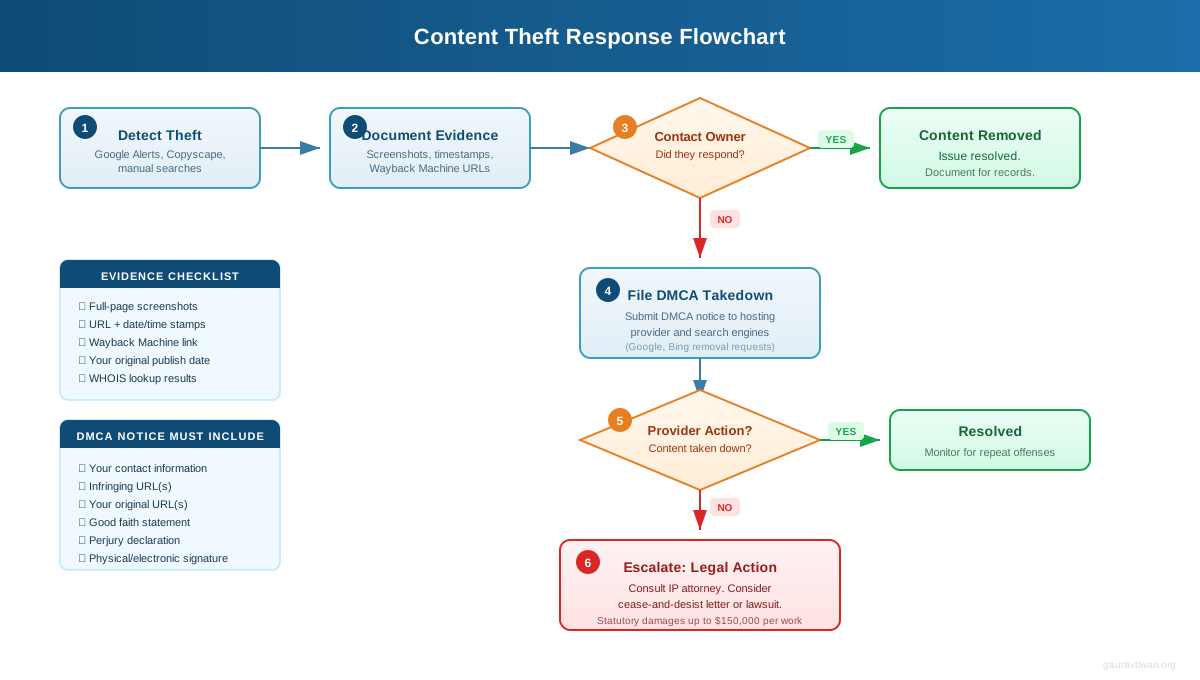
The Digital Millennium Copyright Act (DMCA) is the most powerful tool you have against content theft. It’s a US law, but it applies to any website hosted in the US, any site that uses US-based services (Cloudflare, AWS, Google), and any content indexed by Google. That covers most of the internet.
Here’s the exact process I follow every time I discover stolen content.
Step 1: Document Everything
Before you do anything, collect evidence. Take full-page screenshots of the stolen content with timestamps visible. Save the page URL. Check the Wayback Machine for cached versions of both your original and the copy. Note the dates. This evidence is critical if the infringer challenges your claim.
Step 2: Identify the Host and Owner
Run a WHOIS lookup on the infringing domain using DomainTools WHOIS or a similar service. You need to find two things: the website owner’s contact information and the hosting provider. Most WHOIS records show the nameservers, which tell you who hosts the site. Common hosts like Cloudflare, GoDaddy, Bluehost, and Namecheap all have DMCA abuse reporting processes.
Step 3: Send a Cease and Desist
If you can find the site owner’s contact information, send a cease-and-desist email first. This works about 70% of the time because most people don’t want legal trouble. Give them 48-72 hours to remove the content. Be specific about which content is yours, include the URLs of both the original and the copy, and state that you’ll escalate to a DMCA takedown if they don’t comply.
Here’s a template you can adapt:
“I am the original author of [article title], first published at [your URL] on March 26, 2026. Your website at [their URL] contains a copy of this work published without my permission. Please remove this content within 48 hours. If the content is not removed, I will file a formal DMCA takedown notice with your hosting provider and report the infringement to Google. This is not a request. I retain all rights to this work under applicable copyright law.”
Step 4: File the DMCA Takedown Notice
If the cease-and-desist doesn’t work (or you can’t find contact info), file a formal DMCA takedown. Send it to the hosting provider’s abuse department. Every major host has one. Your DMCA notice must include these elements to be legally valid:
- Your full legal name and contact information
- Identification of the copyrighted work (your original URL and publish date)
- Identification of the infringing material (the thief’s URL)
- A statement that you have a good faith belief the use is not authorized
- A statement under penalty of perjury that the information is accurate
- Your physical or electronic signature
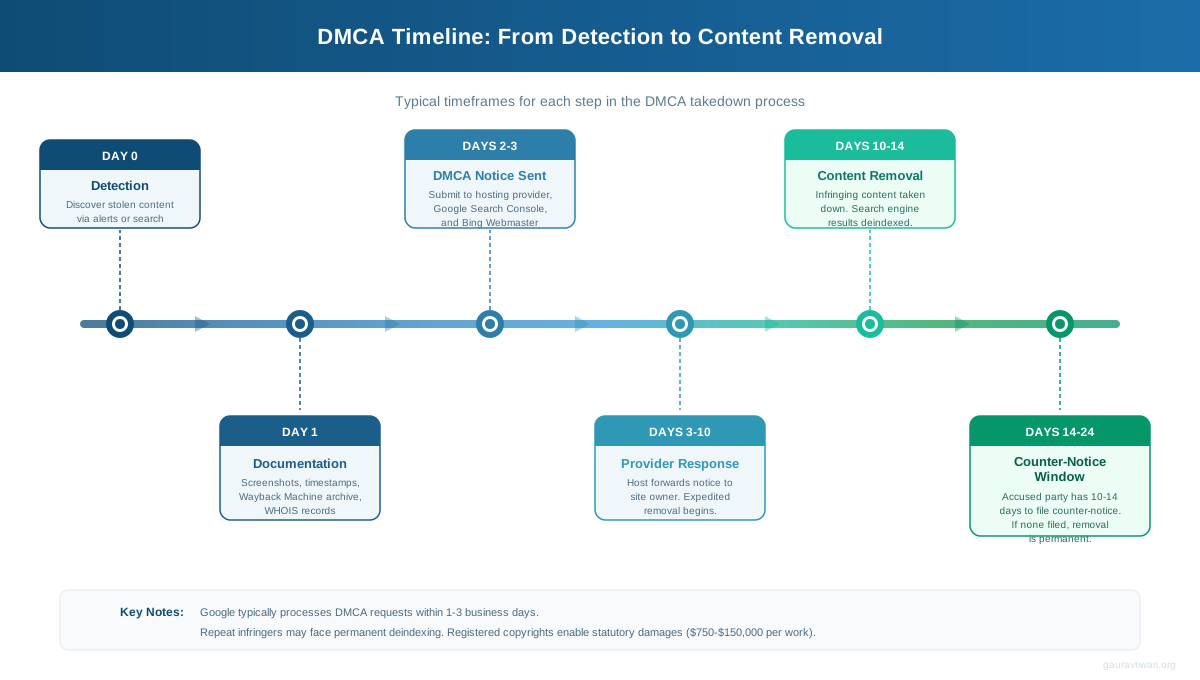
Most hosting providers process DMCA claims within 7-10 business days. The infringer gets a counter-notice window of 10-14 days, but in my experience, fewer than 5% of infringers file counter-notices.
How to File a Google DMCA Complaint
Google has a dedicated DMCA complaint process that removes infringing URLs from search results. This doesn’t delete the stolen content from the internet, but it stops the thief from getting search traffic from your work. Here’s how to do it.
Go to Google’s Legal Removal Request page. Navigate to Google’s copyright removal tool. Select “Web Search” and then “I found content that may violate my copyright.”
Fill out the form. Provide your name, email, the country you’re in, and the URLs of your original work. Then add the URLs of the infringing pages. You can submit up to 30 URLs per request. For each infringing URL, you need to pair it with the original URL it copied from.
Sign the declaration. You’ll check boxes confirming that the information is accurate, that you have a good faith belief the content is unauthorized, and that you’re making these statements under penalty of perjury. This is a legal declaration. Don’t file false claims.
Submit and wait. Google typically reviews and processes DMCA complaints within 7-14 business days. You’ll receive an email confirmation when the URLs are removed from search results. You can track the status of your complaint in Google Search Console under the “Security & Manual Actions” section.
I’ve filed over 50 Google DMCA complaints over the years. The success rate is roughly 85%. The 15% that don’t work are usually because the infringing page was already removed by the time Google reviewed it, or because the claim wasn’t specific enough.
When to Involve a Lawyer (and How Much It Costs)
Most content theft cases don’t require a lawyer. DMCA takedowns handle 90% of situations. But there are times when legal help is the right move.
The infringer filed a counter-notice. If they claim they have the right to use your content, you have 14 days to file a federal lawsuit or the content goes back up. This is where a lawyer becomes essential. A strongly worded letter from an attorney often resolves these disputes without going to court.
The theft is causing significant financial damage. If someone is running ads on your stolen content and making real money, or if their copy is outranking your original for profitable keywords, the financial impact justifies legal fees. An IP attorney can send a demand letter for $300-$500 that recovers far more than it costs.
You want to sue for damages. If your copyright is registered with the US Copyright Office, you can sue for statutory damages of $750 to $150,000 per infringement, plus attorney’s fees. This makes lawsuits financially viable because the potential payout covers legal costs. Without registration, you can only sue for “actual damages,” which are much harder to prove and recover.
Typical legal costs for bloggers:
| Service | Typical Cost | When You Need It |
|---|---|---|
| Cease and desist letter (attorney) | $300-$500 | Infringer ignores your emails |
| Copyright registration | $35-$85 | Before filing a lawsuit |
| DMCA counter-notice response | $500-$1,500 | Infringer challenges your claim |
| IP consultation (1 hour) | $200-$400 | Complex situations, international theft |
| Full copyright lawsuit | $5,000-$25,000+ | Significant financial damages |
For finding an IP attorney, Martindale-Hubbell and your local bar association are good starting points. Many offer free 30-minute consultations. If you’re outside the US, look for attorneys familiar with both local IP law and DMCA procedures, since most hosting providers are US-based.
Register your copyright before someone steals your content. The $65 filing fee can unlock up to $150,000 in statutory damages per infringement.
Trademark Basics for Blog Names and Brand Identities
Trademarks protect your brand, not your content. If you’ve built a blog with a recognizable name, a logo, or a tagline that people associate with you, a trademark prevents someone else from using it to confuse your audience.
You get “common law” trademark rights just by using your brand name in commerce. But registering with the USPTO (or your country’s trademark office) gives you nationwide priority and the ability to sue infringers in federal court.
When to trademark your blog name:
- You sell products or courses under your blog name
- You have significant brand recognition in your niche
- Someone else is using a confusingly similar name
- You’re expanding into multiple platforms (YouTube, podcasts, social media)
The trademark registration process takes 8-12 months with the USPTO. You’ll file in one or more “classes” depending on your business. Class 41 (education and entertainment) and Class 35 (advertising and business) are most relevant for bloggers. Each class costs $250-$350 for the filing fee. Working with a trademark attorney adds $600-$2,000 but significantly increases your chances of approval.
One thing I wish I’d known earlier: collaborating with brands gets easier when you can prove you’ve registered your blog name as a trademark. It signals professionalism and legal awareness that brands appreciate.
- Automatic version history with timestamps
- Shareable links for evidence documentation
- 15 GB free storage per account
- Works as legal proof of authorship date
International IP Protection for Bloggers
If your blog has a global audience, your content will get stolen in countries with different IP laws. The DMCA is a US law. It works for US-hosted sites and US-based services, but what about a site hosted in Russia, India, or Vietnam?
The good news: the Berne Convention provides baseline copyright protection across 179 countries. Your content is automatically copyrighted in all member countries without any registration. The bad news: enforcement varies wildly.
What works internationally:
- Google DMCA complaints work regardless of where the infringing site is hosted. Google removes URLs from global search results
- CDN and hosting provider complaints work if the site uses Cloudflare, AWS, or another US-based service
- Social media takedowns work on all major platforms (Facebook, Instagram, YouTube, X) since they’re US companies
- Domain registrar complaints can get domains suspended if the registrar has an abuse policy
What doesn’t work internationally:
- DMCA notices to hosting providers in countries that don’t recognize DMCA
- Threatening lawsuits in jurisdictions where you can’t afford to litigate
- Expecting fast action from hosting providers in countries with weak IP enforcement
For bloggers with large content libraries, international theft is a constant reality. Focus your enforcement efforts on removing content from search engines rather than from the source site. If the stolen copy doesn’t rank, it does minimal damage.
Building an IP Protection System That Runs on Autopilot
Checking for stolen content manually doesn’t scale. Once you have 100+ published articles, you need a system that monitors for theft automatically and alerts you when something gets copied.
Here’s the system I use.
Weekly automated checks. Copyscape Copysentry monitors your pages daily or weekly and emails you when a match is found. It costs $0.05 per page per day for daily monitoring or $0.01 per page per week. For a blog with 200 articles, that’s about $8/month for weekly monitoring.
Google Alerts for key phrases. Set up 20-30 alerts for unique phrases from your highest-traffic articles. These are the ones most likely to be stolen because they rank well. Update the alerts quarterly as your top articles change.
Monthly image audit. Run your top 10 original images through TinEye once a month. This takes about 15 minutes and catches image theft that text monitoring misses.
IP tracking database. Keep a record of every theft incident. I use Notion with a database that tracks the infringing URL, date discovered, action taken, date resolved, and outcome. This creates a paper trail that’s invaluable if you ever need to escalate to legal action.
- Database templates for IP tracking
- File storage for DMCA evidence
- Free plan supports unlimited pages
- Shared workspaces for legal teams
Quarterly content audit. Run your top 20 articles through Copyscape Premium every quarter. This catches slow-burn theft where someone copies an article months after you published it. It costs about $0.60 per quarter. Worth every cent.
Understanding how GEO and SEO differ also helps here. AI search engines like Perplexity and ChatGPT cite original sources more reliably than Google does, which means properly attributed content has a natural advantage in AI-powered search results.
Creative Commons: When Sharing Makes Strategic Sense
Not all sharing is theft. Sometimes, letting people reuse your content (with attribution) is the smart move. Creative Commons licenses give you fine-grained control over how your work gets shared.
Here’s how the most common CC licenses work for bloggers:
CC BY (Attribution): Anyone can use your work, even commercially, as long as they credit you. Best for: educational content you want widely distributed.
CC BY-NC (Attribution, Non-Commercial): People can share and adapt your work, but not for commercial purposes. They must credit you. Best for: tutorials and guides where you want reach but don’t want competitors monetizing your work.
CC BY-ND (Attribution, No Derivatives): People can share your work as-is but can’t modify it. They must credit you. Best for: opinion pieces and reviews where you don’t want your words twisted.
CC BY-NC-ND (Attribution, Non-Commercial, No Derivatives): The most restrictive CC license. Share only, no changes, no commercial use, with credit. Best for: original research and data that you want cited but not repurposed.
I use CC BY-NC for a few specific resources on my site, like my content marketing plan guide. The wider distribution brings more traffic than the occasional unauthorized reuse costs me. But my product reviews, tutorials with affiliate links, and monetized content? All rights reserved. Always.
Protecting Your Blog Name and Domain
Your blog name is a separate IP asset from your content. If someone registers a similar domain or starts a blog with a confusingly similar name, that’s a trademark issue, not a copyright issue. Different legal framework, different enforcement tools.
Register your domain variations. If your blog is at example.com, consider registering example.net, example.org, and common misspellings. This costs $10-$15 per domain per year and prevents cybersquatters from capitalizing on your brand.
Monitor for similar domain registrations. Services like DomainTools offer monitoring that alerts you when someone registers a domain similar to yours. This is especially important if you have a branded blog name rather than a personal name blog.
UDRP for domain disputes. If someone registers a domain that’s identical or confusingly similar to your trademark, you can file a Uniform Domain-Name Dispute-Resolution Policy (UDRP) complaint through WIPO. It costs $1,500 for a single panelist and takes about 2 months. The success rate for legitimate trademark holders is over 85%.
Social media handles. Register your blog name on major social platforms even if you don’t plan to use them all immediately. This prevents impersonation and name-squatting. At minimum, claim your name on X (Twitter), Instagram, YouTube, LinkedIn, and TikTok.
Frequently Asked Questions
Do I need to register my copyright for it to be valid?
No. Copyright is automatic the moment you create original content. You don’t need to register, add a copyright symbol, or file any paperwork. However, registering with the US Copyright Office ($35-$85) unlocks statutory damages of up to $150,000 per infringement and lets you recover attorney’s fees in a lawsuit. Without registration, you can only claim actual damages, which are much harder to prove.
How long does a DMCA takedown take to process?
Hosting providers typically process DMCA claims within 7-10 business days. Google processes search result removals in 7-14 business days. The infringer has 10-14 days to file a counter-notice. If they don’t, the content stays down permanently. In my experience, about 95% of DMCA claims resolve without a counter-notice.
Can I file a DMCA against a site in another country?
Yes, if the site uses any US-based service. If it’s hosted on AWS, uses Cloudflare, or is indexed by Google, you can file DMCA claims with those US-based providers. For the hosting provider directly, the DMCA only applies to US-based hosts. For international hosts, file a copyright complaint under their local laws or focus on getting the content removed from search engines instead.
What if someone translates my article into another language?
A translation is a derivative work under copyright law. The translator needs your permission to create and publish it. You can file a DMCA takedown for unauthorized translations just like you would for a direct copy. The challenge is detection. Set up Google Alerts with key phrases translated into common target languages (Spanish, Hindi, Portuguese, German) to catch this type of theft.
Does disabling right-click prevent content theft?
No. Disabling right-click is a speed bump, not a wall. Anyone with basic technical knowledge can bypass it using browser developer tools, view-source, or by simply disabling JavaScript. It also annoys legitimate users. Focus your energy on detection and enforcement instead of prevention tricks that don’t actually work.
How much does it cost to trademark a blog name?
Filing with the USPTO costs $250-$350 per class. Most bloggers file in Class 41 (education/entertainment) or Class 35 (advertising/business). Working with a trademark attorney adds $600-$2,000 but increases approval chances. The process takes 8-12 months. In India, trademark registration costs around INR 4,500-9,000 ($55-$110) and takes 18-24 months.
Can AI-generated content be copyrighted?
The US Copyright Office ruled in 2026 that purely AI-generated content cannot be copyrighted because copyright requires human authorship. However, content where a human provides substantial creative direction, selection, and arrangement may qualify. If you use AI as a writing tool but make significant editorial decisions, the resulting work is likely copyrightable. The law is still evolving on this question.
What’s the best free tool for detecting plagiarism of my blog posts?
Google Alerts is the best free option. Set up alerts for unique 5-8 word phrases from your articles. Copyscape’s free version lets you check individual URLs. For images, TinEye offers free reverse image searches. Combined, these three free tools catch the majority of content theft without spending anything. For more comprehensive monitoring, Copyscape Premium at $0.03 per search is worth the investment.
Start Protecting Your Content Today
Content theft isn’t going away. With AI tools making it easier than ever to scrape, spin, and republish content, the problem is getting worse. But the enforcement tools are getting better too.
Here’s what to do this week: add a copyright notice to your footer, set up Google Alerts for 10 unique phrases from your top articles, and run your best-performing posts through Copyscape. That takes about 30 minutes and covers the basics.
Then build from there. Set up Copyscape Copysentry for automated monitoring. Create an IP tracking database in Notion. Save timestamped drafts in Google Workspace. If your blog name has real brand value, start the trademark process.
The bloggers who protect their IP aren’t paranoid. They’re professional. You’ve spent hundreds of hours creating original content. Don’t let someone else profit from it.
Disclaimer: This site is reader-supported. If you buy through some links, I may earn a small commission at no extra cost to you. I only recommend tools I trust and would use myself. Your support helps keep gauravtiwari.org free and focused on real-world advice. Thanks. - Gaurav Tiwari