
Undertaking the Logo Design Process for Your Business
I’ve watched businesses spend $5,000 on a logo they hated, and I’ve seen a $50 Canva logo carry a startup to its first million in revenue. The difference wasn’t the price tag. It was the process. A good logo design process protects you from expensive mistakes, aligns your visual identity with your brand’s personality, and gives you something you’ll still be proud of five years from now.
Logos are your audience’s first glimpse into your brand identity. Through the combination of color, typography, and symbols, a logo paints an overall picture of who you are and what you stand for. Getting this right matters more than most founders realize. Let me walk you through the entire logo design process, from initial research to final file export, along with the tools and psychology that make it work.
Why Your Logo Matters More Than You Think
Your logo isn’t just a pretty icon. It’s the single most-viewed element of your entire brand. It appears on your website, email signatures, social media profiles, invoices, packaging, business cards, and every marketing material you’ll ever create. A weak logo quietly undermines everything it touches. A strong logo elevates it.
Here’s what the research says: 75% of consumers recognize a brand by its logo. 60% of consumers actively avoid companies with logos they find unattractive or strange. And it takes only 10 seconds for someone to form a first impression of your logo, but it takes 5-7 impressions for them to remember it.
The takeaway? Your logo needs to be simple enough to remember after a few views and polished enough to make a strong first impression. That doesn’t happen by accident. It happens through a deliberate design process.
Step 1: Research Before You Design
The biggest mistake in logo design is opening a design tool before doing research. Before you touch a single color swatch, spend time understanding three things:
Your competitors. Look at 10-15 logos in your industry. Note the common colors, styles, and patterns. Your goal isn’t to copy them. It’s to understand the visual language your audience already expects, and then find a way to stand out within that context.
Your audience. A B2B SaaS company targeting enterprise clients needs a different visual tone than a direct-to-consumer wellness brand. Think about what your ideal customer values: trust, innovation, fun, prestige, simplicity? Your logo should reflect those values.
Your brand personality. If your brand were a person, how would they dress? How would they speak? A playful, casual brand might use rounded fonts and bright colors. A serious, professional brand might use sharp angles and muted tones. Write down 3-5 adjectives that describe your brand before designing anything.
Step 2: Choose the Right Logo Type
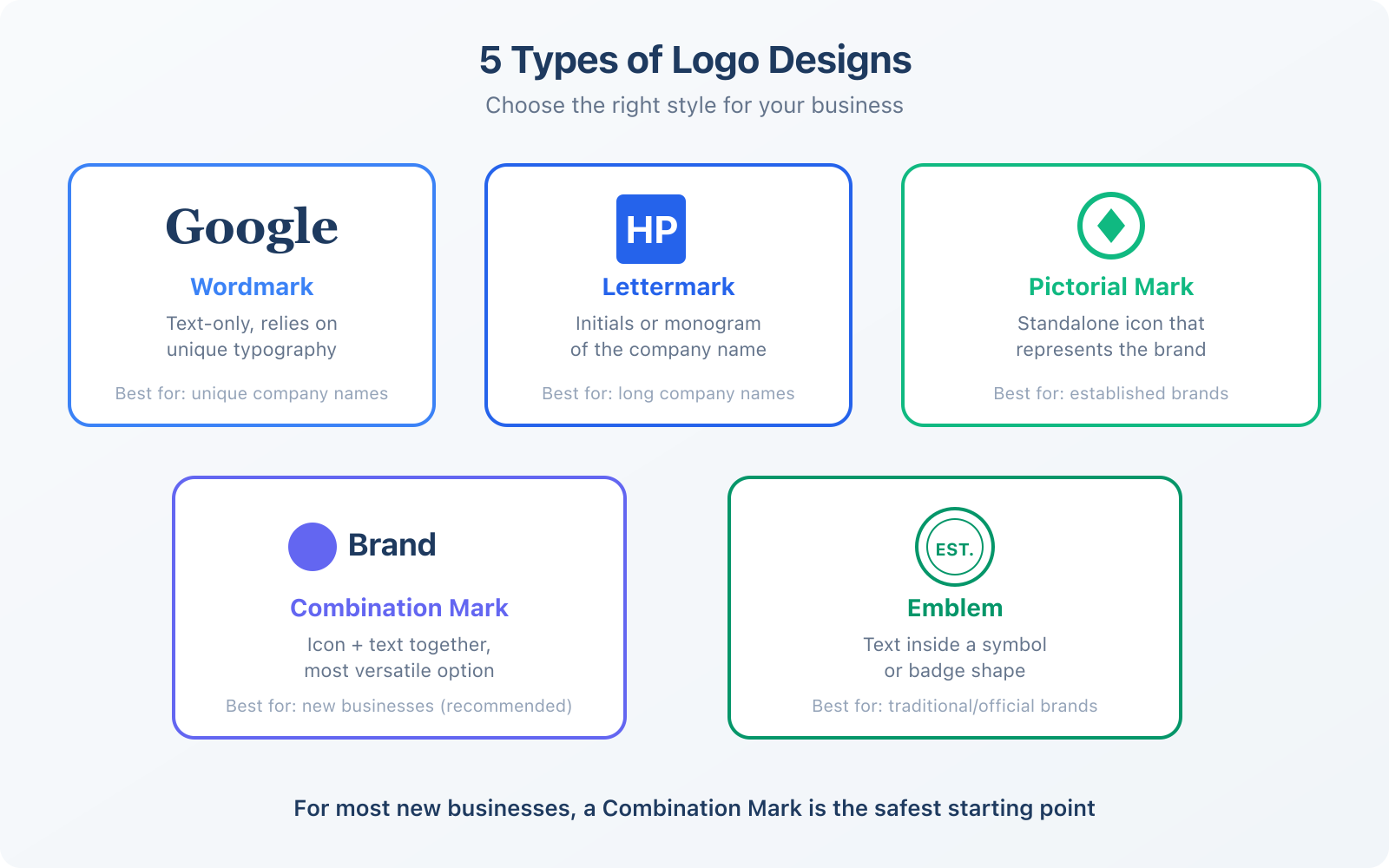
There are five main types of logos, and each serves a different purpose. Choosing the wrong type is a common pitfall that leads to redesigns later.
Wordmark (logotype). Text-only logo that relies on unique typography. Think Google, Coca-Cola, or FedEx. Works best when your company name is short, distinctive, and easy to pronounce. If your name is generic (like “Tech Solutions”), a wordmark alone won’t be memorable enough.
Lettermark (monogram). Uses initials instead of the full name. IBM, HBO, NASA. Best for companies with long names that need something compact. The risk is that new audiences won’t know what the letters stand for, so you need supporting brand recognition.
Pictorial mark (icon). A standalone image, like Apple’s apple or Twitter’s bird. These are powerful but risky for new businesses. It takes years of brand building before people associate a standalone icon with your company. I don’t recommend this for startups.
Combination mark. An icon paired with text. This is the most versatile option and the one I recommend for most new businesses. You get the best of both worlds: the icon builds visual recognition while the text ensures people know your name. As your brand grows, you can eventually drop the text and use the icon alone.
Emblem. Text embedded inside a symbol or badge shape. Think Starbucks, Harley-Davidson, or university seals. Emblems feel traditional and authoritative but can be difficult to scale down to small sizes like favicons or social media avatars.
If you’re unsure which type to pick, go with a combination mark. It gives you maximum flexibility. You can use the full logo on your website, the icon alone for your favicon and app icon, and the text alone when the context calls for it.
Step 3: Color Selection and Psychology
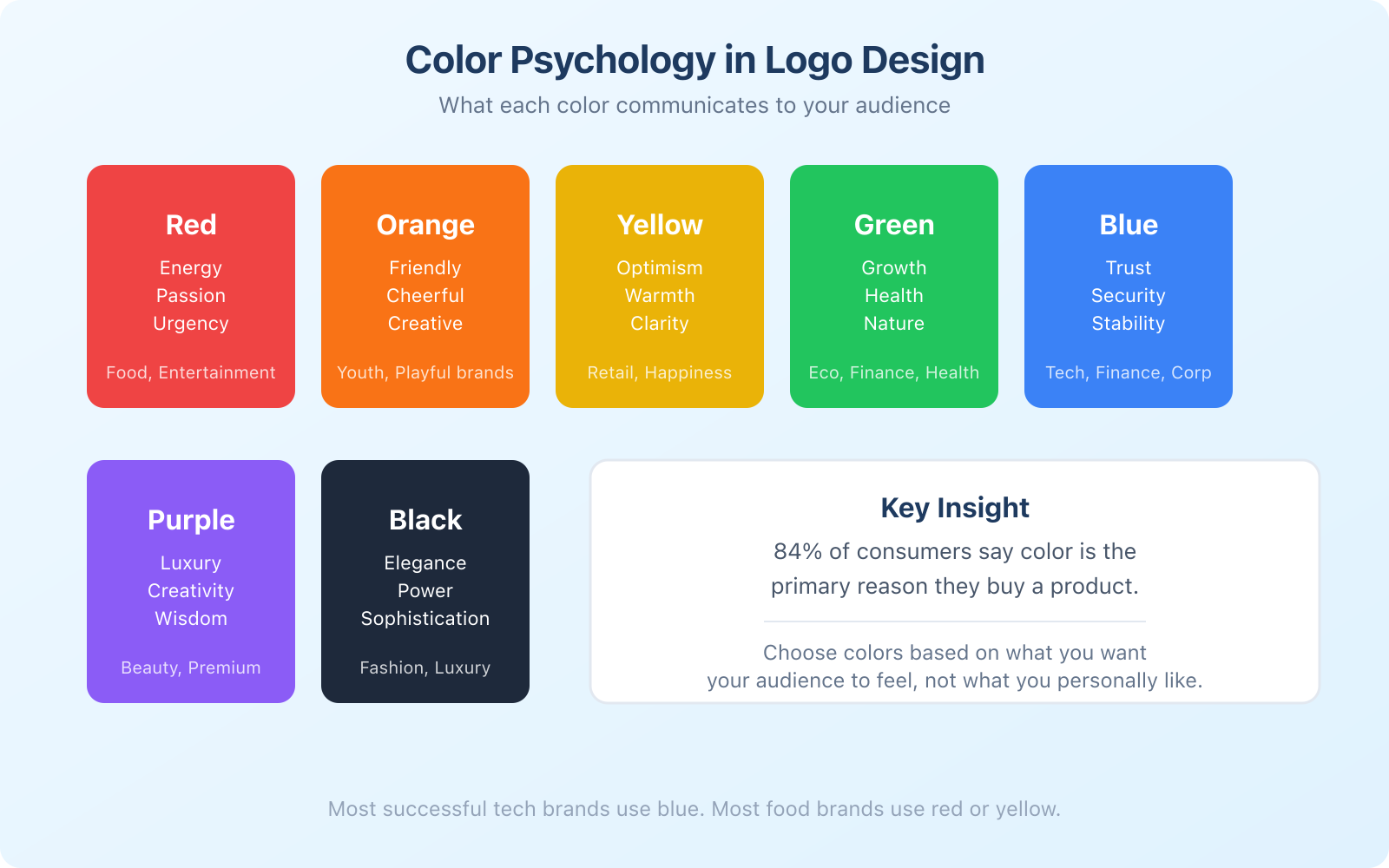
Color isn’t decoration. It’s communication. Eighty-four percent of consumers say color is a primary factor in their purchasing decisions, and 53% of consumers won’t return to a business whose aesthetics they dislike. Your logo’s color palette does heavy lifting whether you realize it or not.
Here’s a quick guide to color psychology in logo design:
- Blue communicates trust, stability, and professionalism. It’s the most popular color in tech and finance logos for a reason. Think Facebook, PayPal, Samsung.
- Red signals energy, urgency, and passion. Common in food and entertainment brands. YouTube, Netflix, Coca-Cola.
- Green suggests growth, health, and sustainability. Perfect for eco-friendly, financial, or wellness brands. Whole Foods, Robinhood, Spotify.
- Yellow/Orange conveys optimism, warmth, and friendliness. Great for brands targeting younger audiences. McDonald’s, Amazon, Fanta.
- Purple implies luxury, creativity, and wisdom. Used by premium and beauty brands. Cadbury, Hallmark, Twitch.
- Black represents elegance, power, and sophistication. Common in fashion and luxury. Chanel, Nike, Apple.
Choose colors based on what you want your audience to feel, not what you personally prefer. Keep it to 2-3 colors maximum. And always test your logo in black and white, because there will be situations where you can’t print or display it in color.
Step 4: Typography That Supports Your Brand
If your logo includes text (and most should), the font choice matters just as much as the colors. Fonts carry cultural associations that shape how people perceive your brand.
Serif fonts (like Times New Roman, Georgia, Garamond) feel traditional, trustworthy, and established. They work well for law firms, financial services, and luxury brands.
Sans-serif fonts (like Helvetica, Inter, Poppins) feel modern, clean, and approachable. They’re the default choice for tech companies, startups, and digital-first brands. Most of the logos you see online use sans-serif fonts.
Script fonts (like handwriting or calligraphy) feel elegant, personal, and sophisticated. They work for beauty brands, bakeries, and wedding businesses. But they’re often hard to read at small sizes, so use them carefully.
Display fonts (decorative, unique typefaces) feel creative, bold, and distinctive. Great for entertainment, food, or creative agencies. The risk is that overly decorative fonts date quickly and can look unprofessional if not executed well.
My general rule: when in doubt, use a clean sans-serif font. It will never look dated, it works at every size, and it reads well on both screens and print. You can add personality through color, spacing, and weight rather than an exotic typeface.
Step 5: Symbols and Icons
If you’re creating a combination mark or pictorial mark, the symbol is the most critical element. A good symbol is simple, memorable, and tells a story about your brand.
The best logo symbols work because they communicate an idea in a single glance. Amazon’s arrow pointing from A to Z suggests “we sell everything.” FedEx’s hidden arrow between the E and X implies speed and precision. These aren’t accidents. They’re deliberate design choices.
A few guidelines for choosing or creating symbols:
- Keep it simple. A 5-year-old should be able to draw it from memory.
- Make sure it works at 16×16 pixels (favicon size) and on a billboard.
- Research cultural meanings. A symbol that’s positive in one culture might be offensive in another.
- Pair your symbol with text until your brand is well-established. Even Apple used the word “Apple” alongside their icon for years before dropping it.
AI Logo Tools: What Works and What Doesn’t
AI-powered logo tools have gotten remarkably good. They won’t replace a skilled designer for complex brand identity work, but they’re more than capable of producing a solid logo for small businesses and startups on a budget.
Canva Logo Maker is my top recommendation. It offers thousands of customizable logo templates organized by industry. You pick a template, change the colors and fonts to match your brand, adjust the layout, and export in multiple formats. The free tier works fine, but Canva Pro gives you access to more templates and the ability to resize your logo for different platforms automatically.
Other notable AI logo tools include Looka (which generates logos from your brand description) and Brandmark (which uses AI to create logo concepts). Both produce decent results, but they charge $20-$65 per logo download, which adds up if you need multiple revisions. Canva’s included-in-subscription model is more cost-effective for ongoing design needs.
What AI logo tools can’t do well: create truly original icon concepts, handle complex visual metaphors, or produce logos that need to work across unusual applications (3D signage, embroidery, vehicle wraps). For those needs, hire a human designer.
Building Your Complete Brand Kit
A logo isn’t the finish line. It’s the starting point of your visual identity. Once you have a logo you’re happy with, build a complete brand kit around it.
Your brand kit should include:
- Logo files in SVG (vector, scalable), PNG (transparent background), and PDF (print) formats
- Color palette with hex codes, RGB values, and CMYK values for print
- Typography specifications including heading font, body font, and sizes
- Logo usage rules covering minimum size, clear space, and prohibited modifications
- Favicon (16×16 and 32×32 pixel versions of your logo for browser tabs)
- Social media avatars optimized for each platform’s dimensions
Canva Pro’s Brand Kit feature stores all of this in one place. Every time you create a new design, your brand colors, fonts, and logos are one click away. It’s the simplest way to maintain consistency, especially if multiple team members create marketing materials.
Don’t skip the favicon. It’s the tiny icon that appears in browser tabs, bookmarks, and search results. A missing or default favicon screams “this business doesn’t pay attention to details.” Export a simplified version of your logo (usually just the icon or first letter) at 16×16 and 32×32 pixels.
Getting Feedback the Right Way
Once your logo is designed, you need feedback. But not just any feedback. The wrong kind of feedback derails more logo projects than bad design does.
Don’t ask: “Do you like this logo?” That’s subjective and unhelpful. Instead, ask specific questions:
- “What industry do you think this company is in?” (Tests if your logo communicates the right context)
- “What three words come to mind when you see this?” (Tests emotional response)
- “Can you describe this logo from memory after seeing it for 5 seconds?” (Tests memorability)
- “Would you trust a company with this logo?” (Tests credibility)
Show your logo to 5-10 people who match your target audience, not to friends and family who will tell you what you want to hear. Platforms like Dribbble, Behance, and even LinkedIn can help you get constructive criticism from designers and brand professionals.
Take feedback seriously, but don’t chase every opinion. If 7 out of 10 people understand your logo’s message, you’re in good shape. If only 3 do, something needs to change. Pivoting too much based on random suggestions will dilute your original brand concept.
Common Logo Design Mistakes to Avoid
After reviewing hundreds of logos over the years, I’ve seen the same mistakes repeat:
- Too complex. If your logo has more than 3 elements, simplify it. Complex logos don’t scale well and are hard to remember.
- Trend-chasing. Gradient logos, 3D effects, and watercolor textures look dated within 2-3 years. Keep it timeless.
- Raster files only. If you only have a PNG of your logo, you can’t scale it up without losing quality. Always get an SVG or AI vector file.
- No black-and-white version. Your logo needs to work in monochrome for faxes, stamps, embroidery, and one-color printing.
- Skipping the favicon. Your browser tab, bookmarks bar, and Google search results all show your favicon. A missing one looks amateur.
- Copying competitors. Looking similar to an established brand doesn’t make you look credible. It makes you look like a knockoff.
Frequently Asked Questions
How long should the logo design process take?
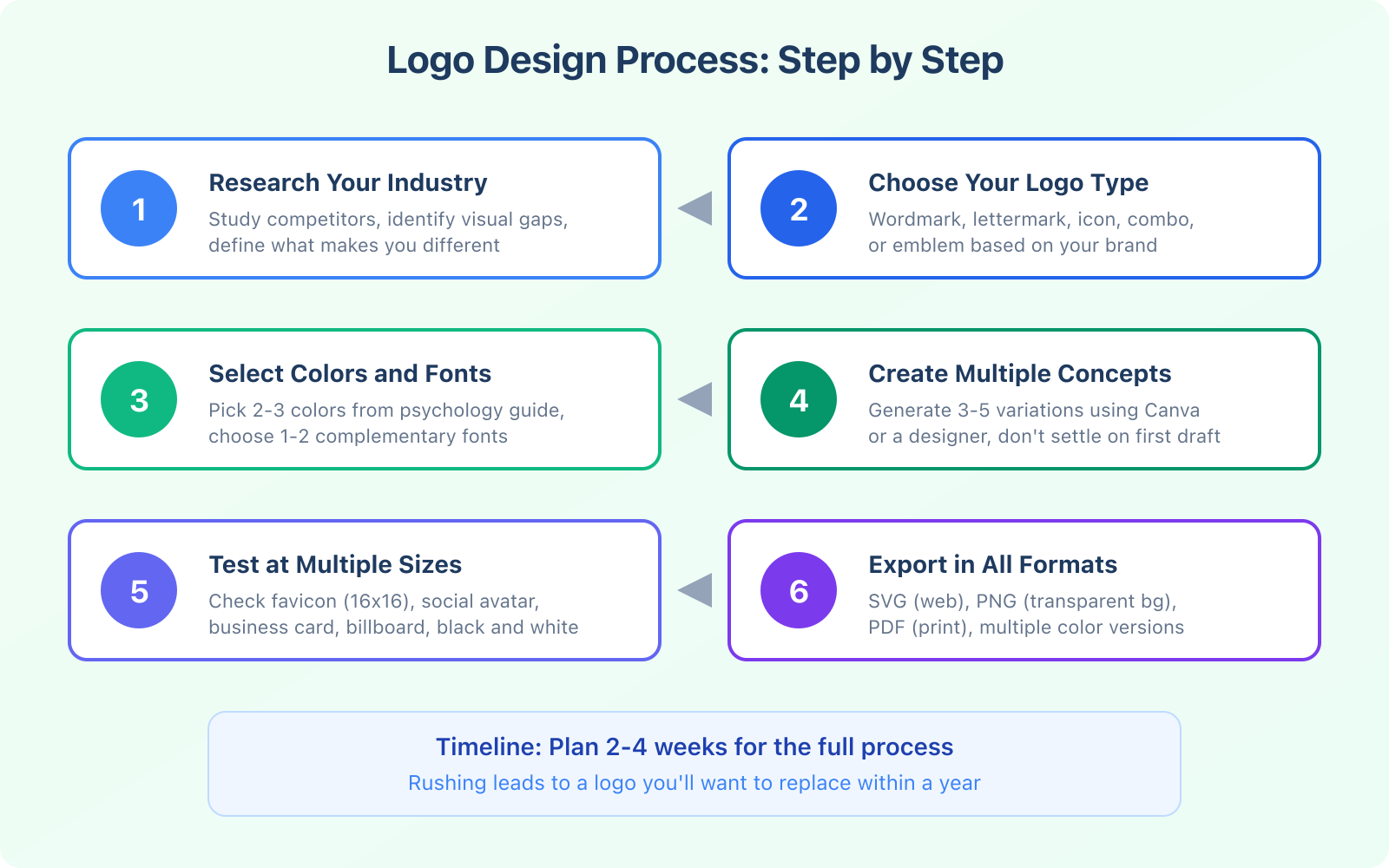
Plan for 2-4 weeks from initial research to final files. Week 1 is research and competitor analysis. Week 2 is concept creation and first drafts. Week 3 is refinement based on feedback. Week 4 is final adjustments and file export. Rushing the process almost always leads to a logo you’ll want to replace within a year.
Can I use an AI-generated logo for my business legally?
Logos created with template-based tools like Canva are generally safe to use commercially, as you’re customizing pre-licensed elements. However, logos generated by pure AI image generators (like Midjourney or DALL-E) sit in a legal gray area regarding copyright and trademark protection. For a logo you plan to trademark, work with a human designer or use a template tool where licensing is clear.
How much should I pay for a professional logo design?
DIY with Canva costs $0-$120/year. Freelance designers charge $200-$2,000 for a logo package. Design agencies charge $5,000-$25,000+ for comprehensive brand identity. For most small businesses, the sweet spot is either Canva Pro for DIY or a skilled freelancer in the $500-$1,000 range. Don’t pay agency prices until you’ve found product-market fit.
What file formats do I need for my logo?
At minimum, you need: SVG (vector format for web, scales to any size), PNG with transparent background (for placing on different colored backgrounds), PDF (for print materials), and a favicon version (ICO or PNG at 16×16 and 32×32 pixels). Also get horizontal, stacked, and icon-only variations of your logo. A good designer will deliver all of these.
When should I consider rebranding or redesigning my logo?
Consider a rebrand if: your business has significantly changed direction or audience, your logo looks dated compared to competitors, it doesn’t work well on digital platforms (too complex for small sizes), or customers consistently misunderstand what your company does based on the logo. A well-designed logo should last 7-10 years minimum. If you’re rebranding every 2-3 years, the original design process was flawed.
The logo design process doesn’t need to be expensive or complicated. It needs to be intentional. Do your research, pick the right logo type for your business, choose colors and fonts that communicate the right message, and test your design at every size before committing. Tools like Canva make the actual design part faster than ever. The thinking behind the design is what takes time, and that’s exactly where you should invest your effort.