
My Experience With WordPress Page Builders: From Hate to (Careful) Love
I used to hate WordPress page builders. Loudly. Publicly. With the kind of confidence you only have when you’ve cleaned up the same mess for the 30th time.
Back then, my hate wasn’t ideological. It was practical. Page builders were slow, shortcode-heavy, and they turned WordPress into a fragile Jenga tower where one plugin update could ruin your entire homepage.
And yes, I wrote about them in a pretty negative way.
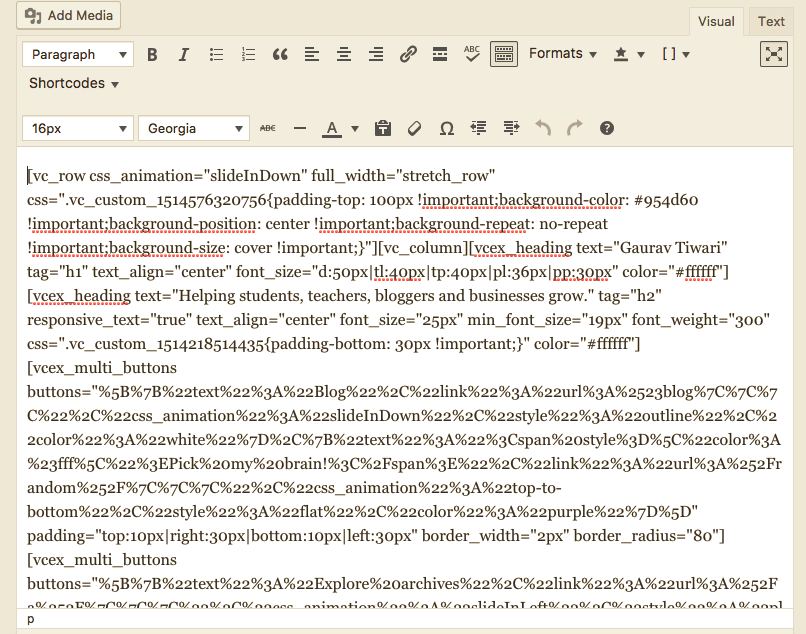
But here’s the part most people miss. I didn’t “change my mind” because I got softer. I changed my mind because the technology actually changed. Builders stopped relying on shortcodes as the core storage layer, they got serious about performance, and they started borrowing the best ideas from modern CSS workflows.
WordPress also changed, and not always in a way I love.
The Block Editor is a win. The Site Editor is… complicated. Sometimes brilliant, often clumsy, and still not the workflow I’d choose when I need to ship pages fast and keep clients happy.
So this is a personal piece. It’s my story. The struggle, the stubbornness, the expensive mistakes, and why I’ve ended up embracing page builders again (with guardrails, because I’m not a saint).
The era when page builders deserved my hate
This article is actually a complete rewrite of my 2018 article titled, “My Experience With WordPress Page Builders” which was 95% negative about page builders.
If you do go the page builder route, Elegant Themes gives you Divi plus Bloom (email opt-ins), Monarch (social sharing), and Extra (magazine theme) in a single membership. For builders that stick closer to native WordPress, Kadence with its starter template library gets you to a finished site faster than anything else I have tested.
When people romanticize “old WordPress,” they forget what it felt like to build marketing pages in 2014 to 2018. You either wrote custom templates, fought your theme options panel, or installed a builder and prayed it didn’t burn your site down.
Builders were popular because they solved a real problem. Business owners wanted pages that looked like modern websites, and developers didn’t want to spend three days on a landing page that would get rewritten next month anyway.
But the early generation of builders paid for that flexibility with brute force. The UI was heavy. The output was heavy. And the internal storage was often a minefield.
Shortcodes were the original sin
Shortcodes were convenient, and also a trap. They let builders store complex layouts inside post content without inventing a whole new architecture.
The problem is simple. If you uninstall the builder, your content turns into a wall of gibberish. That’s not “lock-in” as a marketing concept. That’s a real, operational risk.
I’ve seen businesses lose months because they wanted to switch tools and realized their entire site was basically trapped inside a plugin. And no, “export templates” doesn’t save you when the underlying structure is shortcode soup.
“Shortcodes aren’t evil. But storing your entire site inside them is like storing your accounting in WhatsApp chats.”
Performance wasn’t a rounding error, it was the product
Early builders weren’t just a little slower. They were “your PageSpeed score went from 85 to 25” slower.
You’d load a page, then load a framework, then load widgets, then load more CSS than a fashion website, then initialize everything with JavaScript. The end result was a site that looked fine but felt heavy, especially on mobile.
I’m not anti-JavaScript. I’m anti-unnecessary JavaScript. There’s a big difference.
The “creative freedom” lie
Builders marketed themselves as creative tools. In practice, they pushed everyone into the same design patterns.
You didn’t get creativity. You got a library of “hero, features, testimonials, pricing” sections with different gradients.
And worse, the design decisions were often made through sliders, not systems. Spacing via slider. Typography via slider. Colors via random pickers. That’s not design. That’s chaos with a UI.
As a developer, I want constraints. As a marketer, I want consistency. As a human who has to maintain this in six months, I want a system I can reason about.
“If your design system is a bunch of sliders, you don’t have a system. You have a future support ticket.”
Then Gutenberg happened, and WordPress got weird (in a good way)
The Block Editor also known as the Gutenberg Project, changed WordPress. Not because blocks are magical. Because it changed the storage model, the mental model, and the ecosystem.
It also split WordPress into two worlds. The block world, where WordPress is clearly investing, and the classic world, which still runs a huge part of the internet but gets less love every year.
I’ve built in both worlds. I teach both. And I still think the Block Editor is the right direction, even if the road has potholes the size of a small car.
What the Block Editor actually is
Most people describe Gutenberg as “that editor with blocks.” That’s like describing mathematics as “that thing with numbers.”
Blocks are the interface, but the real power is the architecture. Structured content. A predictable rendering pipeline. A standard way to handle layouts, styles, and patterns.
And once you stop fighting it, the block approach makes sense. You’re composing a page with discrete elements that can be styled consistently and reused. It’s closer to real UI development than the old WYSIWYG mess ever was.
Here’s the nerdy part that actually matters. Blocks store content as data, not as one big blob of HTML you have to guess your way through later. That means WordPress can understand what your content is, not just what it looks like.
That’s why things like patterns, block locking, synced updates, and style controls are possible. The editor isn’t just “rendering.” It’s working with a schema.
This also changes migration dynamics. If you change themes, your blocks don’t turn into garbage shortcodes. Your layout might need tweaks, but your content still exists in a format WordPress understands.
Theme.json is boring, and it’s the future
See more on this: My WordPress Block Editor Setup: ACF Blocks, Custom Styles, and More
If you’ve never opened a theme.json file, you might think it’s “developer stuff.” It is. It’s also the closest WordPress has to a real design token system in core.
Colors. Typography scales. Spacing presets. Global styles. Block-level defaults. It’s WordPress saying, “Stop hardcoding everything in random CSS files and panels.”
When it works, it’s great. You define a system once, and the editor UI reflects it. When it doesn’t work, it’s because half the ecosystem is still catching up, and the Site Editor UI still feels like it was designed by three teams who didn’t sit in the same room.
Patterns, reusable blocks, and the boring stuff that saves you
Patterns are underrated. They’re not flashy, but they solve the biggest real-world problem: speed without chaos.
If you build a “call-to-action” pattern once and reuse it, you’re not reinventing your layout every time. You’re reusing a known-good component. That’s how professional systems work.
Reusable blocks and synced patterns can also backfire if you give clients too much power. But used properly, they create consistency at scale.
This is where my math brain kicks in. Scaling isn’t about working harder. It’s about reducing variance. The fewer unique page structures you have, the fewer places things can break.
“In math, you don’t solve the same equation 50 times with new steps. You define the method, then you apply it. Websites are the same.”
The Site Editor (Full Site Editing) is still a pain
Now the spicy part.
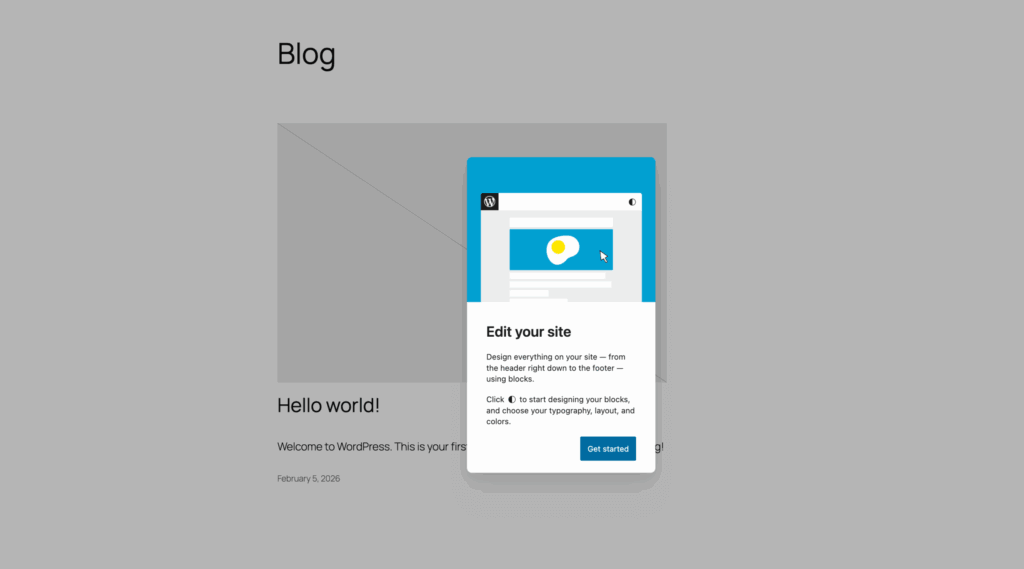
The Site Editor is ambitious. It’s also inconsistent. The UX keeps changing, template hierarchies confuse normal humans, and debugging “why did this style apply here but not there” can feel like you’re doing archaeology.
The Site Editor is trying to turn WordPress into a full design platform. That’s noble. But the workflow still isn’t what I’d call fast or forgiving, especially for production work where clients need predictability.
I’ve had moments where it’s genuinely good. Global styles can be powerful. Template parts can reduce duplication. Style variations can speed up theme development.
But I’ve also had moments where I just want to scream, “Why is this hidden behind three panels?” If you’ve tried to teach a client the Site Editor, you know what I mean. They don’t want to learn a theme architecture. They want to change a headline and move on with their day.
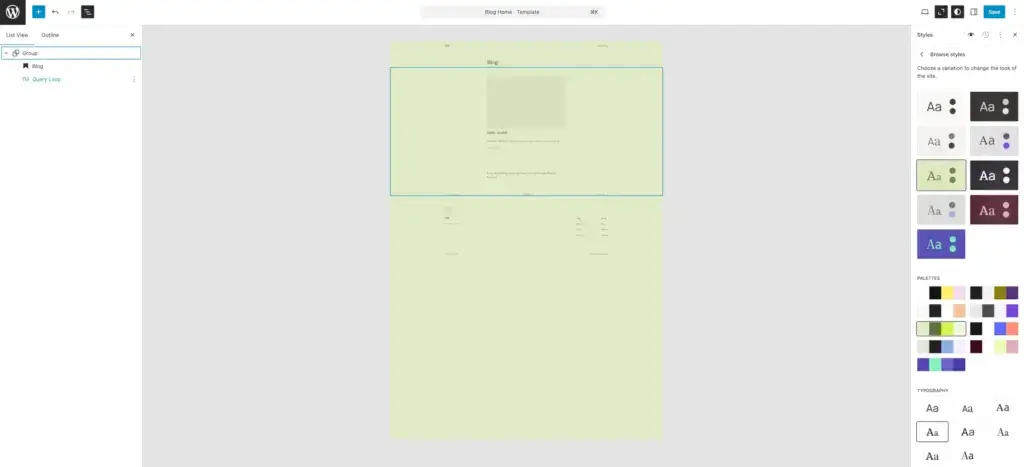
And the mental overhead is real. In the Site Editor, you’re constantly asking, “Am I editing this page, this template, or the template part that feeds ten other templates?” That’s a fair question for a developer. For a business owner who just wants to update their services page, it’s ridiculous.
To be clear, I don’t think the Site Editor is “bad.” I think it’s still immature as a client-facing workflow. WordPress is building a plane while it’s flying. I respect the ambition. I just don’t enjoy being the test pilot on client sites.
The block addon ecosystem grew up fast
The Block Editor alone is okay. The real power comes when you add the right block tools on top.
GenerateBlocks is my favorite for performance and clean output. It’s intentionally minimal, which sounds limiting until you realize it forces good structure.
Then you’ve got heavy hitter Block Editor addons like Kadence Blocks, Spectra, Stackable, and Greenshift. Each one has a different philosophy. Some are “design kits.” Some are “layout frameworks.” Some are “animation playgrounds.”
Here’s my opinionated take. The best block addon is the one that helps you build consistent layouts without turning your site into a widget zoo. The moment you install 50 blocks you’ll never use, you’re back in page builder land, just with different branding.
“More blocks doesn’t mean more freedom. It usually means more ways to break your own site.”
WordPress page builders compared
| Builder | Type | Editor Base | Performance | Dynamic Data | Theme Builder | WooCommerce Builder | Animation / Motion | Lock-in Risk | Learning Curve | Pricing Model | Best For |
|---|---|---|---|---|---|---|---|---|---|---|---|
| Bricks | Theme | Custom (Vue) | Excellent | Advanced | Built-in | Yes | Good | Medium | Moderate | Yearly + Lifetime | Agencies, devs |
| GenerateBlocks + GP | Theme + Blocks | Gutenberg | Excellent | Yes | FSE | Limited | Basic | Very Low | Moderate | Yearly | Speed-focused blogs |
| Kadence Blocks | Blocks | Gutenberg | Very Good | Advanced | FSE | Yes | Basic | Low | Easy | Yearly | SMBs |
| Breakdance | Plugin | Custom | Very Good | Advanced | Built-in | Yes | Good | Medium | Easy–Moderate | Yearly | Woo + agencies |
| GreenShift | Blocks | Gutenberg | Excellent | Advanced | FSE | Yes | Excellent | Low | Moderate | Yearly + LTD | Motion-heavy sites |
| Oxygen | Plugin | Custom | Excellent | Advanced | Built-in | Yes | Good | High | High | Lifetime | Developers |
| Spectra | Blocks | Gutenberg | Good | Yes | FSE | Yes | Basic | Low | Easy | Free + Pro | Astra users |
| Droip | Plugin | Custom | Very Good | Yes | Built-in | Yes | Good | Medium | Moderate | Low-cost Yearly | Designers |
| Elementor | Plugin | Custom | Average | Advanced | Built-in | Yes | Good | High | Very Easy | Yearly | Beginners |
| Divi | Theme + Plugin | Custom | Average | Yes | Built-in | Yes | Good | Very High | Easy | Yearly + Lifetime | Lifetime buyers |
| Beaver Builder | Plugin | Custom | Good | Yes (Addon) | Themer Addon | Limited | Basic | Medium | Easy | Yearly | Stable client sites |
| Thrive Architect | Plugin | Custom | Average | Yes | Thrive Theme Builder | Limited | Basic | High | Easy | Suite-only Yearly | Marketers |
| Brizy | Plugin | Custom | Average | Yes | No | No | Basic | Medium | Very Easy | Yearly | Simple sites |
| Stackable | Blocks | Gutenberg | Good | Yes | FSE | Limited | Basic | Low | Moderate | Free + Pro | Styled blocks |
| WPBakery | Plugin | Shortcode | Poor | Limited | No | Limited | Basic | Very High | Easy | One-time | Legacy TF sites |
| Visual Composer | Plugin | Custom | Below Avg | Yes | Partial | Limited | Basic | High | Easy | Yearly | WPML sites |
| Zion Builder | Plugin | Custom | Very Good | Advanced | Built-in | Yes | Good | Medium | Moderate | Yearly + Lifetime | Budget performance |
| Builderius | Plugin | Custom (React) | Excellent | Advanced (GraphQL) | Built-in | No | None | Medium | Very High | Free + Pro (Lifetime) | Purist developers |
| Themify Builder | Plugin | Custom | Below Avg | Limited | Theme-bound | Limited | Basic | High | Easy | Yearly | Themify users |
| Live Composer | Plugin | Custom | Below Avg | Limited | No | No | Basic | High | Easy | Free | Zero budget |
| Cwicly | Blocks | Gutenberg | Excellent | Advanced | FSE | Yes | Good | Low | High | Free (Maintenance) | Existing installs |
| EtchWP | Plugin | Custom (Svelte) | Good | Advanced | Built-in | Coming Soon | Basic | Low (Gutenberg output) | Very High | Lifetime + Yearly | Code-focused devs |
| Mosaic | Theme | Custom | Very Good | Yes | Built-in | Coming Soon | Basic | Medium | Moderate–High | Free 1st year + Yearly | Design system teams |
Page builders grew up, and I noticed
I didn’t wake up one day and decide to embrace page builders. I was dragged into it by reality.
Clients wanted speed of execution. Agencies needed repeatable workflows. And WordPress core kept nudging everyone toward blocks, which made builders either evolve or die.
The builders that survived learned a few hard lessons. Cleaner output matters. Global styling matters. Performance matters. And if you make developers hate you, they’ll eventually build a replacement.
Goodbye shortcodes, hello structured data
Modern builders still have some lock-in, but the worst forms have faded.
A lot of builders store layouts as JSON in post meta now, not as shortcodes inside content. That makes rendering more predictable and reduces the “uninstall and your content becomes alien language” problem.
It’s not perfect. If you remove a builder, you still lose the layout. But at least you don’t corrupt the actual content field with junk.
The ethical angle matters here. Tools should make your life easier, not trap you. If your business is built on trapping users, that’s not a strategy. That’s a hostage situation with a subscription fee.
“Lock-in isn’t a feature. It’s a moral failure disguised as product strategy.”
Containers, flexbox, and the end of column hell
Old builders loved columns. Nested columns. Columns inside columns. Then a spacer. Then another spacer. Then a divider. Then an inner section. Then you stare at the DOM and cry.
Modern builders shifted toward container-based layouts. Flexbox. CSS Grid. Real layout primitives that map to how the web actually works.
That change alone made builders feel more like real front-end tools and less like “WordPress does HTML, sort of.”
Performance got real (finally)
The performance story isn’t just “builders got faster.” It’s that builders learned what actually makes sites slow.
Heavy DOM. Too much CSS that applies everywhere. JavaScript that loads on every page even if the page doesn’t use the feature. Animations that look cool in a demo and wreck LCP on a mid-range phone.
Modern builders started shipping smarter defaults. Conditional asset loading. Cleaner markup. Fewer nested wrappers. Less reliance on jQuery and legacy libraries. And a stronger emphasis on global styles instead of inline styles on every single element.
I’m not claiming every builder is suddenly lightweight. Some still ship a lot. But the baseline improved, and the market started punishing builders that ignored it.
“Performance isn’t a feature you bolt on later. It’s a design constraint you commit to early.”
The class-first workflow is the real turning point
Here’s the change I care about most. Class-based styling.
When you build pages by setting styles per element, you create a one-off snowflake every time. The page looks right today, and it becomes unmaintainable tomorrow.
When you build pages by assigning classes and using global styles, you create a system. You can change a button style once and have it update everywhere. You can reuse layouts without redoing spacing. You can onboard a teammate without saying, “Just copy this element, but don’t touch this slider, and don’t ask why.”
This is also where page building starts to look like actual engineering. You define tokens (colors, typography, spacing), you define components (hero, CTA, card), then you compose.
And yes, it’s slower in week one. But it’s faster in month three. I’ve seen it over and over.
“The first page is always slower with a class system. The 50th page is stupidly fast. That’s the point.”
The Block Editor stack I actually use (and why it works)
If you’ve read my other WordPress stuff, you know I like boring stacks. GeneratePress. GenerateBlocks. A clean caching layer. A sane hosting setup.
The reason is simple. Most sites don’t need fancy. They need stable, fast, and easy to maintain.
And the Block Editor fits that when you treat it as a system, not a toy.
GenerateBlocks: the “less is more” school of layout
GenerateBlocks looks underwhelming on purpose. It doesn’t give you 90 widgets. It gives you foundational building blocks.
That’s exactly why it works. Containers, grids, headings, buttons. You can do 90% of layout work with those four, especially when you use Global Styles properly.
The real win is how GenerateBlocks encourages a design system mindset. Instead of styling each block like a one-off, you create Global Styles that behave like classes and components. Buttons become “primary,” “secondary,” “ghost,” not “blue button with 14px padding that only exists on this one page.”
Once you build a small library of patterns on top of those Global Styles, you get page-builder speed without page-builder debt. That’s the whole game.
If you’ve ever studied how good systems scale (math, engineering, even sociology), the pattern is the same. You define primitives. You define rules. You reuse. You reduce variance. You stop reinventing the wheel.
This is the math idea again. Constraints reduce decision fatigue. If you have 3 ways to do a layout, you’ll pick one and move on. If you have 30, you’ll waste an hour trying to feel “sure.”
Other block addons: when they make sense
Kadence Blocks is strong if you want a polished UI and a big template library. Spectra is popular, especially for people coming from Astra and starter templates. Stackable has a distinct design language and lots of “done-for-you” sections. Greenshift is interesting if you care about animations and modern effects.
None of these are bad. They’re just different tradeoffs.
My rule is harsh but fair. If you can’t explain why you installed a block addon in one sentence, you probably shouldn’t install it.
“Every plugin is a liability. If you can’t justify it quickly, it doesn’t belong.”
Block Editor workflows that stop clients from breaking everything
Clients don’t need design freedom. They need guardrails.
I give clients patterns, style presets, and a small set of approved blocks. I don’t give them 17 typography sliders and permission to invent new spacing values.
This is social science 101. People behave according to the environment you design. If the UI invites chaos, chaos will happen. If the UI nudges consistency, most people will follow it.
Ethically, this matters. A good system respects the client’s time and reduces cognitive load. It doesn’t make them feel dumb for not understanding a CSS concept they never signed up to learn.
Bricks Builder changed the game (even though it’s a theme)
Bricks is the builder that made a lot of developers stop rolling their eyes.
It’s fast. The UI is practical. The output is clean. And the workflow is close enough to real front-end thinking that you don’t feel like you’re cosplaying as a designer with sliders.
Here’s the weird part. Bricks is technically a theme, not just a plugin. That matters. It means you can’t just switch to another theme later and keep Bricks running like nothing happened.
And yet, despite being “theme-based,” Bricks pushed the whole market forward. Other builders started copying its ideas. Developers started demanding the same performance and class-first workflows elsewhere.
Why Bricks feels different in real projects
Bricks forces structure. You build with containers. You use classes. You think in components.
The best part is the class manager and global styling approach. Once you set it up, building new pages feels like assembling Lego, not painting every brick manually.
Performance-wise, Bricks doesn’t feel like a builder that’s apologizing for existing. It feels like it was built by people who inspect HTML and actually care what it looks like.
Where Bricks really earns its reputation is workflow discipline. It nudges you toward reusable patterns (components), consistent naming, and sane CSS architecture. If you’ve ever taken over a site where every button has a different padding because someone “just adjusted it a bit,” you’ll understand why this matters.
There’s also a psychological trick here. When a tool makes the “right thing” the easiest thing, you do better work without feeling like you’re fighting yourself. That’s behavioral design. I care about it because I’ve seen what happens when the tool encourages chaos.
“Good tools don’t just give you power. They quietly push you toward good decisions.”
The other thing Bricks did (and this is underrated) is make performance a selling point again. Builders used to treat performance like a disclaimer. Bricks treated it like a feature. That shifted the conversation across the ecosystem.
The tradeoff: it’s not for people who want “easy”
Bricks is not the best choice for someone who wants a template library and never wants to think about CSS concepts again.
You don’t need to be a developer. But you do need the willingness to learn the builder’s mental model.
And honestly, that’s fair. Tools should have a learning curve proportional to the power they give you. If a tool claims it’s “easy” and “powerful” and “fast,” it’s usually lying about one of those.
“Easy, powerful, fast. Pick two. If a tool claims all three, you’re reading marketing copy.”
Elementor: still the market leader, still messy, still evolving
Elementor is everywhere. That’s not a compliment or an insult, it’s just reality.
If you run a WordPress agency, you’ll touch Elementor whether you like it or not. Clients ask for it. Templates are built for it. Freelancers know it. It’s the default language of the WordPress marketing world.
I’ve built many sites with Elementor. I’ve also migrated many sites away from Elementor. Both experiences taught me the same thing: Elementor’s strength is ecosystem, and Elementor’s weakness is the cost of ecosystem.
Elementor got better, but it had to
Elementor’s move toward containers was necessary. The old section/column approach created bloated markup and made responsive work painful.
Their push toward global styling and class-like systems is also a sign of maturity. It’s Elementor admitting that per-widget styling doesn’t scale.
If you’ve never managed a 300-page site, it’s easy to underestimate how big this is. Local styling feels fast because you get instant gratification. Global systems feel slower because they demand planning.
But global systems are what keep you sane. They turn “change the button style across the site” from a weekend project into a 2-minute change. That’s what professionals pay for. Not the slider.
And then there’s Elementor v4.
Elementor v4 editor: “beta” and “production-ready” in the same sentence
Elementor v4 (Editor v4) is in beta. They say it’s ready for production sites.
I’m not going to call them liars. But I will say this. When a major product release changes the editing architecture, I don’t trust “it’s ready” until I’ve seen it survive real client chaos.
This is the difference between a demo and production. In a demo, you control the variables. In production, you’ve got 28 plugins, a caching layer, a multilingual setup, a client who pastes random HTML into a widget, and an update scheduled at the worst possible time.
So my stance is cautious. Test it on staging. Test it on non-critical sites. Don’t bet your business on a beta because a landing page told you it’s fine.
“A beta that works in your sandbox can still fail in the real world. And clients don’t care that the release notes sounded confident.”
Also, “production-ready” is a slippery phrase. Elementor has a Developer Edition that’s explicitly not meant for production sites. So when you see “beta” plus “production-ready” in the same marketing cycle, your skepticism should go up, not down.
If Elementor v4 becomes what it’s trying to become, it’ll be a serious step forward. A more CSS-first workflow. Less legacy baggage. A modern editor foundation that can handle the next decade.
But I’ve been doing WordPress long enough to know how these transitions go. There’s always a messy middle. And the messy middle is where client sites go to die if you’re careless.
The real Elementor question is workflow
Elementor can be fast to build with, especially when you rely on templates. But speed isn’t just “how fast can I drag a widget.”
Speed is also “how fast can I keep this consistent across 200 pages.” Speed is “how fast can I change a brand color across the site without hunting through every section.” Speed is “how fast can I debug a layout issue without wanting to quit WordPress and become a farmer.”
Elementor is moving in the right direction, but it’s still carrying a lot of legacy baggage. That’s the cost of being big.
Oxygen: the veteran builder that made developers feel seen (and then confused)
Oxygen was the builder developers loved because it felt like building a real website. Clean output. Real control. Less hand-holding.
I’ve used Oxygen on client projects. It taught me something important. A builder can be powerful without being bloated.
Oxygen also proved something else. The “developer market” isn’t tiny. It’s just picky. Developers will tolerate complexity if it buys them control and consistency. What they won’t tolerate is random magic.
But Oxygen also shows the risk of niche builders. Roadmaps change. Products evolve. And sometimes the community has to wait longer than they’d like for the next chapter.
I’m watching Oxygen’s “new” direction – Oxygen V6, almost ready to be released – with interest. I’m also not putting it on a fresh client project until the dust settles and the workflow feels stable again.
That’s not hate. That’s risk management.
EtchWP: block-first thinking without pretending WordPress is already perfect
EtchWP is one of the more interesting experiments in WordPress building right now.
It’s not trying to be “Elementor but faster.” It’s trying to be a better layer on top of the Block Editor. A workflow tool. A builder that respects blocks, not replaces them.
I like that philosophy. It aligns with where WordPress is going. And it feels more future-proof than fighting WordPress core forever. Etch’s pitch (as I understand it) is basically this: build visually, but store things like WordPress wants them stored. Blocks. Patterns. Reusable structures. Not a parallel universe.
That’s smart in theory, but Etch hasn’t kinda delivered what it claimed it would. It feels messier than Site Editor itself and leaves a lot to be desired.
“New tools are exciting. New tools also break in weird ways. Both things can be true.”
Why the Site Editor creates bottlenecks for everyone
WordPress is betting hard on blocks and the Site Editor. That’s where the engineering energy is.
That creates a weird bottleneck. Page builders have to stay compatible with WordPress, but WordPress doesn’t always care about page builders.
When core changes something about how styles cascade, or how templates resolve, or how the editor loads assets, builders have to adapt. Sometimes quickly. Sometimes with hacks.
And the Site Editor’s “everything is editable” philosophy doesn’t always play well with client reality. Most clients want a few editable areas, not the ability to accidentally redesign their header.
So builders are doing the sensible thing. They’re embracing blocks where it helps and insulating users where WordPress core is still rough.
Builders embracing the Block Editor (and why that’s a good sign)
The old era was builders vs Gutenberg. That war is mostly over.
Now it’s more like “builders as a layer” on top of WordPress. They integrate with blocks. They output clean HTML. They try to fit into a world where WordPress wants patterns, templates, and global styles.
In practical terms, this is what I see on real projects. We use the Block Editor for blog posts and documentation because it’s fast, portable, and future-proof. We use a builder for marketing pages, complex layouts, and client-driven landing page iteration.
Even inside builder-driven sites, the “post content” area often stays block-based. Builders handle the shell (header, footer, layout, template logic), while blocks handle the day-to-day content. That hybrid approach is surprisingly sane.
And builders are learning to play nicely with core concepts like patterns, global styles, and reusable components. They don’t have to copy WordPress. They just need to stop fighting it.
This is healthy. When tools converge on good ideas, the ecosystem improves. You get better portability. Less weird one-off markup. More consistent workflows.
I don’t think builders will disappear. I think they’ll become more like professional UI tools, and less like “drag stuff until it looks okay.”
Plugin-based vs theme-based page builders: my stance (with nuance)
If you’re choosing a builder, you need to understand this difference. Plugin-based builders and theme-based builders solve different problems.
Plugin-based builders (Elementor, Beaver Builder, Divi Builder plugin, and others) sit on top of your theme. You can switch themes later, and the builder still exists.
Theme-based builders (Bricks, some “builder themes,” and similar approaches) replace the theme layer. That can be faster and cleaner because you remove one source of conflicts. But you lose portability.
Why I prefer plugin-based builders for most businesses
Portability matters. Businesses change their minds. Agencies change. Designs get refreshed.
If your builder is theme-based, a rebrand might become a rebuild. That’s fine if you planned for it. It’s painful if you didn’t.
Plugin-based builders also give you the freedom to pair them with a theme you trust for performance and accessibility. That matters more than people think.
And yes, plugin-based builders can be used with almost any theme. That’s a real advantage, especially when you inherit a site and can’t just rip out the entire theme layer without starting a war.
When theme-based builders make sense
Theme-based builders make sense when you want full control and you’re okay with committing.
If you’re an agency standardizing on Bricks and you plan to rebuild designs as part of your lifecycle anyway, the theme-based approach can be a feature, not a bug.
It can also reduce conflicts. One system. One styling pipeline. One set of assumptions. That simplicity can be worth the tradeoff.
This is the ethics part again. The problem isn’t commitment. The problem is accidental commitment. Tools are fine if they’re honest about the cost.
The AI layer: what’s real, what’s hype, what’s risky
AI is showing up in page building, whether we like it or not.
Some of it is genuinely useful. Some of it is gimmicky. And some of it is dangerous if you care about accuracy, brand voice, and ethics.
Where AI actually helps in page building
AI is best at the annoying parts. Drafting copy variants. Generating section ideas. Turning bullet points into a first draft. Creating placeholder content that isn’t lorem ipsum garbage.
It’s also useful for “translation” between concepts. You describe a layout goal in plain language, and the tool suggests structure, blocks, and styling.
But I’m careful here. AI can help you start faster. It doesn’t guarantee a better result.
“AI is a speed tool, not a taste tool. You still need taste.”
Where AI creates new problems
AI can produce generic copy that sounds confident and says nothing. You’ve seen it. Everyone has.
AI can also create ethical issues if you treat it as truth. Hallucinated claims. Bad advice. Biased language. Accessibility problems.
And in marketing, AI makes it dangerously easy to publish too much mediocre content. Quantity is not a strategy if the content is forgettable.
This is where my social science side kicks in. People trust language that sounds authoritative. AI is great at sounding authoritative. That combination can mislead, even when nobody intends harm.
“Ethics isn’t just ‘don’t be evil.’ It’s designing systems that reduce the chance of accidental harm.”
WordPress AI experiments: the direction is interesting
WordPress is experimenting with AI features in core-adjacent ways. That could improve page building, especially if it helps with patterns, style suggestions, and content structure.
I’m optimistic, but cautious. WordPress core moves slowly for a reason. It powers too much of the internet to break things casually.
The upside is real. If WordPress can make “build a decent page” easier for normal users without locking them into a proprietary builder, that’s a win.
The downside is also real. If AI becomes a layer that encourages low-quality sites and misinformation, we’ll pay for it later.
Performance in 2026: the real bottlenecks aren’t where you think
Most people blame page builders for slow sites. Sometimes they’re right.
But I’ve also seen “pure block editor” sites that are slow because the hosting is weak, the database is bloated, images are huge, and the plugin stack is out of control.
Performance is systems thinking. Builders are one variable. Not the only variable.
The builder performance checklist I actually use
When I evaluate a builder (or a block stack), I look at four things:
- Front-end payload: how much CSS and JS does a typical page ship?
- Markup cleanliness: how deep is the DOM, and is the HTML readable?
- Asset loading: does it load only what’s used, or everything always?
- Workflow sustainability: can I build a design system, or am I stuck styling per element?
If a tool fails two of these, it’s not going on a serious project. Life’s too short.
And yes, I measure. I don’t just “feel” performance. I run Lighthouse. I check WebPageTest. I inspect the waterfall. I look at LCP and CLS. Data matters.
“If you can’t measure it, you’re arguing from vibes. Vibes don’t fix slow sites.”
The dilemma: too many options, too much noise
The biggest challenge now isn’t that builders are bad. It’s that there are too many decent options.
Elementor. Bricks. Breakdance. Oxygen. Beaver. Divi. Block stacks like GenerateBlocks, Kadence, Spectra. Then hybrids like EtchWP.
Everyone has a hot take. Everyone has an affiliate link. Everyone claims their tool is “fastest.”
So how do you choose without falling into analysis paralysis?
My honest decision framework
I choose based on the kind of site you’re building and the kind of person you are.
If you want raw speed, long-term maintainability, and you don’t mind learning, I lean toward block-based systems (GenerateBlocks, Kadence Blocks with restraint) or developer-friendly builders (Bricks).
If you want a huge ecosystem, templates, and hiring flexibility, Elementor still wins, even if it costs you some performance and introduces more moving parts.
If you’re a solo builder who wants to ship and iterate, the block editor with a solid addon is often the sweet spot. It’s harder in the first month. It gets easier fast.
And if you’re building for clients, remember the ethics. The best builder is the one your client can safely use without breaking the site every week.
“Your tools should reduce stress. If your tool creates stress, it’s not a tool. It’s a hobby.”
A math-ish way to avoid decision paralysis
Here’s a simple scoring approach I’ve used internally. It’s not perfect, but it stops you from falling in love with shiny features.
Assign weights based on your project:
- Performance: 30%
- Workflow speed: 25%
- Maintainability: 25%
- Ecosystem and hiring: 10%
- Cost: 10%
Score each builder from 1 to 10. Multiply. Add. Pick the top two and test them on a real page.
That’s it. No drama. No tribal wars.
Math won’t tell you what you love. But it will stop you from making a decision based on one flashy demo.
Challenges going forward (and why I’m still cautious)
Page builders are better now. Way better. But the future isn’t guaranteed.
Here are the big challenges I see coming.
WordPress core vs builder ecosystems
WordPress wants blocks everywhere. Builders want to control the page building experience.
That tension won’t disappear. It’ll just change shape.
If WordPress core keeps improving the block editor and site tooling, some builder features will become redundant. Builders will have to differentiate with workflow, performance, and integrated design systems.
And if WordPress core introduces breaking changes, builders will have to scramble to stay compatible. That’s the cost of building on a platform you don’t control.
Accessibility and ethics
Builders make it easy to create complex layouts. That also makes it easy to create inaccessible layouts.
Fancy animations. Bad contrast. Heading hierarchies that don’t make sense. Buttons that are actually divs.
This matters. Not as a checkbox. As basic respect for users.
I care about this because I’ve worked with real businesses where accessibility wasn’t optional. It was the difference between serving customers and excluding them.
The ethical stance is simple. If your tool makes it easy to do harm accidentally, it’s not “user-friendly.” It’s negligent.
The temptation to ship fast and accumulate debt
Builders reduce friction. That’s the whole point.
But low friction can lead to sloppy work. You ship fast. You copy-paste sections. You add plugins. You don’t build a system. Six months later, your site becomes unmaintainable.
This isn’t a builder problem. It’s a human problem. Builders just make it easier to express that human problem at scale.
I was right, and I was wrong
If you’re stuck between builders or migrating from one to another, I’ve done this dozens of times for clients. My WordPress development services cover full site builds, builder migrations, and block editor setups. I also offer UI design services for teams that need both the design and the build.
I was right about old page builders. They were often slow, messy, and ethically dubious in how they locked people in.
I was also wrong to treat “page builder” as one category. That’s lazy thinking. Builders evolved, and some of them deserve respect now.
If you’re choosing a builder in 2026, don’t pick based on tribal loyalty. Pick based on your project, your team, and your tolerance for long-term maintenance.
And don’t ignore blocks. Even if you love your builder, the Block Editor is now the core language of WordPress. Builders are aligning with it for a reason.
My current stance is simple. Use the Block Editor when it’s enough (and it often is). Use a modern builder when you need speed, complex layouts, or a client-friendly workflow. But set up classes and global styles early, because future you will thank you.
Questions? Send them. I’ve made enough mistakes here that I can probably save you a few.
Disclaimer: This site is reader-supported. If you buy through some links, I may earn a small commission at no extra cost to you. I only recommend tools I trust and would use myself. Your support helps keep gauravtiwari.org free and focused on real-world advice. Thanks. - Gaurav Tiwari