
Perfmatters Discount Code (Save 20%)
I run Perfmatters on gauravtiwari.org and every other WordPress site I manage. It’s a lightweight performance plugin that does one thing well: it gives you control over what loads on your pages. Use my coupon code GAURAVTIWARI to save 20% on any Perfmatters plan.
Perfmatters Pricing 2026
Perfmatters is priced per year, based on how many sites you need it on. All plans include the same features. You’re only paying for additional site licenses.
| Plan | Regular Price | With GAURAVTIWARI Code (20% Off) | Sites |
|---|---|---|---|
| Personal | $24.95/year | $19.96/year | 1 site |
| Business | $54.95/year | $43.96/year | 3 sites |
| Unlimited | $124.95/year | $99.96/year | Unlimited sites + multisite support |
Every plan comes with one year of updates and priority support, plus a 30-day money-back guarantee. At under $20/year for a single site with my discount, it’s one of the cheapest performance improvements you can make on a WordPress site.
Use code
GAURAVTIWARIat checkout to save 20% on any plan.
What Perfmatters Actually Does
Most WordPress sites load scripts and stylesheets they don’t need. Your contact form plugin loads its CSS and JS on every page, even though you only have a form on one page. Your slider plugin loads assets globally. WooCommerce scripts load on blog posts that have nothing to do with your store.
Perfmatters fixes this. Its Script Manager lets you disable scripts and styles on a per-page, per-post, or global basis. That alone shaved 0.5 seconds off my site’s load time when I first installed it.
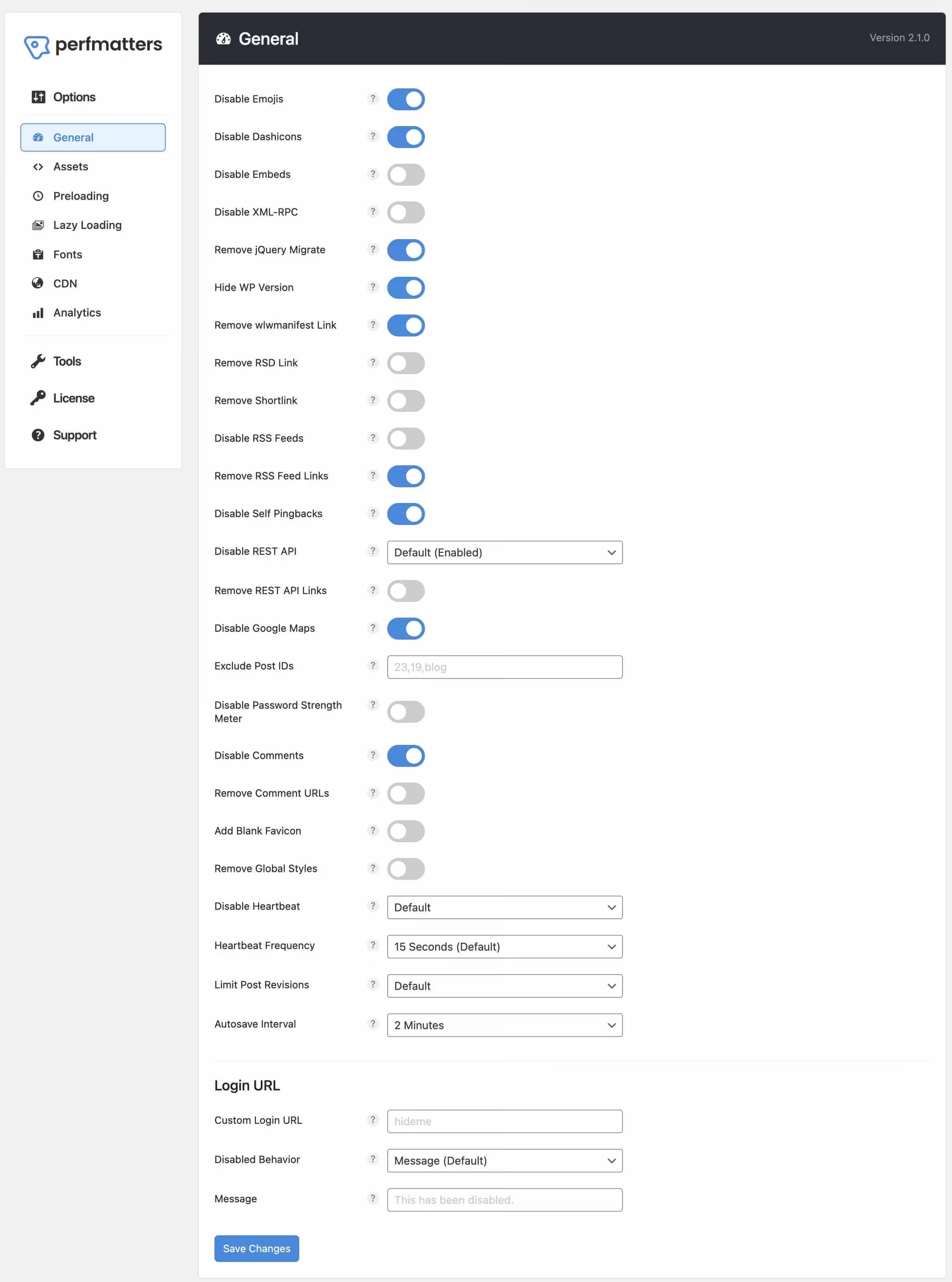
But Perfmatters does more than script management. Here’s the full feature list:
Script & Asset Management
- Script Manager: Disable CSS/JS per page, post, or globally
- Defer JavaScript: Move render-blocking scripts below the fold
- Remove jQuery Migrate: Eliminates an outdated compatibility script most sites don’t need
- Disable WooCommerce scripts: Stop WooCommerce from loading on non-shop pages
WordPress Optimization
- Disable XML-RPC: Remove this security risk if you’re not using it
- Remove WordPress version number: One less piece of information for attackers
- Disable REST API: Block public access to the REST API if you don’t need it
- Disable RSS feeds: Remove unnecessary feed generation
- Disable self-pingbacks: Stop WordPress from pinging itself
- Remove shortlink, RSD link, wlwmanifest link: Clean up your HTML head
- Disable password strength meter: Remove an unnecessary script from login/registration pages
- Change WordPress login URL: Add a layer of security by hiding wp-login.php
Performance Features
- Lazy loading: Defer offscreen images and iframes
- Local Google Fonts: Host Google Fonts locally for GDPR compliance and speed
- Disable Google Fonts entirely: If you’re using system fonts or custom-hosted fonts
- Preload and prefetch: Hint the browser about resources it’ll need next
- CDN rewriting: Rewrite URLs to serve static assets from a CDN
- Database optimization: Clean up revisions, transients, and other database bloat
Analytics & Tracking
- Local Analytics: Host Google Analytics locally for faster loading
- Minimal Analytics: A lightweight alternative to the full GA script
- Insert header and footer code: Add tracking scripts without a separate plugin
Why I Use Perfmatters on Every Site
I’ve tested a lot of performance plugins over 16+ years of building WordPress sites. Perfmatters earns its spot because it does things no caching plugin covers.
Caching plugins like WP Rocket or FlyingPress are great at serving cached pages. But they don’t give you per-page control over which scripts and styles load. Perfmatters fills that gap. I use it alongside my caching plugin, not instead of one.
On gauravtiwari.org, the Script Manager alone eliminated 8 unnecessary HTTP requests on blog posts. That translated to about 400ms faster load times. On a site getting 100,000+ pageviews per month, that matters for both user experience and search rankings.
The other thing I appreciate: Perfmatters is built by Brian Jackson, who ran the performance engineering blog Woorkup and later worked at Kinsta. The guy knows WordPress performance at a deep level, and it shows in how the plugin is designed. Clean code, no bloat, small footprint.
Who Should Buy Perfmatters
Good fit for:
- WordPress sites running 10+ plugins (which is most sites)
- WooCommerce stores where shop scripts load on every page
- Sites using page builders that add global CSS/JS
- Anyone who wants per-page control over what loads
- Developers managing multiple client sites (get the Unlimited plan)
Not necessary for:
- Simple sites with 3-4 lightweight plugins
- Static site generators or headless WordPress setups
- Sites already using a host with built-in script optimization (like Rocket.net)
How to Get the 20% Discount
- Visit the Perfmatters pricing page
- Select your plan (Personal, Business, or Unlimited)
- Enter
GAURAVTIWARIin the coupon field at checkout - Click Apply. Your 20% discount is reflected immediately
- Complete your purchase
The code works year-round. There’s no expiration date and no limit on how many times it can be used.
What is the Perfmatters coupon code?
Use the code GAURAVTIWARI at checkout to save 20% on any Perfmatters plan. This code works year-round with no expiration date. It applies to the Personal ($24.95), Business ($54.95), and Unlimited ($124.95) plans.
Does Perfmatters replace a caching plugin?
No. Perfmatters is not a caching plugin. It handles script management, asset optimization, and WordPress cleanup. You should use it alongside a caching plugin like WP Rocket, FlyingPress, or LiteSpeed Cache. Perfmatters controls what loads on your pages. Caching plugins control how those pages are served to visitors. They complement each other.
Will Perfmatters slow down my site?
No. Perfmatters is designed to make your site faster, not slower. The plugin itself has a tiny footprint (less than 1KB of frontend impact). Its job is to remove unnecessary scripts and styles, which reduces page weight and improves load times. I’ve seen improvements of 0.3 to 0.8 seconds on sites after installing it.
Is Perfmatters worth it for a single site?
Yes. The Personal plan is $24.95/year (about $20 with the coupon code). If your site runs more than 5-6 plugins, Perfmatters will likely remove several unnecessary script loads per page, resulting in faster load times. For a site that generates revenue or serves as a professional presence, $20/year for measurable speed improvements is a straightforward return on investment.
Does Perfmatters work with WooCommerce?
Yes, and this is one of its biggest strengths. WooCommerce loads its scripts and styles on every page by default, even blog posts and static pages. Perfmatters lets you disable WooCommerce assets on non-shop pages, which can significantly reduce load times on those pages. You keep WooCommerce functionality on your shop, cart, and checkout pages where it’s needed.
Can I get a refund if Perfmatters doesn’t work for me?
Yes. Perfmatters offers a 30-day money-back guarantee on all plans. If you’re not satisfied within the first 30 days, you can request a full refund. This applies even if you used a coupon code at purchase.
How does Perfmatters compare to Asset CleanUp?
Both plugins handle script management, but Perfmatters is cleaner and easier to use. Asset CleanUp has a free version, which is great if you’re on a tight budget. But Perfmatters’ interface is more intuitive, and it includes extra features like local analytics, database optimization, and login URL changes that Asset CleanUp doesn’t offer. For the price difference ($20/year with my code), I think Perfmatters is the better pick.
Disclaimer: This site is reader-supported. If you buy through some links, I may earn a small commission at no extra cost to you. I only recommend tools I trust and would use myself. Your support helps keep gauravtiwari.org free and focused on real-world advice. Thanks. - Gaurav Tiwari