
How to Market Your Gaming Blog: 5 Tips
A gaming blog is a lot of fun. You get to tell everyone about your gaming love, connect with other gamers, and dive into the world of game reviews, news, and tricks. But the catch is that, just like with any other kind of blog, getting your content seen in all the internet junk can be challenging.
You have to be smart with your marketing plan if you want your gaming blog to get noticed. So, how do you do that? Let’s see five steps to market your gaming blog and gain proper exposure.

Tap Into Social Media’s Power
This is the prominent first place you should take to market your blog – social media. Using Twitter, Instagram, YouTube, and TikTok, you have access to connect with other gamers more than ever. But you can’t just post snippets and hope someone comes across your content.
Make it a blog community first. Chat about new games or ask your followers what they think about the hot games. Paste bits of your blog posts and be accessible. For instance, if you are a Twitter user, you can tweet a hot take or question that links back to something you’ve written about on your blog and to that post for more details.
Consistency is key here, too. If you post and engage regularly on social media, your followers will know what to expect. And, if you’re a member of gaming groups (either subreddits or Facebook groups), you’ll have a chance to meet potential readers in person.
SEO Is Your Best Friend
You can have the world’s best gaming blog, but nobody will read it. What’s the point? That’s where SEO (Search Engine Optimization) comes in. You don’t need to be a pro to start using SEO, but with some basic strategies, your visibility will increase substantially.
Begin with researching keyword searches that your target audience is doing. When writing a review of a new game, for instance, you’ll need to add words such as “[Game Title] review” or “best strategy for [Game Title]”. Don’t just sprinkle keywords on your blog post like that, though. Include them naturally in your content – Google’s algorithm is not afraid to penalize keyword stuffing.
But keywords aren’t all there is. Google loves new, quality articles, so be sure to provide content that has been thought through and that your readers will take away. Don’t forget to tag your headers, segment your text using images, and don’t overdo sentences and paragraphs to help keep your blog post legible. Your content should be user-friendly, as the better it can be read, the more Google tends to favor it.
Join Other Gamers and Bloggers
Finding other gaming bloggers or influencers to network with can be amazing for your campaigns. Find other bloggers and ask them for suggestions on what to do together, be it guest posting on each other’s blog or hosting a live stream together. You make your audience larger and network with different individuals to spread your content.
For example, if you are both hitting Live casino tables anyway, why not do a joint stream and share each other’s audience?
You might also use partnerships with influencers on YouTube or Twitch. Even massive following gamers constantly search for something new to share or talk about. Find influencers on the same wavelength as your blog (for example, RPGs or indie games) and offer to work together. The exposure you’ll get from being featured on a popular gaming channel can get a ton of traffic to your blog.
And don’t forget the force of posting a comment on someone else’s blog or an online discussion. Talking to other bloggers and gamers shows that you are in the community and generally gets you noticed. Not only that, but a thoughtful response to a popular post will sometimes draw the attention of other readers, and they will end up reading your blog.
Diversify Your Content
Don’t rely only on the written word to market your gaming blog. Be different with the types of content to keep readers interested and draw more people in. Not everyone likes the same kind of content, so provide them in various formats, and you’ll attract other players.
First, post images such as screenshots, infographics or game trailers. For instance, an excerpt of a gameplay video can make your review real in a way that nothing else can. Even try vlogs, Let’s-Play videos or tutorials. People like to watch others play and gain new tips, so you can create a YouTube channel or embed videos on your blog to get even more exposure.
If you are not a video content fan, podcasts can be great. Implement podcasts in your blog. Podcasts are getting very popular, especially in games, and are a great way to dive into something a blog post could never possibly cover. Also, podcasts can easily be shared on social media, adding more people to your list.
Do Not Forget Email Marketing
Our world is saturated with social media and instant messaging, but email marketing is one of the most efficient methods of interacting with your target audience. When you provide a newsletter for your gaming blog, you are getting in contact with your biggest fans. They already prefer your content, so stay connected with regular updates and VIP material.
Be sure to send your newsletter with new blog posts, previews of upcoming articles, or even an early warning of giveaways or competitions. Include something to entice your readers into subscribing, such as free e-books, gaming guides, or sales to your store (if you have one).
Email marketing is beautiful because it’s personal. You can develop a long-term relationship with your readers, and they’ll return for more. But don’t just bombard them with emails – quality matters, and less is more regarding updates.
Conclusion
Advertising a gaming blog takes time, patience, and some innovation. But with some social media, SEO, partnerships, diversified content, and email campaigns, you’ll quickly become the target of an attentive following.
The gaming world is vast and filled with passionate gamers, and with the right strategy, your blog can be the difference maker and reach those with the same gaming interests as you. So get out there, start selling and let your gaming blog take off!
Equipment for Creating Gaming Content
You can’t market a gaming blog without decent content, and decent content needs decent equipment. The good news: you don’t need $5,000 worth of gear. A solid webcam and microphone will do more for your content quality than any fancy editing software.
The Logitech MX Brio at $199 gives you 4K video for streams and video content. The Razer Kiyo at $49 is a budget pick that still looks professional. Both connect via USB, no drivers needed. For the full breakdown, check my guide on the best webcams for streaming.

- Ultra HD 4K webcam: meet or stream in 4K resolution at 30fps or 1080p at 60fps, with our most advanced webcam sensor yet, with 70% larger pixels (1) for sharp image quality
- AI-enhanced image quality: Experience 2x better face visibility with finer image details in difficult light (2), with auto-exposure, auto white balance, noise reduction, and autofocus
- Curate Your Image: Fine controls (3) on this Ultra HD webcam let you adjust lighting and white balance, such as ISO, Shutter Speed, Tint, and Vibrance, or let Auto mode take care of it
- Let Them Hear Your Every Word: Integrated dual beamforming noise-reducing microphones minimize background noise with the aid of AI to make sure you are clearly heard
- Share Your Work: Tilt down your Logitech webcam to share notes and sketches on your desk with Show Mode, allowing for better collaboration on calls
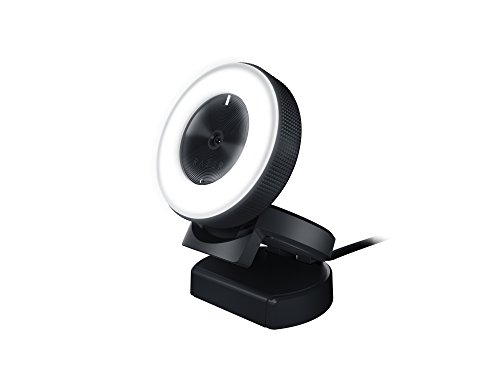
- FULL HD RESOLUTION — Experience crisp, detailed video and audio recording in 720p 60 FPS / 1080p 30 FPS. Works great for streaming, gaming, recording, video calling, conferencing, and online school. Audio Codec: 16 bit 48 KHz
- CONVENIENT, BUILT-IN LIGHTING — Features a 5600K daylight-balanced ring light around the camera that provides even lighting without the hassle of additional lighting equipment
- ADJUSTABLE BRIGHTNESS — Make quick adjustments to the brightness level by simply rotating the built-in ring light. There's no need to configure software settings
- SUPERIOR LOW-LIGHT PERFORMANCE — Reduces graininess and brings out details to show the best light even in darker environments
- COMPACT, FOLDING DESIGN — Sleek look for any gaming setup or office, and perfect for on-the-go content creators