
All You Need To Know About Location Based APIs and Apps
You spent $2,000 on Facebook ads last month. The clicks looked decent. But you have no idea how many of those people actually walked into your store. That’s the problem with most digital marketing for local businesses. You’re paying to reach everyone, including people three states away who will never visit you.
Location-based marketing fixes this. Instead of broadcasting to the internet, you target people who are physically near your business, right when they’re ready to buy. I’ve helped local businesses set up geofencing campaigns that cut their ad spend by 40% while increasing foot traffic. The technology isn’t new, but most small business owners still don’t use it because it sounds complicated.
It isn’t. I’m going to walk you through exactly how location-based APIs and apps work for local business marketing, from geofencing and push notifications to Google Maps integration and privacy compliance. You’ll get 10 practical sections with real setup steps you can implement this week.
What Location-Based Marketing Actually Means
Location-based marketing uses a customer’s physical position to deliver targeted ads, push notifications, or content. GPS data, Wi-Fi signals, Bluetooth beacons, and IP addresses all feed into this system. The result: you reach people within a specific radius of your business at the exact moment they’re nearby.
This isn’t theoretical. Starbucks uses geofencing to send promotions when you’re near a store. Home Depot triggers app notifications in the parking lot. Even small coffee shops and boutiques can run the same playbook with tools that cost under $50/month.
The core technologies break down into three categories. GPS-based targeting works through smartphone location services and is the most precise (within 3 meters). IP geolocation identifies a user’s approximate city or region through their internet connection. Bluetooth beacons detect devices within 30-50 meters of a physical transmitter. Each one serves a different purpose in your marketing strategy.
The real advantage isn’t just targeting. It’s timing. Someone searching for “pizza near me” at 12:15 PM is a fundamentally different lead than someone browsing pizza recipes on Pinterest at 10 PM. Location data captures intent that no amount of interest-based targeting can match.
Geofencing: Virtual Boundaries That Drive Foot Traffic
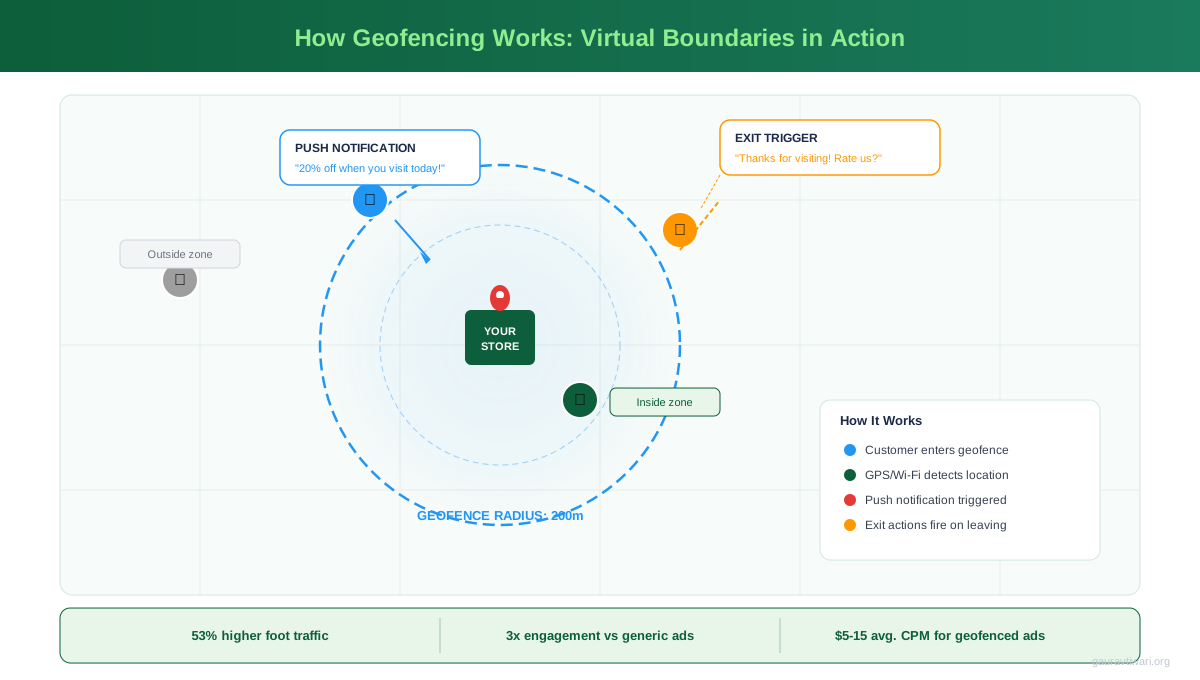
Geofencing creates an invisible perimeter around a physical location. When someone’s phone crosses that boundary, it triggers an action: a push notification, an ad, a text message, or all three. I’ve set up geofences around competitors’ locations, event venues, and shopping centers for clients. The conversion rates consistently beat standard digital ads by 2-3x.
How Geofencing Works Behind the Scenes
Your phone constantly checks its GPS position. When a geofencing-enabled app detects you’ve entered a defined zone, it fires an API call to the app’s server. The server checks whether you match the campaign criteria (time of day, frequency caps, customer segment) and decides whether to send a notification.
The geofence itself is just a set of GPS coordinates forming a polygon or circle. Google’s Geofencing API supports up to 100 geofences per app on Android. Apple’s Core Location framework handles the same on iOS with a limit of 20 monitored regions per app. Most businesses only need 3-5 active geofences.
Setting Up Geofencing with Google and Facebook Ads
You don’t need custom app development to use geofencing. Both Google Ads and Facebook Ads support location-based targeting out of the box.
In Google Ads, go to Campaign Settings, then Location Options. Select “People in or regularly in your targeted locations.” Set a radius targeting of 1-5 miles around your business address. For competitive geofencing, add your competitors’ addresses as separate location targets. Layer this with time-of-day scheduling, so your ads only run during business hours.
Facebook’s approach is similar. In Ads Manager, use the “Drop Pin” feature under Locations to set a 1-mile radius around any address. Facebook’s “People recently in this location” option targets users who were physically present within the last 7 days. This is powerful for retargeting visitors who didn’t convert.
Google Maps API on Your Website
Google Maps Platform is the backbone of location features on most business websites. The JavaScript API lets you embed interactive maps, add custom markers for your locations, display real-time traffic, and calculate driving directions. Over 5 million websites use it, and the free tier covers most small business needs (up to 28,000 map loads per month).
For a single-location business, you need the Maps JavaScript API and the Places API. The Maps API displays your location on an interactive map. The Places API powers the autocomplete search bar so customers can type their address and get directions. Combined cost for a typical local business: $0, because you’ll stay under the $200/month free credit Google provides.
If you’re running a WordPress site, plugins like WP Google Maps or Store Locator Plus handle the API integration without writing code. You plug in your API key, add your business address, and the plugin generates an embedded map with directions. I’ve installed these on restaurant sites, dental offices, and retail stores. Setup takes about 15 minutes. If you’re building a website from scratch, the Google Maps embed is one of the first things to add.
Beyond Basic Maps: What the APIs Can Do
The Distance Matrix API calculates travel time from a customer’s location to yours, in real time with traffic data. The Geocoding API converts addresses to coordinates and vice versa. The Directions API provides turn-by-turn navigation. The Places API lets customers search for your business type (“dentist near me”) and find you on the map.
These APIs work together. A customer lands on your site, the Geolocation API detects their approximate position, the Distance Matrix API shows “12 minutes away,” and the Directions API gives them a route. That combination turns a website visit into a store visit. I’ve seen this reduce the “How do I get there?” support calls by about 60% for multi-location businesses.
The difference between a website visitor and a store visitor is often just showing them how close you actually are. A map with real-time driving time does more than any sales copy.
Location-Based Advertising Platforms
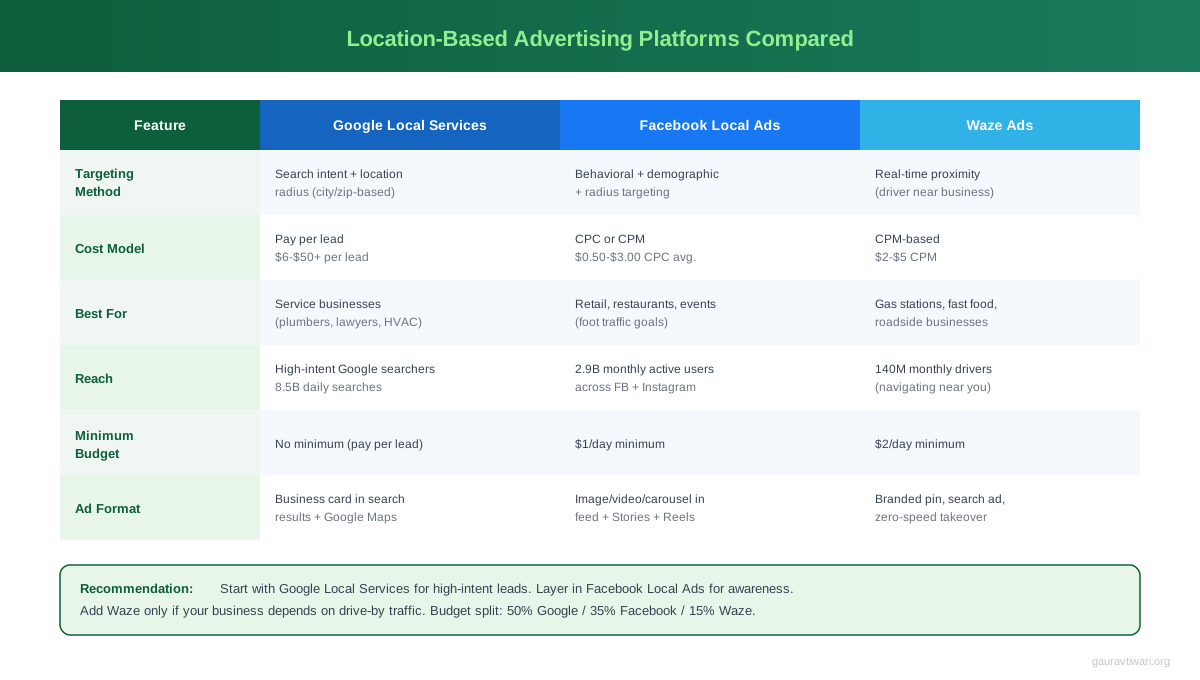
Google Local Services Ads, Facebook Local Awareness Ads, and Waze Ads are the three platforms that matter most for local businesses in 2026. Each targets nearby customers differently, and using all three creates overlapping coverage that’s hard for competitors to match.
Google Local Services Ads
These appear at the very top of Google search results, above regular paid ads. You only pay when someone calls or messages you directly through the ad. Average cost per lead: $6-30 depending on your industry. For plumbers, electricians, lawyers, and home service businesses, this is the highest-ROI ad format available. The “Google Guaranteed” badge builds trust instantly.
Facebook Local Awareness Ads
These target users within a set radius of your business. The “Get Directions” and “Call Now” buttons make conversion frictionless. Facebook’s advantage is the visual format. Restaurants show food photos. Salons show before/after shots. Retail stores show product displays. Cost per reach is typically $1-3 per thousand impressions for a 5-mile radius.
Waze Ads
Waze has 150 million monthly active users navigating roads. Waze Ads put your business pin on the map as drivers approach your area. The “Promoted Search” format shows your business when drivers search for categories like “gas station” or “restaurant.” The “Zero-Speed Takeover” displays a full ad when the driver is stopped at a red light. Pricing starts at $2/day, making it accessible even for micro-businesses.
Push Notifications and Bluetooth Beacons
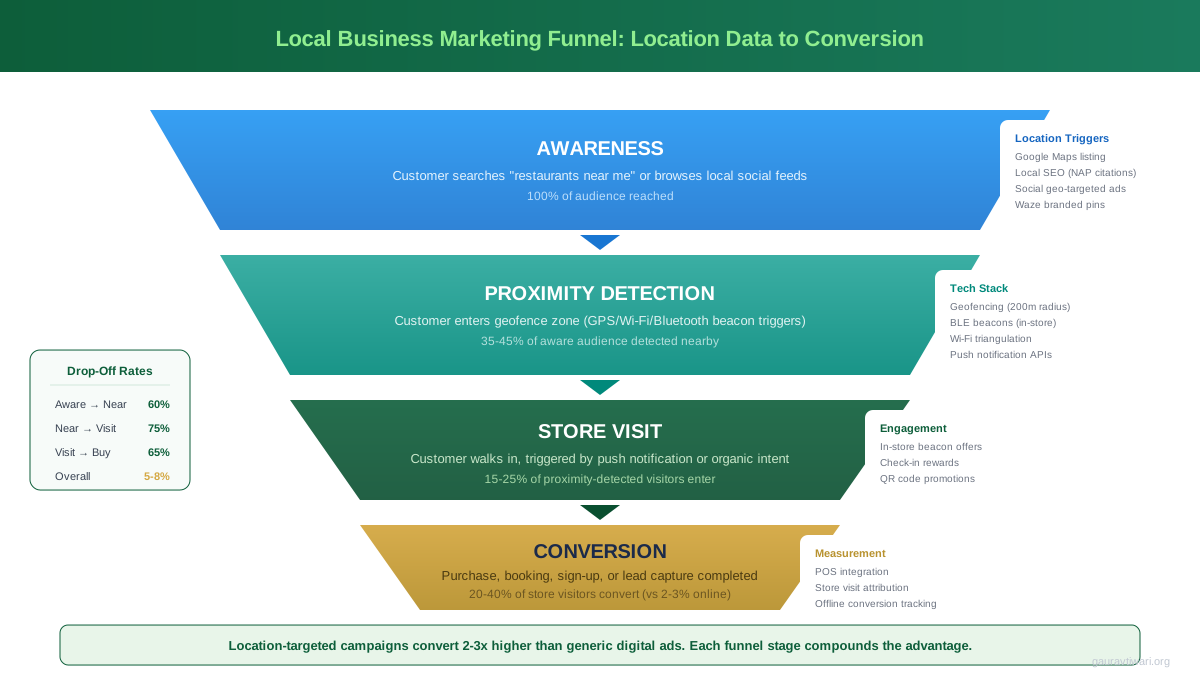
Push notifications triggered by physical proximity convert at 3-5x the rate of standard push notifications. The secret is Bluetooth Low Energy (BLE) beacons, small transmitters that cost $15-30 each and communicate with smartphones within a 30-50 meter range.
Here’s how the flow works. You place beacons at strategic points: your store entrance, a product display, the checkout counter. When a customer’s phone detects the beacon signal, your app sends a context-aware notification. Near the entrance: “Welcome back! Your loyalty reward is ready.” Near a product display: “This item is 20% off today.” Near checkout: “Add a drink for $1 with your meal.”
Retailers like Macy’s, Target, and Walmart use beacon networks with thousands of devices. But you don’t need that scale. A single-location retailer gets meaningful results from 3-5 beacons placed at key decision points. The lead generation potential is significant because you’re reaching people already inside your store who’ve shown intent by showing up.
The setup requires a mobile app (even a basic PWA works), a beacon management platform like Kontakt.io or Estimote, and the Eddystone or iBeacon protocol. Kontakt.io starts at $99/year for the software platform, plus the one-time beacon hardware cost.
Google Business Profile as Location Marketing
Google Business Profile (formerly Google My Business) is the most underrated location marketing tool. It’s free, it directly affects your local search rankings, and it puts your business in Google Maps results, the Knowledge Panel, and Local Pack results. 46% of all Google searches have local intent, and GBP is how Google decides which businesses to show.
I optimize GBP profiles for clients as part of every local SEO engagement. The businesses that post weekly updates, respond to every review within 24 hours, and keep their hours/services current consistently rank higher in the Local Pack (the map + 3 listings at the top of search results).
The GBP API lets you automate this at scale. You can programmatically update business hours, post offers, respond to reviews, and pull performance data. For agencies managing multiple locations, the API eliminates hours of manual work. For single-location owners, the dashboard is sufficient.
GBP Features That Drive Foot Traffic
Google Posts let you share offers, events, and updates directly in search results. Products and Services sections display what you sell with photos and prices. The Q&A section is prime real estate for addressing common objections before someone visits. The Messaging feature lets customers text you directly from the listing. And the “Popular Times” data shows when you’re busiest, which some businesses use as social proof (“See how busy we are!”).
The booking integration is particularly valuable. Restaurants can connect with Reserve with Google. Service businesses can link to scheduling tools. Retail stores can enable “See What’s In Store” to show local inventory. Every one of these features reduces friction between searching and visiting. If your small business is struggling with visibility, GBP optimization should be your first priority before spending money on paid ads.
Google Business Profile is free location marketing that outperforms most paid channels for local businesses. I’ve seen properly optimized profiles generate 200+ calls per month with zero ad spend.
Location Data Privacy: GDPR, CCPA, and Apple ATT
Location data is classified as personal data under GDPR (Europe), CCPA (California), and similar regulations worldwide. If you collect, store, or process location information from customers, you need explicit consent. Apple’s App Tracking Transparency (ATT) framework, launched in iOS 14.5, made this even stricter for mobile apps.
Here’s what compliance looks like in practice. Your app must request location permission with a clear explanation of why (“We use your location to send you nearby offers”). You must offer a “While Using” option, not just “Always Allow.” You need a privacy policy that specifically describes location data collection, storage duration, and third-party sharing. Under GDPR, you must provide a way for users to request deletion of their location history.
Apple ATT requires a separate prompt before any cross-app tracking. After ATT launched, opt-in rates for location tracking dropped to about 25% on iOS. This means your geofencing campaigns reach roughly one quarter of iPhone users. Android is less restrictive currently, but Google is moving toward similar controls with its Privacy Sandbox initiative.
The practical impact: build your location marketing strategy assuming only 25-40% of your audience will share location data. Focus on first-party data (Google Business Profile, email lists with zip codes, loyalty program check-ins) rather than relying entirely on GPS tracking through third-party apps.
Location APIs for WordPress Sites
WordPress powers 43% of websites, and adding location features to a WordPress site is straightforward with the right plugins and APIs. Three categories of location functionality matter for local businesses: maps, store locators, and IP geolocation.
Maps and Store Locators
WP Google Maps (free, 400,000+ installs) is the go-to for embedding Google Maps. You get custom markers, info windows, directions, and polygon overlays. The Pro version ($39.99/year) adds store locator functionality with search-by-radius. Store Locator Plus is the alternative for multi-location businesses with 50+ locations, it handles bulk import from CSV and supports custom data fields per location.
For businesses using a page builder like Elementor or Bricks, both include native Google Maps widgets. You add your API key in settings and drag a map widget onto any page. Bricks has a particularly clean implementation that doesn’t load the Maps JavaScript until the user scrolls to the map section, which keeps your page speed score high.
IP Geolocation for Content Personalization
IP geolocation detects a visitor’s approximate location (city level) through their IP address, without requiring GPS permission. This is useful for personalizing content without the friction of a location permission popup.
GeoTargeting WP plugin ($89/year) uses IP geolocation to show different content based on visitor location. A national franchise can display the nearest location’s phone number automatically. An e-commerce site can show local pricing and shipping estimates. A service business can display location-specific testimonials.
The major IP geolocation APIs are IPinfo (50,000 free requests/month), MaxMind GeoIP2 ($26/month for the web service), and BigDataCloud (10,000 free requests/day). All return city, region, country, latitude/longitude, and timezone. IPinfo also returns the visitor’s ISP and company name, which is useful for B2B lead identification. For most WordPress sites, IPinfo’s free tier is more than enough.
Use Cases by Business Type
Location marketing isn’t one-size-fits-all. The right approach depends on your business model, customer behavior, and average transaction value. Here’s what works for the five most common local business types.
Restaurants and Cafes
Geofence a 1-mile radius during lunch and dinner rushes. Send push notifications with daily specials 30 minutes before peak hours. Use Google Business Profile to post menu updates and respond to reviews same-day. Install a beacon at the entrance for loyalty program check-ins. Expected lift: 15-25% increase in weekday traffic based on what I’ve seen with restaurant clients.
Retail and Boutique Stores
Competitor geofencing is the power move here. Set geofences around competing stores and show ads when shoppers are nearby. Use in-store beacons to trigger product-specific promotions. Run Facebook Local Awareness Ads within 3 miles showing new arrivals. Add Google Maps with real-time inventory (“In Stock at Your Nearest Location”).
Service Businesses (Plumbers, Electricians, Cleaners)
Google Local Services Ads are non-negotiable for this category. The “Google Guaranteed” badge and pay-per-lead model make it the highest-ROI channel. Supplement with geo-targeted Google Search Ads for “[service] near me” queries. Use IP geolocation on your website to auto-detect the visitor’s area and show relevant testimonials from their neighborhood.
Gyms and Fitness Studios
Geofence your location and send “miss you” notifications to members who haven’t visited in 7+ days. Use Waze Ads to target commuters passing your location during morning and evening rush hours. Run Facebook Ads within 5 miles targeting fitness interests with a free trial offer. Beacons at equipment stations can trigger workout tips and class schedules.
Professional Services (Dentists, Lawyers, Accountants)
Google Local Services Ads and GBP optimization should absorb 70% of your location marketing budget. Add Waze “Promoted Search” for visibility when people search service categories. Use IP geolocation to personalize landing pages by city (“Trusted Dentist in [City Name] Since 2005”). Geofencing matters less here because these are appointment-based businesses with longer decision cycles.
Do you use location-based marketing for your business?
Measuring Location Marketing ROI
The biggest objection to location marketing is measurement. How do you know if that geofencing campaign actually drove people to your store? You can’t just look at click-through rates. You need to track physical outcomes.
Foot Traffic Attribution
Google Ads reports “Store Visits” as a conversion metric for businesses that meet the data threshold (typically chains with 10+ locations). For smaller businesses, use coupon codes tied to specific campaigns. “Show this notification for 15% off” creates a measurable link between the digital touchpoint and the in-store visit.
WiFi analytics platforms like Purple WiFi or Aislelabs track device presence in your store by detecting WiFi probe requests. This doesn’t require the customer to connect to your network. You get foot traffic counts, dwell time, and repeat visit frequency. Cost starts around $100/month per location.
Key Metrics to Track
Cost per store visit is your north star metric. Calculate it by dividing total location marketing spend by attributed store visits. Benchmark: $5-15 per visit for retail, $10-30 for service businesses. Other metrics that matter: geofence enter rate (what percentage of people in the area see your ad), notification open rate (target: 5-10% for location-triggered push), coupon redemption rate (target: 8-15% for proximity offers), and repeat visit rate (target: 30%+ within 30 days).
Google Business Profile Insights provides free data on how many people requested directions, called, or visited your website from your listing. This is the simplest ROI indicator for local businesses. If direction requests increase after you start posting weekly updates, the strategy is working.
Tools That Make Location Marketing Easier
You don’t need to build custom apps or write API integrations from scratch. These three tools cover the core workflow: managing your online presence across platforms, tracking your local search rankings, and coordinating your team’s marketing tasks.
- Manage Google Business Profile from the same dashboard as email
- Google Maps API included in the ecosystem
- Shared drives for marketing assets and campaign docs
- Starts at $7/user/month with 30GB storage
- Built-in video conferencing for team coordination

- Local SEO toolkit with GBP audit and rank tracking
- Map rank tracker shows your position in Local Pack results
- Listing management across 70+ directories
- Review monitoring and response management
- Competitor local ranking analysis
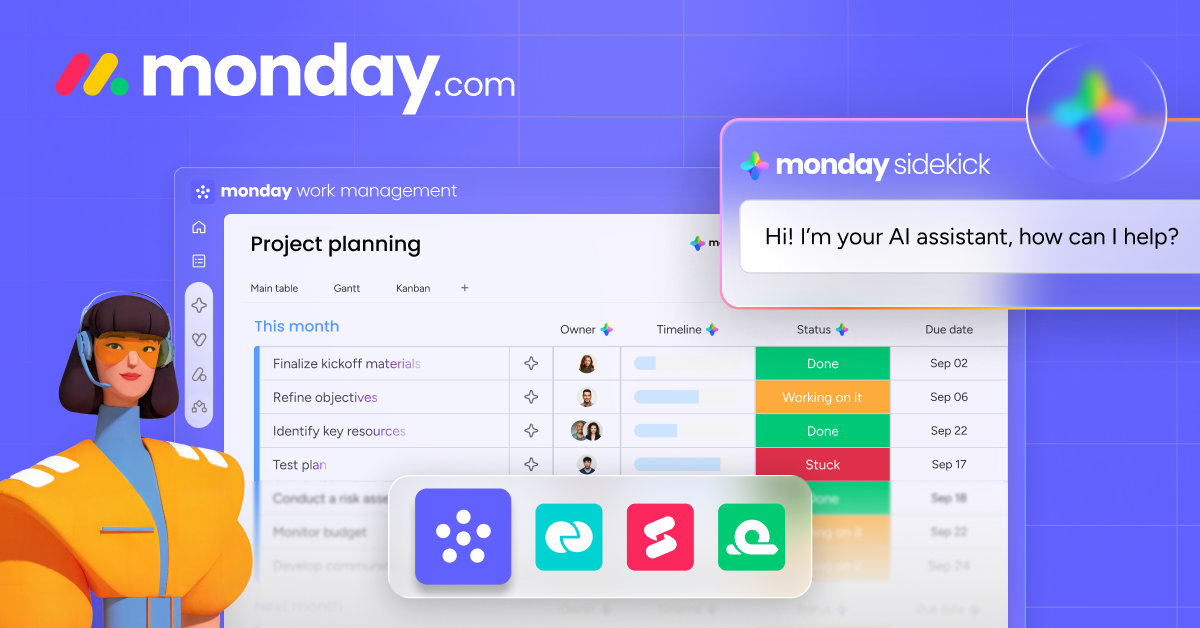
- Marketing campaign boards with location-based task tracking
- Automations for recurring local marketing tasks
- Dashboard views for multi-location campaign performance
- Integration with Google Ads, Facebook Ads, and 200+ tools
- Free plan for up to 2 team members
Frequently Asked Questions
What is location-based marketing?
Location-based marketing delivers targeted ads, notifications, or content to customers based on their physical position. It uses GPS, Wi-Fi, Bluetooth beacons, or IP addresses to detect proximity to a business location. The goal is to reach people who are physically near your store when they’re most likely to visit.
How much does geofencing cost for a small business?
Geofencing through Google Ads and Facebook Ads costs the same as regular ads on those platforms, with no extra fee for location targeting. Dedicated geofencing platforms like Groundtruth or Simpli.fi charge $5-15 CPM (cost per thousand impressions). A typical small business spends $500-2,000/month on geofencing campaigns. Bluetooth beacons cost $15-30 per unit as a one-time purchase, plus $99-300/year for the management platform.
Do I need a mobile app for location-based marketing?
Not necessarily. Google Ads geofencing, Facebook Local Ads, Waze Ads, and Google Business Profile all work without a custom app. Push notifications via beacons do require an app (or a Progressive Web App). For most small businesses, the ad platforms and GBP provide enough location marketing capability without app development costs.
What is the Google Maps API and how much does it cost?
The Google Maps API (now called Google Maps Platform) is a set of programming interfaces that let you embed interactive maps, get directions, calculate distances, and search for places on your website or app. Google provides $200/month in free credits, which covers approximately 28,000 map loads. Most small business websites stay within the free tier. Beyond that, pricing is $7 per 1,000 map loads.
Is location tracking legal?
Yes, but it requires explicit user consent. Under GDPR (Europe), CCPA (California), and similar laws, you must clearly explain what location data you collect and why. Apple’s App Tracking Transparency requires a separate opt-in prompt on iOS. You must provide users the ability to opt out and request deletion of their data. IP geolocation (city-level detection without GPS) is generally less restricted but should still be disclosed in your privacy policy.
What are the best IP geolocation APIs?
The top IP geolocation APIs are IPinfo (50,000 free requests/month, city-level accuracy), MaxMind GeoIP2 ($26/month, widely used in e-commerce), BigDataCloud (10,000 free requests/day), and ipstack (10,000 free requests/month). For WordPress sites, IPinfo’s free tier handles most use cases. For high-traffic sites processing 100,000+ lookups monthly, MaxMind’s downloadable database is the most cost-effective option.
How do I measure foot traffic from location-based ads?
Use a combination of methods. Unique coupon codes tied to specific campaigns (“Show this notification for 15% off”) provide direct attribution. WiFi analytics platforms like Purple WiFi detect device presence without requiring network connection ($100+/month). Google Ads reports Store Visit conversions for qualifying businesses. Google Business Profile Insights shows direction requests and calls for free. Compare all metrics to your pre-campaign baseline.
Can I target competitors’ customers with geofencing?
Yes, competitor geofencing (also called conquest marketing) is a legitimate and common strategy. You create a geofence around a competitor’s location and show ads to people who visit there. Google Ads and Facebook Ads both support this through radius targeting around any address. The key is to lead with your unique value proposition, not just undercut on price. This works especially well for retail, restaurants, and fitness businesses where customers have multiple options nearby.
Location-based marketing isn’t futuristic technology reserved for enterprise brands. Every tool I’ve covered, geofencing through Google and Facebook Ads, Google Maps on your website, beacon-triggered notifications, Google Business Profile, is available to businesses of any size right now. The businesses that start using location data to reach nearby customers will have a significant edge over those still running untargeted campaigns.
Start with the free options. Optimize your Google Business Profile this week. Set up radius targeting on your next Facebook or Google Ads campaign. Add an interactive map to your website. Those three steps alone will put you ahead of most local competitors. Then layer in beacons, Waze Ads, and IP geolocation as you grow.
Disclaimer: This site is reader-supported. If you buy through some links, I may earn a small commission at no extra cost to you. I only recommend tools I trust and would use myself. Your support helps keep gauravtiwari.org free and focused on real-world advice. Thanks. - Gaurav Tiwari