
Creating Your Perfect Home Office (Complete Guide)
I’ve been working from home since 2009. Not the pandemic kind of “working from home” where you set up a laptop on the kitchen table and called it a day. I mean actually building a workspace from scratch, iterating on it year after year, and learning what makes you productive versus what just looks good on Instagram.
After 16+ years of freelancing and running client projects from my home office, I can tell you this: your workspace isn’t just furniture and gadgets. It’s the system that either fuels your best work or silently drains your output. I’ve worked from cramped corners, dedicated rooms, standing desks, and everything in between. The difference between a thoughtful setup and a random one is measurable in hours of productive work per week.
This guide covers everything you need to create a home office that actually works in 2026. I’m talking about the desk, the chair, the lighting, the storage, the tech, and the habits that tie it all together. If you’re a freelancer building your first setup or a remote worker upgrading what you have, you’ll find practical recommendations here, not generic advice.
Designing Your Workspace Layout
Before you buy anything, you need to figure out where your office lives and how it’s arranged. I’ve seen people spend $2,000 on gear only to cram it into a dark corner with zero natural light. That’s a waste. The space itself matters more than what you put in it.
Picking the Right Spot
Choose a location away from high-traffic areas in your home. You don’t want to be next to the kitchen or the living room TV. If you don’t have a spare room, a quiet corner in your bedroom works, but use a bookshelf or screen to create a visual boundary. Your brain needs that physical separation to switch into work mode.
- Prioritize spots with natural light. A window to your side (not behind your monitor) reduces eye strain and keeps your energy up
- Avoid rooms that get too hot or cold. Temperature swings kill focus faster than noise does
- Make sure there’s enough space for your desk, chair, and room to move. Cramped setups lead to bad posture
- If you take video calls, pick a spot with a clean background or enough wall space for a simple backdrop
Getting Your Lighting Right
Lighting is the most underrated part of any home office. I spent years working under harsh overhead fluorescents before switching to a combination of natural light and a quality desk lamp. The difference in how my eyes felt at the end of the day was immediate.
- Position your desk so natural light comes from the side, not directly behind or in front of your screen
- Use a dedicated desk lamp with adjustable brightness. I’ve used the BenQ e-Reading LED for years and it eliminates screen glare completely
- Switch to warm LED bulbs (2700K-3000K) for ambient room lighting. Philips Hue bulbs let you adjust color temperature throughout the day
- Avoid relying solely on overhead lights. They create shadows on your desk and cause eye fatigue over long sessions
Choosing Colors That Help You Focus
This sounds minor, but wall color affects your mood more than you’d expect. I painted my office a soft blue-gray after years of working in a white room, and it genuinely changed how calm I felt during long coding sessions. Cool tones like blues and greens promote focus. Warm tones like orange and red spark creativity but can feel overwhelming in a space where you spend 8+ hours.
- Stick with neutral or cool shades for walls. Save bright accents for artwork or accessories
- Test paint samples in your actual room before committing. Colors look completely different under natural versus artificial light
- Dark colors make small rooms feel smaller. If your office is compact, go lighter
Choosing the Right Desk
Your desk is where all the work happens. I’ve used everything from a $50 IKEA tabletop to a $600 motorized standing desk, and the upgrade path taught me what actually matters: surface area, height adjustability, and stability. A wobbly desk with a great monitor on it is worse than a solid desk with a mediocre one.
If you’re a developer, designer, or anyone who uses multiple screens, you need at least 48 inches of width. Anything smaller and you’re constantly rearranging things. Standing desks have become my go-to recommendation because alternating between sitting and standing throughout the day genuinely reduces the afternoon energy crash. Here’s the one I recommend for most budgets.
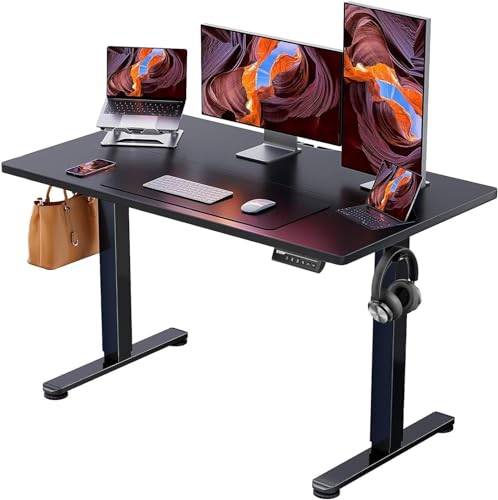
ErGear Height Adjustable Electric Standing Desk, 48 x 24 Inches
- Solid steel frame with aerospace-grade lifting column connectors for outstanding stability
- Electric height adjustment from 28.35 to 46.46 inches with 3 memory presets
- 48 x 24 inch surface fits dual monitors and accessories comfortably
The ErGear standing desk is the best value option I’ve found under $150. At $119.99 (down from $189.99), you’re getting a 48 x 24 inch electric desk with 3 memory presets and a steel frame that doesn’t wobble when you type. The height range goes from 28.35 to 46.46 inches, which covers most people whether sitting or standing. I like the memory presets because you can save your exact sitting height, standing height, and a middle position for when you want variety.
For the price, the build quality punches above its weight. The motor is quiet enough to use during calls, and the desktop surface is scratch-resistant. If you’re building a complete home office setup on a budget, start here. A good desk is the foundation everything else builds on.
Investing in an Ergonomic Chair
I’ll be blunt: your chair is the single most important purchase in your home office. You’ll sit in it 6-10 hours a day, 5-6 days a week. A bad chair doesn’t just make you uncomfortable. It causes back pain, neck strain, and fatigue that compounds over months and years. I learned this the hard way after spending my first 3 years freelancing in a $40 dining chair. My productivity jumped noticeably when I finally invested in proper seating.
The market ranges from $150 budget options to $1,500+ premium chairs. Here are three options at different price points that I’d recommend based on what I’ve tested and researched.
Budget Pick: GABRYLLY Ergonomic Chair
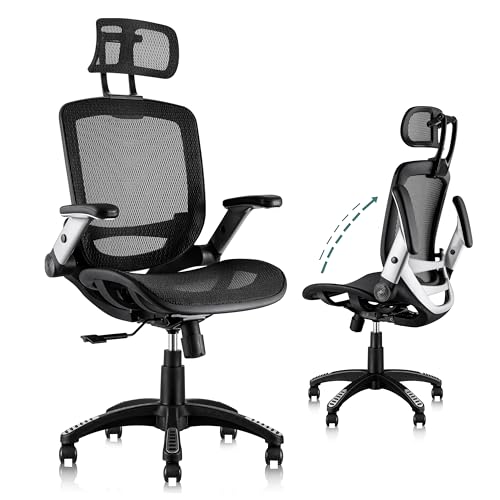
GABRYLLY Ergonomic Office Chair with Headrest, Flip-Up Arms, and Wide Cushion
- 4-point ergonomic support for head, back, hips, and hands with adjustable lumbar
- Breathable mesh seat wider than most office chairs to accommodate different body types
- 90-120 degree tilt lock with flip-up arms for flexible positioning
At $188 (marked down from $269.50), the GABRYLLY is the best ergonomic chair you can get under $200. It hits all the fundamentals: adjustable headrest, lumbar support, flip-up arms, and a wide mesh seat that breathes well during long sessions. The 90-120 degree tilt lock lets you recline when you need a break without the chair feeling unstable.
What sets the GABRYLLY apart from other budget chairs is the seat width. It’s noticeably larger than competitors in this price range, which matters if you’re a bigger person or just prefer not feeling squeezed. The mesh material stays cool even in warm rooms. For freelancers and remote workers who need solid ergonomics without the $500+ investment, this is the one I’d point to first.
Mid-Range Pick: Herman Miller Aeron (Remanufactured)
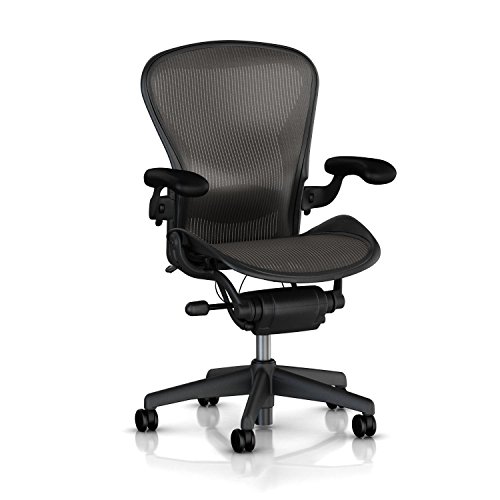
Herman Miller Aeron Office Chair (Remanufactured) with Full Adjustability and Lumbar Support
- Fully remanufactured with tension control, rear tilt lock, forward tilt, and lumbar support
- Stainless steel frame, Size B, fully adjustable arms
The Herman Miller Aeron is the gold standard for office chairs, and at $565 for a remanufactured unit, it’s significantly cheaper than buying new (which runs $1,400+). Remanufactured doesn’t mean “used and sold as-is.” These are fully rebuilt with new parts where needed, and this particular listing comes with a solid warranty. The Aeron’s mesh design, PostureFit lumbar, and forward tilt are features you feel immediately after switching from a budget chair.
I recommend the remanufactured route because you’re getting 90% of the new experience at 40% of the price. Make sure to verify the seller, since some Amazon listings for refurbished Aerons vary in quality. If you can stretch your budget to the $500-$600 range, this is the chair that lasts a decade.
Premium Pick: Steelcase Leap V2
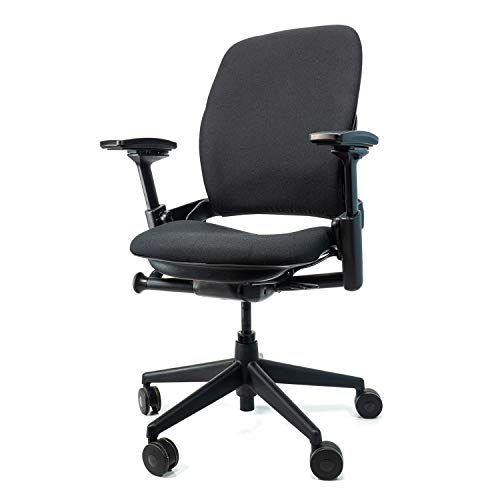
Steelcase Leap V2 Office Chair (Remanufactured) with 12-Year Warranty
- Fully remanufactured by Crandall Office Furniture with 12-year full-chair warranty
- Fully adjustable ergonomic design for home and workplace use
The Steelcase Leap V2 is the chair I recommend for people who already know they want the best and plan to use it for years. At $649 (remanufactured with a 12-year warranty), it’s the most comfortable office chair I’ve sat in for long sessions. Unlike the Aeron which uses full mesh, the Leap V2 has a padded fabric seat that many people find more comfortable for 8+ hour days.
The 12-year warranty from Crandall Office Furniture covers the entire chair, not just replaced parts. That’s a significant differentiator. The Leap V2’s back flexes independently of the seat as you recline, which mimics natural spinal movement. If you’re choosing between this and a new Herman Miller Aeron at $1,400, I’d take the remanufactured Leap V2 every time. You save $750 and arguably get a more comfortable chair.
Smart Storage That Actually Helps
Clutter is the silent productivity killer. I hate when I can’t find a cable, a notepad, or a document because everything’s piled on the desk. Good storage isn’t about having more space. It’s about having the right containers in the right places so everything you need is accessible without thinking about it.
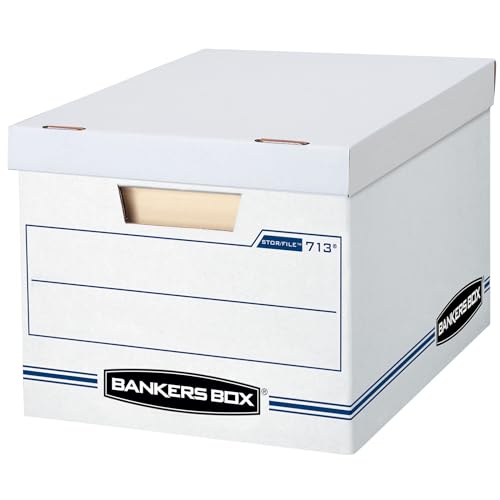
Bankers Box 12 Pack Standard Duty File Storage Boxes with Removable Lid
- Standard-duty construction for moderate stacking or shelving use
- Removable lid fits letter and legal size documents, made in the USA
For document storage, the Bankers Box 12-pack at $34.99 is a straightforward, no-frills solution. You get 12 boxes with removable lids that fit both letter and legal size documents. They stack neatly on shelves, and the construction is sturdy enough for moderate weight. If you deal with physical paperwork (contracts, invoices, tax documents), these keep things organized and out of sight. At under $3 per box, there’s no reason to let paper pile up on your desk.
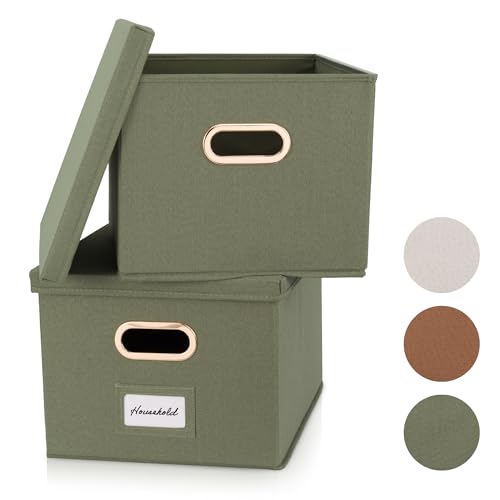
ZICOTO Decorative File Organizer Box Set of 2 with Collapsible Linen Design
- Collapsible linen filing cabinets with reinforced bottom and handles for easy portability
- Supports hanging file folders, easy to clean, and looks good on a shelf
If you want something that looks nicer than cardboard boxes sitting on a shelf, the ZICOTO organizer set is worth the $29.99. You get 2 collapsible linen filing boxes with handles that support hanging file folders. The reinforced bottom keeps them stable when loaded, and the linen finish blends with most office decor. I prefer these for active files I access weekly (client contracts, current project documents) and use the Bankers Boxes for archive storage.
- Keep your desk surface clear. Only items you use daily should be within arm’s reach
- Use a small desk organizer for pens, sticky notes, and cables. Spend 2 minutes at the end of each day resetting your desk
- Go digital where possible. Scan documents and store them in cloud storage. Less paper means less clutter
- Schedule a monthly deep clean to purge items you haven’t touched in 30 days
Essential Tech for Your Home Office
Your technology stack can either streamline your day or create constant friction. After managing 800+ client projects from home, I’ve learned exactly which tech investments pay for themselves and which ones are nice-to-haves. Let me share what actually matters.
Reliable Internet
This isn’t negotiable. If you’re on video calls, uploading large files, or running web applications all day, you need a stable connection with at least 100 Mbps download speeds. I’ve had client calls drop mid-presentation because of flaky Wi-Fi, and it’s unprofessional. Invest in fiber if it’s available in your area, and keep your router within 10 feet of your desk. A mesh Wi-Fi system like Google Nest WiFi solves coverage issues if your office is far from the router.
Always have a backup. I keep a mobile hotspot plan active for the 2-3 times a year my primary internet goes down. That $20/month plan has saved me from missing deadlines more than once.
Monitor Setup
A single laptop screen is limiting if you’re doing any kind of serious work. An external monitor is one of the highest-ROI purchases you can make. I use a 27-inch 4K monitor as my primary display, with my laptop screen as a secondary for Slack and email. The extra screen real estate lets you reference documents, keep communication apps visible, and code or design without constantly switching windows.
If you’re on a budget, even a $200 1080p monitor from LG or ASUS will transform your workflow. Position it at eye level (use a monitor arm or stand) so you’re not looking down all day. That angle adjustment alone reduces neck strain significantly.
Keyboard, Mouse, and Audio
Don’t underestimate ergonomic peripherals. I switched to a Logitech MX Keys and MX Master mouse about 4 years ago, and I can’t go back to a standard keyboard and mouse. The ergonomic shape of the MX Master alone reduced the wrist pain I used to get after long coding sessions. For audio, a decent pair of headphones with noise cancellation makes a massive difference for focus. Quality headphones also improve how you sound on calls, which matters more than people realize.
Cable Management
A tangled mess of cables under your desk is distracting and looks terrible on video calls. Use cable clips or velcro ties to bundle wires together, label them with simple tags, and route everything through a single power strip mounted under your desk. It takes 30 minutes to set up and saves you from the visual chaos that subconsciously drains your focus. I use adhesive cable clips along the back edge of my desk, and everything routes down a single channel to the power strip below.
Personalizing Your Workspace
A sterile, purely functional office gets depressing after a few months. I learned this working from a blank white room for my first two years of freelancing. Your workspace needs personal touches that make you want to sit down and work. But there’s a line between “personalized” and “cluttered,” and you need to stay on the right side of it.
Plants Make a Real Difference
This isn’t just aesthetic advice. Studies consistently show that indoor plants reduce stress, improve air quality, and boost mood. I keep a snake plant and a pothos in my office. Both are nearly impossible to kill, which matters when you’re busy with client work and forget to water things for a week. Place one near your desk and one on a windowsill. If real plants aren’t practical, high-quality artificial ones from IKEA look convincing enough to get the same psychological benefit.
Decor That Inspires Without Distracting
A few framed prints, a small shelf with books you reference, or a whiteboard for brainstorming are all solid additions. I keep a simple whiteboard next to my desk for jotting down daily priorities and sketching ideas during calls. Family photos or travel pictures add warmth without taking up desk space if you mount them on the wall. Rotate your decor every few months to keep the space feeling fresh.
Comfort Touches
Small investments in comfort compound over time. A soft rug under your chair, a lumbar pillow if your chair needs extra support, and a room at the right temperature all affect your endurance throughout the day. If your office gets cold in winter, a small space heater under the desk keeps your feet warm without heating the entire room. In summer, a desk fan or portable AC unit prevents the afternoon heat from tanking your focus.
Staying Organized and Productive
Your physical workspace is only half the equation. The habits you build around it determine whether you actually use the space effectively. I’ve spent years refining my daily workflow, and these are the practices that stuck.
Daily Declutter Habit
Spend 3-5 minutes at the end of each workday clearing your desk completely. Put supplies back in drawers, file loose papers, close unnecessary browser tabs. Starting the next day with a clean workspace is like getting a mental reset. I’ve been doing this for over a decade, and skipping it even for two days creates enough mess to slow me down the following morning.
Time Management That Works
I use a combination of Todoist for task management and the Pomodoro Technique for focused work blocks. The key is structuring your day around your energy levels, not just your calendar. I do my hardest, most creative work in the morning (9-12), handle calls and meetings in the early afternoon (1-3), and process admin tasks and emails late afternoon (3-5). Find your own rhythm and protect your peak hours ruthlessly.
Work-Life Boundaries
Working from home blurs the line between work and personal time. You need to set that boundary intentionally. Define your working hours and communicate them to anyone you live with. When work hours end, close your laptop and leave the office. Don’t check email from the couch. Don’t take “one quick call” at dinner. Your workspace should be a place you go to work and leave when you’re done. This boundary is what prevents burnout over months and years of remote work.
Common Mistakes to Avoid
After helping hundreds of clients build their digital businesses from home offices, I see the same mistakes repeated. Here are the ones that cost you the most.
Cheaping Out on Your Chair
A $50 chair from a big box store will cost you far more in chiropractor visits, lost productivity from back pain, and general discomfort. If you can only invest in one thing, make it the chair. You can work on a $100 desk, but you can’t work well in a $50 chair. Budget at least $180-$200 for an ergonomic chair, or $500-$650 for one that lasts a decade.
Ignoring Lighting
Working under a single overhead light or in a dim room causes eye strain, headaches, and fatigue that you might attribute to “being tired” rather than bad lighting. A $40 desk lamp with adjustable brightness solves this instantly. Natural light from a nearby window is free and even better. Don’t skip this.
Not Having a Dedicated Space
Working from the couch, the bed, or the kitchen table seems fine for a week. After a month, you’ll notice you can’t focus and you can’t relax because every room in your house has become “the office.” Even a small corner with a proper desk and chair is better than floating between rooms. Your brain needs a consistent location to associate with productive work.
Making It All Come Together
You don’t need to build your perfect home office in a single weekend. Start with the chair and desk. Get your lighting sorted. Add tech as your budget allows. The personalization and habits develop naturally over the first few weeks. What matters is that you’re intentional about each piece rather than throwing money at whatever looks good online.
I’ve rebuilt my home office setup 4 times over the past 16 years, and each iteration taught me something. The setup I have now costs roughly $1,200 total, and it supports everything from 12-hour coding marathons to quick video calls with clients across timezones. Your perfect number might be $500 or $2,000, depending on your priorities. Either way, the investment pays for itself in productivity, comfort, and the sheer satisfaction of working in a space that was built for you.
Start with one section of this guide today. Even upgrading just your chair or desk will make a noticeable difference by the end of the week. Your home office is where your career happens. Make it count.
Frequently Asked Questions
How much should I spend on a home office setup in 2026?
A solid home office setup costs between $500 and $1,500 depending on your needs. The essentials are a good chair ($188-$649), a proper desk ($120-$400), and a monitor ($200-$500). You can build a productive workspace for under $500 if you prioritize the chair and desk, then add tech over time. Don’t try to buy everything at once if budget is tight. Start with ergonomics and upgrade from there.
Is a standing desk worth it for working from home?
Yes, but not because standing all day is better than sitting. The real benefit is alternating between sitting and standing throughout the day. This reduces the afternoon energy crash, lowers back strain, and keeps you more alert during long work sessions. Electric standing desks like the ErGear ($119.99) make switching positions effortless with memory presets. If you sit for 8+ hours daily, a standing desk is one of the best investments you can make.
What’s the best ergonomic chair under $200?
The GABRYLLY Ergonomic Office Chair at $188 is the best option under $200. It has adjustable lumbar support, a headrest, flip-up arms, and a wide mesh seat that accommodates different body types. The 90-120 degree tilt lock adds flexibility for breaks. For the price, it covers all the ergonomic basics that budget chairs typically miss. It won’t last as long as a Herman Miller or Steelcase, but for 3-4 years of solid use, it’s excellent value.
Do I need a separate room for a home office?
A separate room is ideal but not required. A dedicated corner in your bedroom, living room, or even a large closet can work if you create a clear visual boundary. Use a bookshelf, room divider, or even a different rug to define the workspace. The key is consistency. Your brain needs to associate that specific spot with focused work. What doesn’t work is floating between the couch, bed, and kitchen table throughout the day.
How do I reduce eye strain when working from home all day?
Three things make the biggest difference: proper lighting, monitor positioning, and the 20-20-20 rule. Use a desk lamp with adjustable brightness alongside natural light from a window. Position your monitor at arm’s length with the top of the screen at or slightly below eye level. Every 20 minutes, look at something 20 feet away for 20 seconds. Also consider a monitor with a built-in blue light filter or use your operating system’s night mode after 6 PM.
Should I buy a remanufactured Herman Miller or Steelcase chair?
Remanufactured chairs from reputable sellers are an excellent value. You get 90% of the new chair experience at 40-50% of the price. The Herman Miller Aeron remanufactured runs around $565 (vs $1,400+ new), and the Steelcase Leap V2 remanufactured is about $649 (vs $1,200+ new). Both come with multi-year warranties when bought from verified sellers. Just make sure you’re buying from the listed seller and not a third-party reseller on the same listing.
What’s the one thing that improves a home office the most?
The chair. Without question. You can work on a cheap desk, use your laptop screen, and skip the fancy peripherals. But an uncomfortable chair will wreck your back, drain your energy, and cut your productive hours short every single day. If you can only upgrade one thing, replace your chair with a proper ergonomic one. Everything else can wait.
How do I stay productive working from home long-term?
Set fixed working hours and stick to them. Use a task manager like Todoist to plan your day each morning. Work in focused blocks (the Pomodoro Technique works well for this). Keep your desk clean at the end of each day. Most importantly, maintain a physical boundary between work and rest. When you leave your office for the day, don’t go back. Long-term remote work sustainability comes from discipline and boundaries, not motivation.
Disclaimer: This site is reader-supported. If you buy through some links, I may earn a small commission at no extra cost to you. I only recommend tools I trust and would use myself. Your support helps keep gauravtiwari.org free and focused on real-world advice. Thanks. - Gaurav Tiwari