
How to Create Effective Ads for Paid Advertising Campaigns?
Paid advertising used to be straightforward. You’d pick some keywords, write a headline, set a budget, and hope for the best. That doesn’t work anymore. Between AI-powered campaign types like Google’s Performance Max, Meta’s Advantage+ shopping, and the sheer volume of competition on every platform, running profitable ads in 2026 requires a fundamentally different approach than it did even two years ago.
I’ve managed ad campaigns across Google, Meta, LinkedIn, and TikTok for client projects. The difference between campaigns that burn money and campaigns that actually convert comes down to a few things: clear goals, proper tracking, smart creative, and knowing which platform to use for what. I’ll walk you through all of it.
What Is Paid Advertising and Why Does It Still Work?
Paid advertising is any marketing where you pay to show your message to a specific audience. This includes search ads (Google, Microsoft Bing), social media ads (Meta, LinkedIn, TikTok), display ads, video ads, and newer formats like connected TV advertising. The core model is simple: you bid to reach people, and you pay when they click, view, or take an action.
Here’s why paid ads still matter despite rising costs: organic reach on social media is down to about 5.2% on Facebook and even lower on Instagram. SEO takes months to show results. Paid advertising gets you in front of your target audience today, not six months from now. When done right, the math works. A well-optimized Google Ads campaign can return $2 to $8 for every $1 spent, depending on your industry.
The challenge is that “done right” has gotten more complex. You’re not just competing with other advertisers anymore. You’re also working with (and sometimes against) AI algorithms that decide who sees your ads. Understanding how these systems work gives you a real edge.
Types of Paid Advertising Campaigns in 2026
Before you start creating ads, you need to understand the different campaign types available. Each serves a different purpose, and picking the wrong one is the fastest way to waste your budget.
Search Ads (Google Ads and Microsoft Ads)
Search ads appear when someone types a query into Google or Bing. This is intent-based advertising at its purest. Someone searching “best CRM for small business” is actively looking for a solution. That’s why search ads typically have the highest conversion rates, often between 3% and 7% depending on your industry.
Google dominates with about 90% of search market share, but don’t ignore Microsoft Ads. The CPC on Bing is typically 30% to 50% lower than Google, and the audience skews older and wealthier. For B2B campaigns, that’s a goldmine most advertisers overlook.
Social Media Ads (Meta, LinkedIn, TikTok)
Social ads interrupt users while they’re scrolling, so the creative has to work harder. Meta (Facebook and Instagram) is still the largest social ad platform by revenue, but TikTok is growing fast, especially for reaching audiences under 35. LinkedIn is expensive (expect $5 to $12 per click) but unbeatable for B2B targeting because you can filter by job title, company size, industry, and seniority.
Performance Max and AI-Driven Campaigns
Google’s Performance Max (PMax) campaigns use machine learning to automatically place your ads across Search, Display, YouTube, Gmail, Discover, and Maps. You provide the creative assets and audience signals, and Google’s AI handles everything else. PMax campaigns have become Google’s default recommendation for most advertisers, and for good reason. They often outperform traditional campaign types by 15% to 20% on conversion volume.
Meta’s equivalent is Advantage+ Shopping Campaigns, which use AI to find the best audience for your product ads. Both systems require you to trust the algorithm, which means feeding them good data through proper conversion tracking.
Display and Video Ads
Display ads (banners on websites) and video ads (YouTube, connected TV) are best for brand awareness and retargeting. They have lower click-through rates (0.1% to 0.5% for display, 1% to 2% for video) but they’re cheap and great for staying top of mind. Use them to retarget people who visited your website but didn’t convert.
Don’t spread your budget across every platform from day one. Start with one platform, master it, and then expand. If you sell to businesses, start with Google Search. If you sell consumer products, start with Meta. Test with $20 to $50 per day for at least two weeks before making any decisions.
How to Set Campaign Goals That Actually Matter
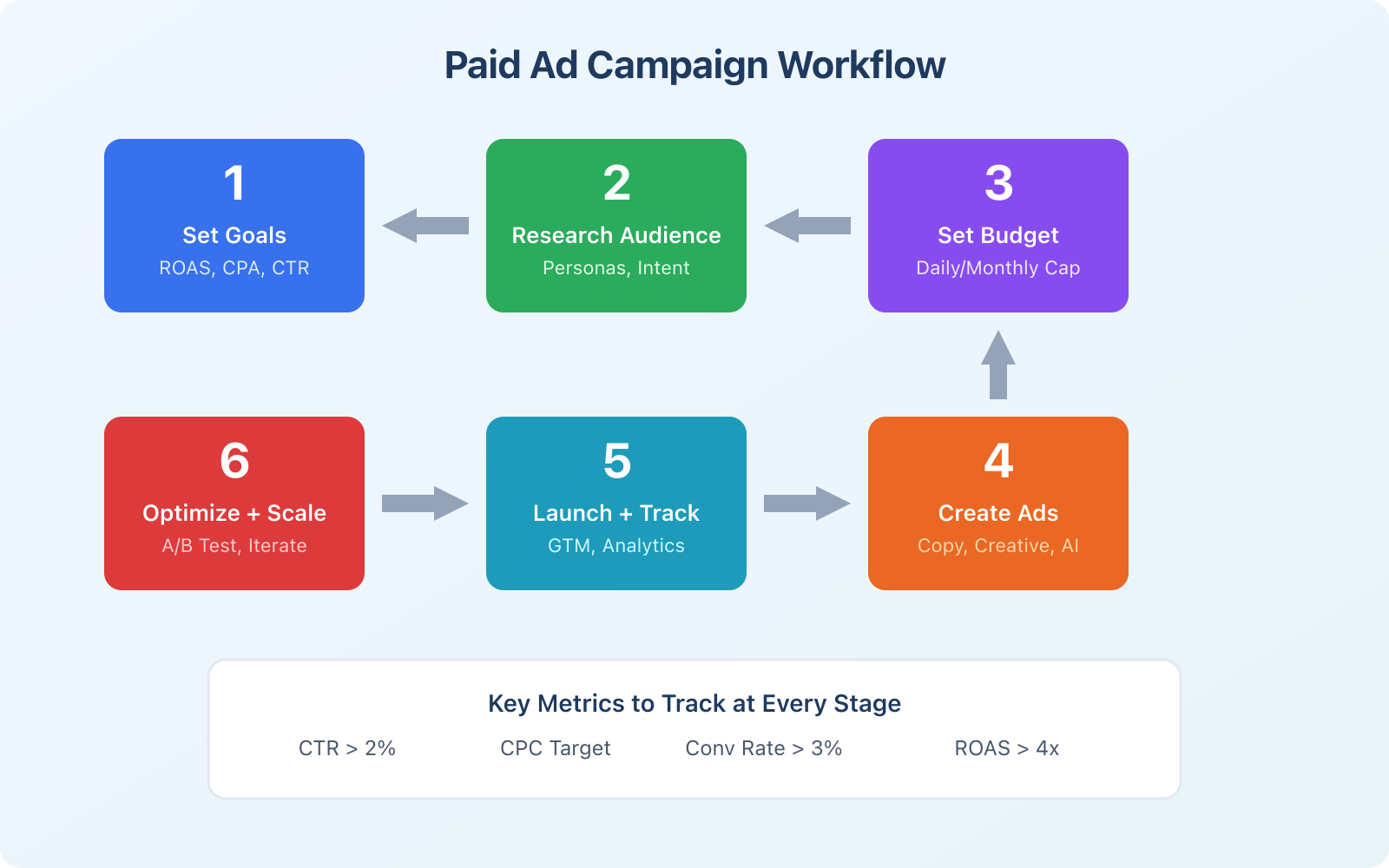
Vague goals like “increase brand awareness” or “get more leads” will kill your campaign before it starts. Every ad campaign needs a specific, measurable target tied to real business outcomes.
Here’s what effective goal-setting looks like for paid ads:
- Revenue target: “Generate $50,000 in revenue from ads this quarter”
- Cost per acquisition (CPA): “Acquire new customers at under $45 each”
- Return on ad spend (ROAS): “Achieve at least 4x return on every dollar spent”
- Lead volume: “Generate 200 qualified leads per month at under $25 each”
Notice that each goal includes a number and a timeframe. That’s not optional. If you can’t measure it, you can’t optimize it. Work backward from your revenue target: if your average customer is worth $200 and your close rate is 20%, you need 5 leads per sale. At a target CPA of $25, each sale costs you $125 in ad spend, giving you a $75 profit per customer before other costs.
Audience Research: The Foundation of Every Profitable Campaign
Most ad campaigns fail because of poor targeting, not poor creative. You can write the best ad copy in the world, but if you’re showing it to the wrong people, you’re throwing money away.
Start with what you already know. Look at your existing customer data. Which demographics convert the best? What pages do they visit before buying? What keywords do they search? Google Analytics 4 and your CRM have this data. Use it.
Then build your targeting:
- First-party audiences: Website visitors, email subscribers, past customers. These are your highest-value audiences because they already know you
- Lookalike audiences: Let Meta or Google find people similar to your best customers. Upload your customer list and the AI will find patterns you’d never spot manually
- Interest and behavior targeting: Useful for cold audiences, but getting less reliable as privacy regulations limit tracking
- Keyword targeting: For search ads, build keyword lists around commercial and transactional intent. Skip informational queries unless you’re running a content funnel
One thing I’ve learned from running campaigns: broad targeting with AI-driven campaigns often outperforms hyper-specific targeting these days. Google’s and Meta’s algorithms have gotten remarkably good at finding converters if you give them enough data to work with. The key is feeding them quality conversion signals through proper tracking.
Setting Your Advertising Budget the Smart Way
There’s no universal “right” budget for paid advertising. But there are formulas that work better than guessing.
If you’re just starting out, I recommend the minimum viable budget approach. Calculate your target CPA, then multiply by 50. That’s roughly how many conversions you need for the algorithm to learn and optimize. If your target CPA is $30, you need about $1,500 in spend before you can make meaningful optimization decisions. Spread that over 2 to 4 weeks.
For established businesses, the standard formula is to allocate 5% to 12% of revenue to digital marketing, with 60% to 70% of that going to paid advertising. So if you’re doing $500,000 in annual revenue, expect to spend $25,000 to $60,000 on ads per year.
Here are the budget rules I follow:
- Never set a daily budget so low that the algorithm can’t generate enough data. $10/day is the absolute minimum for Google Search, $20/day for Performance Max
- Front-load budget in the first two weeks to accelerate the learning phase
- Keep 20% of your budget as a reserve for scaling winners
- Cut losers fast. If a campaign hasn’t shown improvement after 2x your target CPA in spend, pause it and try a different approach
Writing Ad Copy That Converts: AI Tools and Proven Formulas
Ad copy is where most people overthink things. The best-performing ads are usually simple, specific, and speak directly to the reader’s problem.
For search ads, you have limited space (30 characters per headline, 90 per description in Google Ads). Every word matters. Use these proven formulas:
- Problem-Solution: “Tired of [problem]? [Product] fixes it in [timeframe]”
- Benefit-Proof: “[Specific benefit]. Trusted by [number] customers”
- Urgency-Action: “[Offer] ends April 13, 2026. Get [result] today”
For social media ads, the rules shift. You need to stop the scroll in the first 1 to 2 seconds. Lead with a bold claim, a surprising stat, or a visual that makes people pause. Video ads consistently outperform static images on Meta and TikTok, with 20% to 30% lower cost per result in most cases.
Using AI for Ad Copy Generation
AI tools have gotten genuinely useful for ad copy. Google Ads now has built-in AI that generates headline and description suggestions based on your landing page content. Meta’s Advantage+ creative automatically generates variations of your ad text, images, and calls to action.
My workflow for ad copy generation:
- Write 3 to 5 base ad variations manually using the formulas above
- Use AI (ChatGPT, Google’s built-in tools, or AI writing tools) to generate 10 to 15 more variations
- Edit the AI output to add specific numbers, social proof, and brand voice
- Run all variations and let the platform’s algorithm find the winners
- After 2 weeks, kill the bottom 50% and create new variations based on what’s working
The AI-generated copy almost never works as-is. It’s too generic. But it’s a great starting point that saves hours of brainstorming.
Conversion Tracking with Google Tag Manager
This is the part most advertisers skip, and it’s the single biggest reason their campaigns underperform. Without proper conversion tracking, you’re flying blind. The algorithm can’t optimize for conversions if it doesn’t know what a conversion looks like.
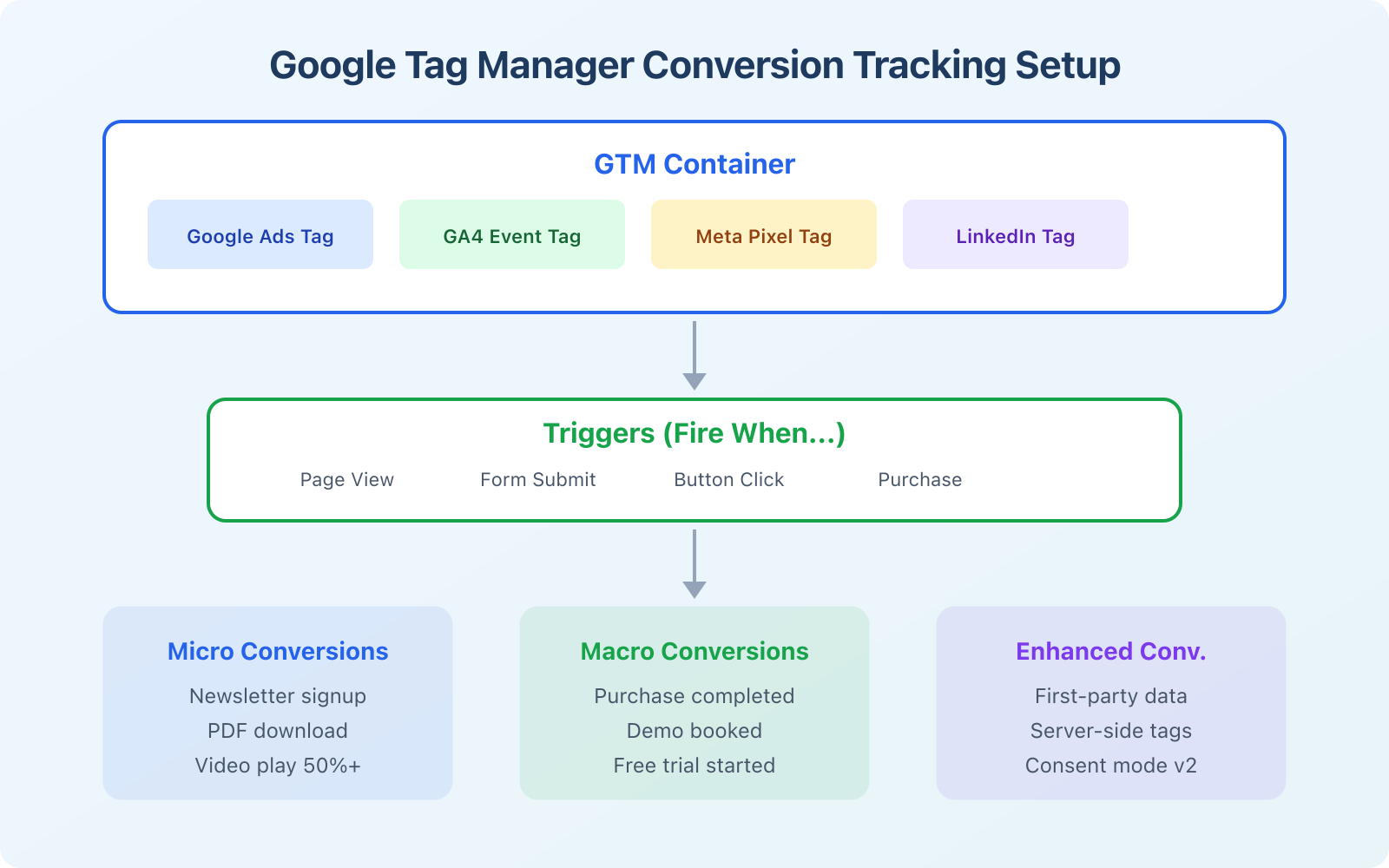
Google Tag Manager (GTM) is the standard tool for setting up tracking. It sits between your website and your ad platforms, firing tracking events when users take specific actions. Here’s the setup I recommend for every paid advertising campaign:
- Google Ads conversion tag: Fires on purchase, signup, or whatever your primary conversion is
- GA4 event tags: Track micro-conversions like add to cart, begin checkout, form starts, and time on page
- Meta Pixel: Required for any Facebook or Instagram campaigns. Track standard events (ViewContent, AddToCart, Purchase)
- LinkedIn Insight Tag: For B2B campaigns on LinkedIn. Tracks conversions and enables retargeting
The critical setup in 2026 is Enhanced Conversions. This sends hashed first-party data (email, phone) back to Google alongside your conversion events. It improves attribution accuracy by 15% to 25%, which directly translates to better algorithm optimization and lower CPAs.
If you’re not comfortable setting up GTM yourself, it’s worth hiring someone who knows what they’re doing. Bad tracking data is worse than no tracking data because it teaches the algorithm the wrong things.
With Google phasing out third-party cookies and Apple’s App Tracking Transparency limiting data collection, server-side tracking through GTM is becoming essential. It sends conversion data directly from your server to ad platforms, bypassing browser-based restrictions. The setup is more technical, but the data quality is significantly better.
Ad Platform Comparison: Where Should You Spend Your Budget?
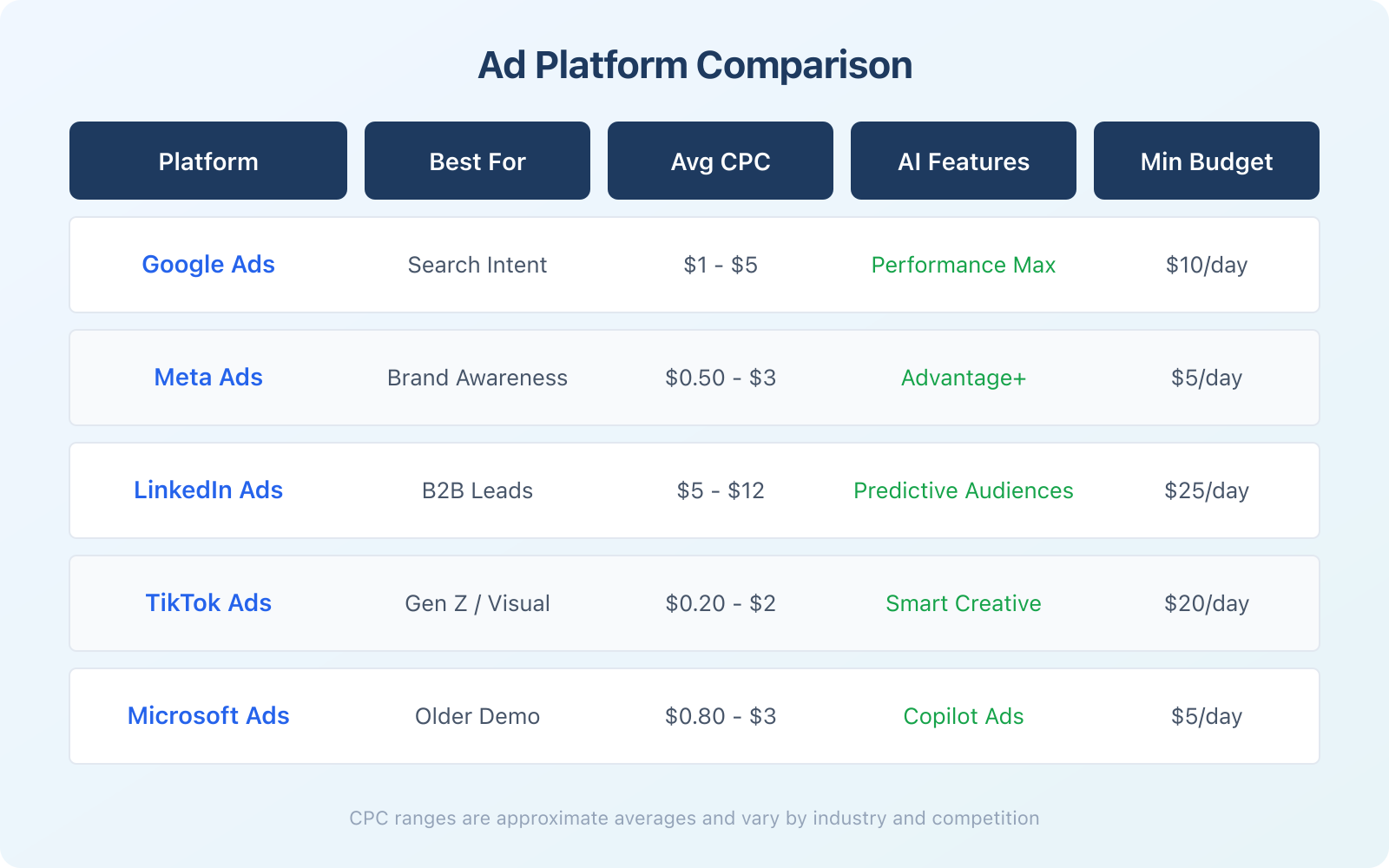
Every platform has a sweet spot. Choosing the wrong one wastes money no matter how good your ads are. Here’s how I’d break it down based on what I’ve seen work across different client campaigns:
Google Ads is the default choice for most businesses. If people search for what you sell, start here. The intent is already there. Average CPC ranges from $1 to $5 for most industries, though competitive verticals like insurance and law can hit $30 to $50 per click.
Meta Ads (Facebook/Instagram) is the best option for visual products, e-commerce, and brand building. The targeting has gotten less precise since iOS 14.5 privacy changes, but the AI optimization (Advantage+ campaigns) has largely compensated. Average CPC sits around $0.50 to $3.
LinkedIn Ads is expensive but effective for B2B. If you’re selling enterprise software, professional services, or high-ticket B2B products, the ability to target by job title and company size is worth the premium. Just know that you’ll need a minimum budget of about $25/day to see any meaningful results.
TikTok Ads has the lowest CPMs of any major platform right now, making it great for awareness and discovery. If your audience is under 40 and your product is visually interesting, test it. The creative needs to feel native, not polished. Raw, authentic content outperforms professional productions by a wide margin here.
Microsoft Ads (Bing) is the underrated option. Lower competition means lower CPCs, and the audience tends to be older, wealthier, and more likely to convert. It’s also the default search on Windows computers and Xbox, reaching about 100 million users daily.
How to Optimize and Scale Winning Campaigns
Creating the ad is just the beginning. The real work happens after launch. Here’s my optimization framework that I use on every campaign:
Week 1 to 2 (Learning phase): Don’t touch anything. Let the algorithm learn. Check that tracking is firing correctly and that your landing pages load fast (under 3 seconds). Monitor for obvious problems like zero impressions or sky-high CPCs, but don’t make bid adjustments.
Week 2 to 4 (Optimization): Start making data-driven changes. Pause keywords or audiences with spend but zero conversions. Increase bids on top performers. Test new ad copy variations against your best performers. Add negative keywords to filter out irrelevant traffic.
Month 2+ (Scaling): Once you’ve found winning combinations, scale carefully. Increase budgets by no more than 20% every 3 to 5 days. Larger jumps can reset the learning phase and tank performance. Add new audiences gradually, starting with lookalikes of your converters.
The biggest mistake I see is changing too many things at once. If you adjust the bid, the audience, and the creative simultaneously, you’ll never know what caused the improvement (or the decline). Change one variable at a time and give it enough data to draw conclusions.
A/B Testing Your Ads for Continuous Improvement
A/B testing is how you turn good campaigns into great ones. The principle is simple: run two versions of something, keep the winner, and test again. But most people do it wrong by testing too many things or declaring winners too early.
Here’s what to test, in order of impact:
- Offer/value proposition: This has the biggest impact on conversion rates. Test different offers (free trial vs demo, 10% off vs free shipping) before anything else
- Creative format: Video vs image, carousel vs single image, UGC-style vs polished
- Headlines: Test benefit-focused vs pain-focused headlines. Numbers in headlines typically outperform generic claims
- Landing page: Send traffic to different landing pages and measure conversion rate differences. This often has a bigger impact than the ad itself
- Call to action: “Get Started Free” vs “See Pricing” vs “Book a Demo” can produce dramatically different results
Let each test run until you have at least 100 conversions per variation (or 1,000 clicks if measuring click-through rate). Anything less and you’re making decisions based on noise, not signal.
Common Paid Advertising Mistakes to Avoid
After managing dozens of ad accounts, I’ve seen the same mistakes come up repeatedly. Here are the ones that cost the most money:
- No negative keywords: On Google Ads, your search campaigns will show for irrelevant queries unless you actively exclude them. Check your search terms report weekly and add negatives
- Sending traffic to the homepage: Create dedicated landing pages for each campaign. A landing page with a single call to action converts 2x to 5x better than a generic homepage
- Ignoring mobile: Over 60% of ad clicks happen on mobile devices. If your landing page isn’t fast and mobile-friendly, you’re wasting more than half your budget
- No retargeting: Only 2% to 4% of visitors convert on their first visit. Retargeting brings them back at a fraction of the cost of acquiring new traffic
- Making decisions too fast: Statistical significance matters. A 10% difference based on 20 conversions means nothing. Wait for enough data before making changes
- Ignoring ad extensions: Sitelinks, callouts, structured snippets, and price extensions on Google Ads increase click-through rates by 10% to 15% at no extra cost. There’s no reason not to use them
Measuring Success: The Metrics That Matter
It’s easy to get lost in vanity metrics like impressions and clicks. Here are the numbers that actually tell you if your campaign is working:
- ROAS (Return on Ad Spend): Revenue generated divided by ad spend. A 4x ROAS means you made $4 for every $1 spent. This is the ultimate measure of profitability
- CPA (Cost per Acquisition): How much you spend to get one customer or lead. Compare this to your customer lifetime value to make sure the math works
- Conversion rate: The percentage of clicks that result in a conversion. Below 2% usually means your landing page needs work, not your ads
- Quality Score (Google Ads): A 1-10 rating that affects your CPC. Higher quality scores mean lower costs. Improve it with relevant ad copy, strong landing pages, and good click-through rates
- Click-through rate (CTR): The percentage of people who see your ad and click. For search ads, aim for 5%+. For social ads, 1%+ is solid
Set up a weekly reporting cadence. Every Monday, review last week’s spend, conversions, CPA, and ROAS across all platforms. Monthly, do a deeper analysis of which audiences, keywords, and creatives are driving the best results. This rhythm keeps you on top of performance without micromanaging.
Wrapping Up: Effective Ads Start with a System
Running profitable paid advertising campaigns in 2026 isn’t about finding a hack or a secret platform. It’s about building a system: clear goals, proper tracking, smart creative, continuous testing, and disciplined optimization. The tools and AI features available today make it easier than ever to get good results, but they still require a human who understands the strategy behind them.
Start small. Pick one platform. Set up tracking properly before spending a dollar on ads. Test your way to profitability, and scale what works. That approach has worked for every successful campaign I’ve been involved with, and it’ll work for you too.
What is the best platform for paid advertising in 2026?
Google Ads is the best starting point for most businesses because it captures search intent. If someone is actively searching for what you sell, Google puts you right in front of them. For visual or consumer products, Meta (Facebook/Instagram) offers the best targeting and creative options. Start with one platform and master it before expanding.
How much should I spend on paid advertising?
Start with at least $10 to $20 per day on Google Ads or $5 to $10 per day on Meta to give the algorithms enough data to optimize. For a minimum viable test, budget 50 times your target cost per acquisition over 2 to 4 weeks. Established businesses typically allocate 5% to 12% of revenue to digital marketing, with the majority going to paid ads.
What is Performance Max in Google Ads?
Performance Max is Google’s AI-driven campaign type that automatically places your ads across Search, Display, YouTube, Gmail, Discover, and Maps. You provide creative assets (headlines, descriptions, images, videos) and audience signals, and Google’s machine learning optimizes placement, bidding, and targeting. It typically delivers 15% to 20% more conversions than traditional campaign types.
How do I track conversions from paid ads?
Use Google Tag Manager (GTM) to install conversion tracking tags on your website. Set up the Google Ads conversion tag, GA4 event tags, and platform-specific pixels like the Meta Pixel. Enable Enhanced Conversions to send hashed first-party data back to Google, which improves attribution accuracy by 15% to 25%. For best results, also implement server-side tracking.
How long does it take for paid ads to start working?
Most ad platforms need 1 to 2 weeks in a learning phase to optimize delivery. You’ll start seeing clicks within hours, but meaningful conversion data takes 2 to 4 weeks to accumulate. Don’t make major changes during the learning phase. Expect to spend 2 to 3 months refining campaigns before hitting consistent profitability.