
Why You Should Really Consider Starting an Online Business?
I started my first online business with a $12 domain name and free hosting that crashed every other day. That was back in 2009. Since then, I’ve built multiple businesses entirely online, and the barrier to entry has only gotten lower. You can launch a legitimate online business for under $300 right now, this afternoon, with nothing but a laptop and internet connection.
But here’s the part most “start an online business” articles skip: picking the right business model, choosing the right tools, and having a clear plan for your first 90 days. Without those three things, you’ll join the 90% of online businesses that fade out within a year. This guide gives you the full picture, from choosing your business model to getting your first paying customer.
Why an Online Business Makes Sense Right Now
The numbers tell the story better than I can. Over 5.3 billion people use the internet globally. E-commerce revenue is projected to hit $6.3 trillion worldwide in 2026. Remote work has gone from a perk to the default for millions of professionals. The infrastructure for running an online business, from payment processing to website building to marketing automation, has never been cheaper or easier to use.
But the real advantage isn’t just the market size. It’s the economics. An online business eliminates the overhead that crushes most traditional businesses. No rent. No utility bills. No inventory (depending on your model). No commute. You can run a six-figure business from your home office with a team of contractors spread across the globe.
I’ve watched friends pour $50,000 into brick-and-mortar businesses only to close in 18 months. Meanwhile, some of the most successful businesses I’ve helped build started with less than $500 in total investment. The risk-to-reward ratio of an online business is hard to beat.
Choosing the Right Business Model
This is where most people get stuck. They hear “start an online business” and immediately think of dropshipping or selling courses. But there are at least six viable models, each with different startup costs, timelines, and skill requirements. Picking the wrong model for your situation is the fastest way to burn out.
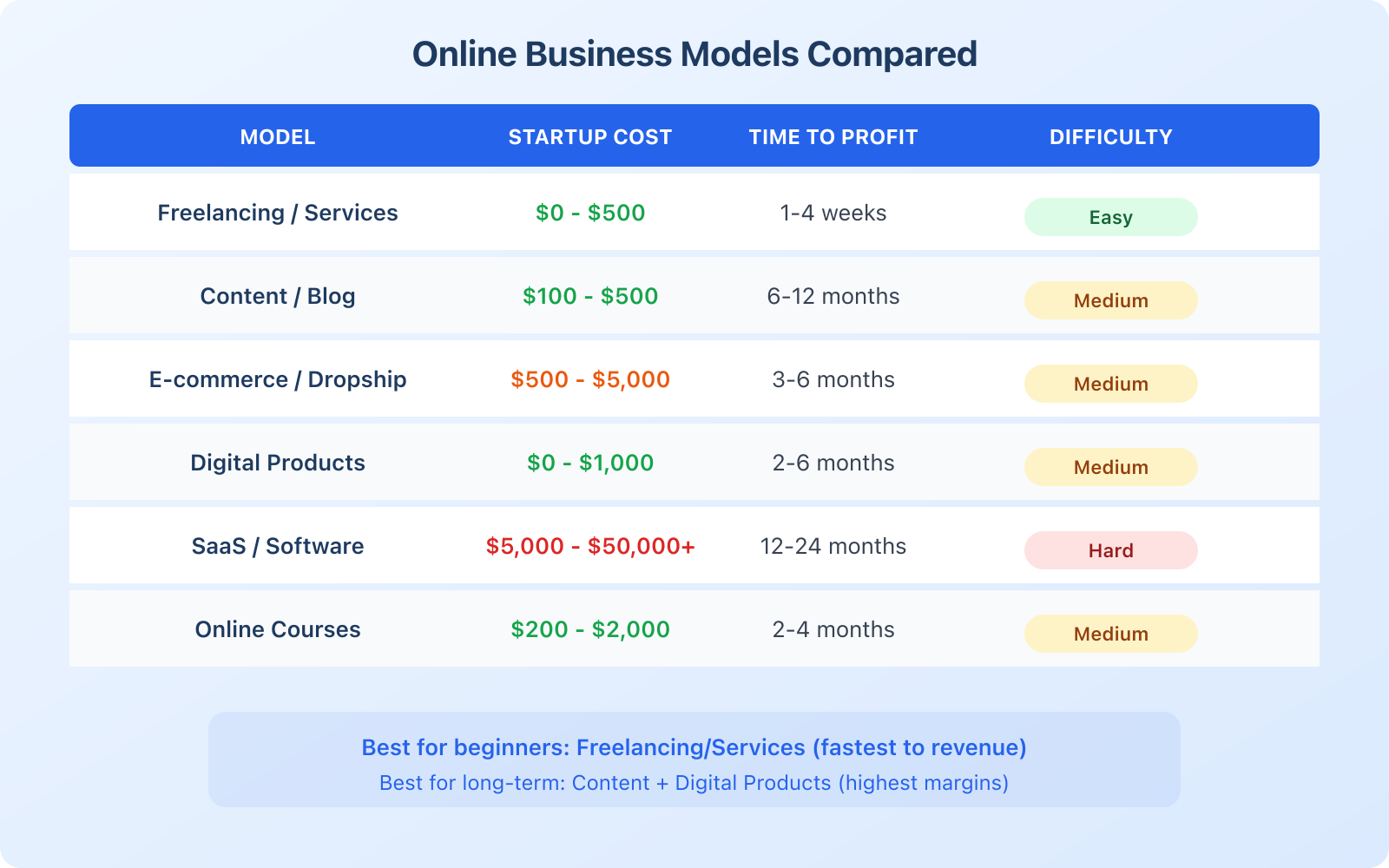
Freelancing and services. This is the fastest path to revenue. If you have a marketable skill (writing, design, development, marketing, consulting, bookkeeping), you can start selling your services today. Startup cost: essentially $0. Time to first dollar: 1 to 4 weeks. The downside? You’re trading time for money, and there’s a ceiling unless you build a team.
Content and affiliate marketing. Build a website, publish valuable content, and earn money through advertising, affiliate commissions, and sponsored content. This is the model that built gauravtiwari.org. Startup cost: $100 to $500 for hosting and a domain. Time to profit: 6 to 12 months. The upside is that content works for you around the clock, even while you sleep. The downside is the long ramp-up period.
E-commerce and dropshipping. Sell physical products through an online store. With dropshipping, you don’t hold inventory. Your supplier ships directly to the customer. Startup cost: $500 to $5,000. Time to profit: 3 to 6 months. The margins are thinner than digital products, and competition is fierce, but it’s a proven model with massive scale potential.
Digital products. Create and sell ebooks, templates, printables, stock photos, plugins, or software tools. Startup cost: $0 to $1,000 (mainly your time). Time to profit: 2 to 6 months. Near-100% profit margins after creation. The challenge is building an audience to sell to.
Online courses and coaching. Package your expertise into a course or coaching program. Platforms like Teachable, Thinkific, and Podia handle the tech side. Startup cost: $200 to $2,000. Time to profit: 2 to 4 months. This model works best when you already have an audience or network.
SaaS (Software as a Service). Build a software product that customers pay for monthly. Highest ceiling, highest barrier. Startup cost: $5,000 to $50,000+. Time to profit: 12 to 24 months. This isn’t for beginners, but it’s where the biggest online businesses live.
My recommendation if you’re starting from scratch: begin with freelancing or services to generate immediate revenue, then use that income to fund a content-based business. That’s exactly what I did, and it’s the path with the best risk-adjusted returns.
Setting Up Your Website
Every online business needs a website. Social media profiles aren’t enough because you don’t own them. One algorithm change and your audience disappears. Your website is your home base, the one digital asset you fully control.
Here’s exactly how I’d set up a new business website today:
Step 1: Get hosting. I recommend Cloudways for anyone serious about their online business. Plans start at $14/month. You get managed cloud hosting with servers from DigitalOcean, Linode, or Vultr. It’s fast, reliable, and you can scale as you grow without migrating. Shared hosting might save you $5/month, but the performance difference is massive. A slow website costs you visitors and sales.
Step 2: Register a domain. Pick something short, memorable, and relevant to your business. The .com extension is still the gold standard. Budget $10 to $15/year. Avoid hyphens and numbers. If your preferred .com is taken, consider adding a word like “get,” “use,” or “try” before your brand name.
Step 3: Install WordPress. WordPress powers 43% of all websites on the internet. It’s free, incredibly flexible, and has an ecosystem of 60,000+ plugins for anything you need. Cloudways lets you install WordPress with one click during setup.
Step 4: Choose a theme. Don’t spend 3 weeks picking a theme. Choose a lightweight, fast theme that you can customize to match your brand. GeneratePress, Kadence, or Astra are solid free options. A professional theme costs $50 to $100 one-time and is worth every penny for the design quality and support.
Step 5: Create your core pages. At minimum, you need: Homepage (clear value proposition), About page (your story and credibility), Services/Products page, Blog (for content marketing), and Contact page. Don’t overthink the design at this stage. You can always improve it later. Getting live is more important than getting perfect.
Install Rank Math as your SEO plugin on day one. It’s free, handles schema markup, sitemaps, and on-page optimization. Getting SEO right from the start saves you massive headaches later. Trust me, I’ve learned this the hard way.
Essential Tools for Your Online Business
You don’t need 50 SaaS subscriptions to run an online business. You need a lean, focused tech stack that handles the essentials without draining your budget. Here’s what I’d start with:
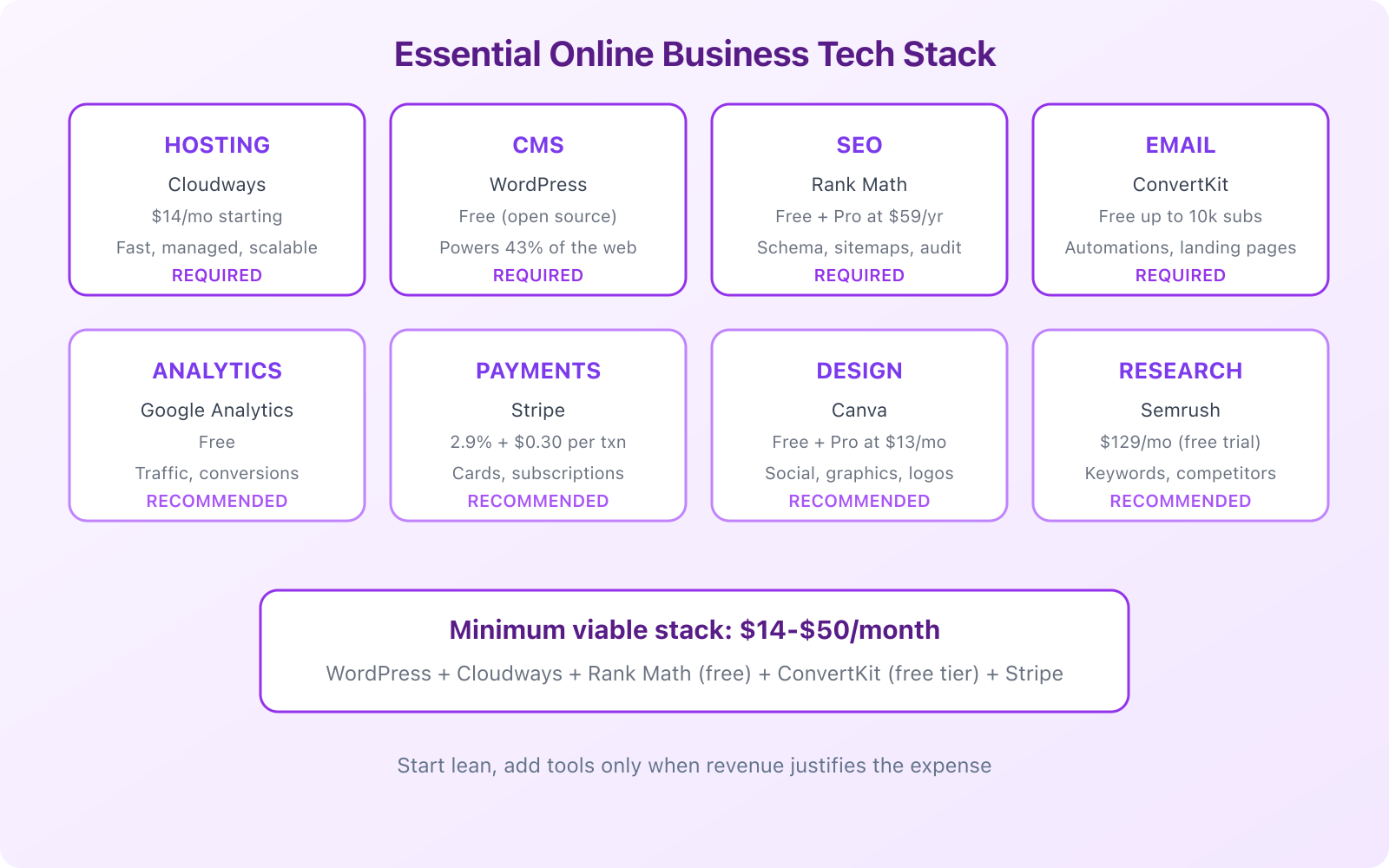
Website and hosting: WordPress on Cloudways ($14/month). This gives you a fast, secure, scalable foundation. Everything else builds on top of this.
SEO: Rank Math (free for most features). Handles your technical SEO, on-page optimization, schema markup, and XML sitemaps. The Pro version ($59/year) adds advanced features like keyword rank tracking and local SEO tools.
Email marketing: Your email list is your most valuable asset. It’s the one audience you truly own. I recommend building your list from day one, even before you have something to sell. Every week you delay is lost subscribers.
Analytics: Google Analytics (free) and Google Search Console (free). Together, these tell you where your traffic comes from, what people do on your site, and how you’re performing in search results.
Design: Canva for social media graphics, blog images, and basic branding. The free version handles most needs. Canva Pro ($13/month) adds brand kit features, background remover, and a much larger asset library.
Payment processing: Stripe for accepting credit card payments. 2.9% + $0.30 per transaction. Integrates with virtually every WordPress e-commerce and membership plugin. If you sell internationally, Stripe handles multiple currencies automatically.
Total cost for this entire stack: $14 to $50/month to start. That’s less than a dinner out. There’s truly never been a cheaper time to start a business.
Content Strategy: Your Free Marketing Engine
Paid advertising is a money pit for new online businesses. You don’t have the margins, the conversion data, or the budget to compete with established players. Content marketing is your unfair advantage. It costs time instead of money, and the results compound over months and years.
Here’s the content strategy I’d follow in the first 90 days:
Identify 20 to 30 keywords your target customers search for. Use Google’s autocomplete, “People also ask” boxes, and Semrush to find keywords with decent search volume and low competition. Focus on long-tail, question-based keywords. These are easier to rank for and attract people with specific needs.
Publish 2 to 4 articles per week for the first month. Aim for 1,500 to 2,000 words per article. Cover topics that genuinely help your target audience solve problems. Don’t write about yourself. Write about them.
Optimize every piece of content for SEO. Use your target keyword in the title, first paragraph, one or two subheadings, and the meta description. Add internal links between related articles. Include images with descriptive alt text. This isn’t complicated, but it makes a massive difference over time.
Promote your content. Share every article on social media. Submit to relevant forums and communities (without being spammy). Reach out to people and businesses mentioned in your content. Join conversations in your niche. Content that nobody sees is content that doesn’t exist.
For more on building a content engine, check our guide on content marketing strategy.
Getting Your First Customers
Your first 10 customers won’t come from SEO. Organic traffic takes months to build. Your first customers come from direct outreach, relationships, and putting yourself in front of people who already need what you offer.
Leverage your existing network. Tell everyone you know what you’re doing. Post on LinkedIn, send personal emails, and update your social profiles. Your first clients are almost always people you already know, or people one degree away from your network.
Offer value before asking for money. Write a helpful guide and share it freely. Answer questions in forums and communities. Audit someone’s website or marketing strategy for free. This builds trust and demonstrates your expertise. Several of my biggest clients started as people I helped for free.
Start with competitive pricing. Don’t undervalue yourself, but recognize that you need case studies and testimonials more than you need top-dollar rates right now. Offer your first 3 to 5 clients a discounted rate in exchange for detailed testimonials and case studies. That social proof will pay for itself many times over.
Use freelance platforms strategically. Sites like Upwork and Fiverr can provide initial revenue while you build your own client pipeline. Don’t rely on them long-term (the race-to-the-bottom pricing is brutal), but they’re a legitimate starting point.
Don’t wait until everything is “ready” to start selling. Your website doesn’t need to be perfect. Your content doesn’t need to be polished. Ship early, get feedback, and improve as you go. I’ve seen too many aspiring entrepreneurs spend 6 months perfecting a logo while their competitors were out there closing deals.
Payment Integration and Monetization
Getting paid should be the easiest part of running your business. Modern payment tools make it trivially simple. Here’s how to set up payments based on your business model:
For services and freelancing: Send invoices through Stripe, PayPal, or a tool like FreshBooks. Stripe’s invoicing feature is free for the first few invoices. For recurring clients, set up subscription billing to guarantee monthly revenue.
For digital products: Use WooCommerce (free WordPress plugin) + Stripe for one-time sales. For courses, platforms like Teachable handle payments, course delivery, and student management in one place.
For e-commerce: WooCommerce is the standard for WordPress-based stores. Pair it with Stripe and PayPal for payment processing. If you’re doing high volume, consider Shopify ($39/month) for its built-in logistics and fulfillment features.
For subscriptions and memberships: WordPress plugins like Restrict Content Pro or MemberPress integrate with Stripe to handle recurring payments, content gating, and member management.
The key principle: offer as many payment methods as possible. Credit cards, PayPal, Apple Pay, Google Pay. Every friction point in the checkout process costs you sales. I’ve seen conversion rates jump 15 to 20% just by adding PayPal as a payment option alongside credit cards.
Your First 90-Day Plan
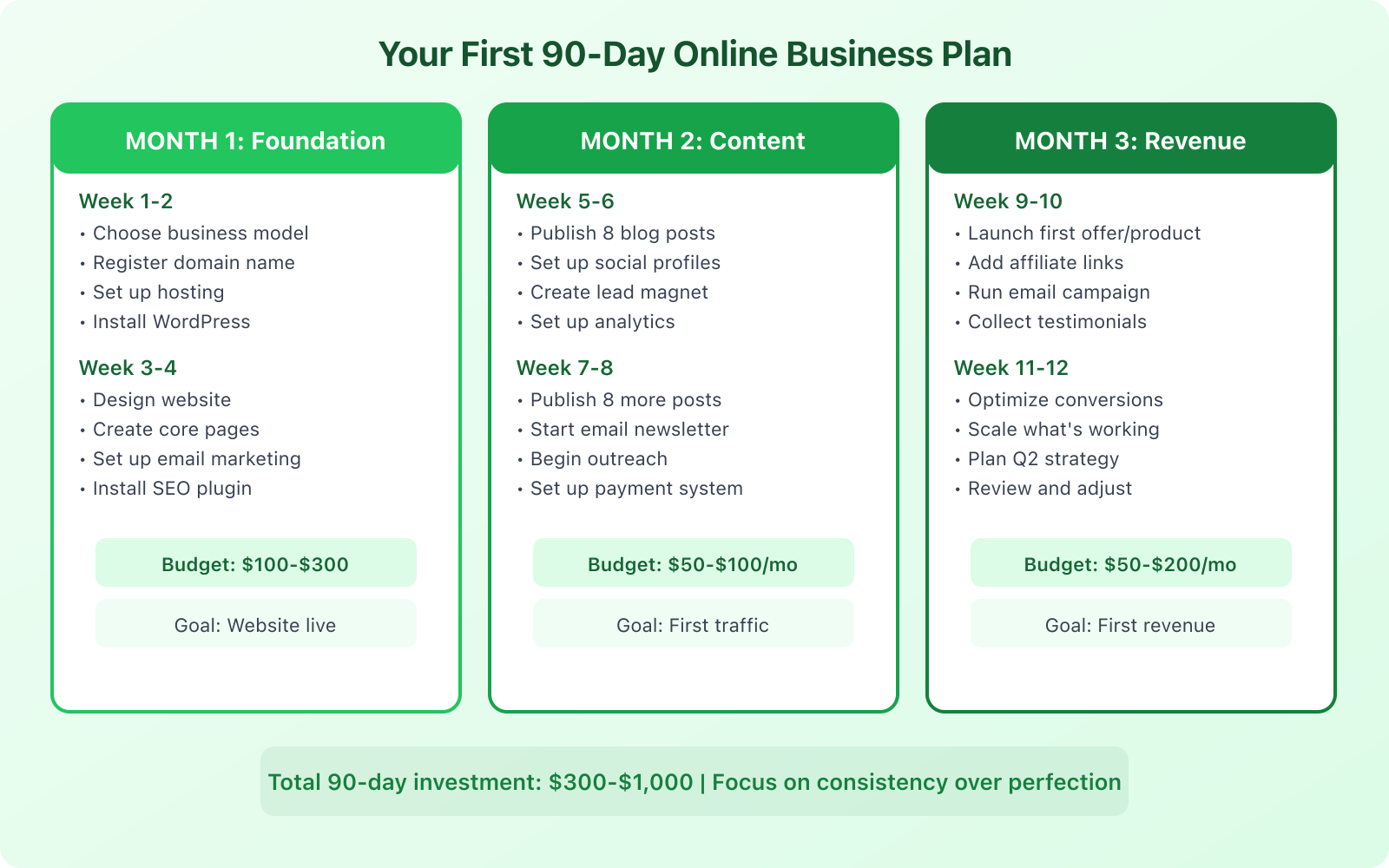
Vague goals produce vague results. Here’s a specific, week-by-week plan for your first 90 days:
Weeks 1 to 2: Foundation. Choose your business model. Register your domain. Set up Cloudways hosting. Install WordPress. Choose a theme. Create your core pages (Home, About, Services, Contact, Blog). Install Rank Math. Set up Google Analytics and Search Console.
Weeks 3 to 4: Content launch. Publish your first 8 blog posts targeting low-competition keywords. Set up social media profiles. Create a simple lead magnet (checklist, guide, or template) to start building your email list. Set up email marketing automation for new subscribers.
Weeks 5 to 6: Outreach. Start promoting your content on social media and in relevant communities. Publish 8 more blog posts. Begin direct outreach to potential clients or partners. Guest post on 1 to 2 relevant websites in your niche.
Weeks 7 to 8: Monetization setup. Set up your payment processing (Stripe + PayPal). Create your first paid offer, whether that’s a service package, digital product, or consulting engagement. Start an email campaign promoting your offer to subscribers.
Weeks 9 to 10: First sales. Launch your offer to your email list and social following. Reach out directly to warm leads. Offer introductory pricing to your first 5 customers. Collect testimonials from every client.
Weeks 11 to 12: Optimize and plan. Review your analytics. What content is getting traffic? Where are your leads coming from? What’s converting and what’s not? Double down on what works. Cut what doesn’t. Plan your strategy for the next quarter based on real data, not assumptions.
Common Mistakes That Kill New Online Businesses
I’ve watched hundreds of people start online businesses. The ones who fail almost always make the same mistakes:
- Perfection paralysis. Spending months on a logo, website design, or business plan instead of actually selling something. Launch ugly. Improve later.
- No audience building. Creating a product before you have anyone to sell it to. Build your audience first through content and community engagement.
- Shiny object syndrome. Jumping between business ideas every few weeks. Pick one model and commit to it for at least 6 months before evaluating.
- Ignoring SEO. Not investing in organic search traffic from day one. Paid ads drain your budget fast. Organic traffic is free and compounds over time.
- No email list. Relying entirely on social media. You don’t own your social followers. An algorithm change can wipe out your reach overnight. Your email list is the only audience you truly control.
- Trying to do everything alone. Not outsourcing or delegating tasks outside your core competency. Your time is better spent on what you’re best at. Outsource the rest.
Scaling Beyond the First Year
If you’ve followed this plan and reached your first $1,000 to $5,000/month, the question becomes: how do you grow? Here’s the playbook:
Systematize and automate. Document your processes. Automate repetitive tasks with tools like Zapier. Create standard operating procedures (SOPs) for everything from content publishing to client onboarding. Systems free you to work on the business instead of in it.
Hire strategically. Your first hire should handle the tasks that consume the most time but don’t require your specific expertise. For most online businesses, that’s content creation, social media management, or administrative tasks. Use contractors before committing to full-time employees.
Diversify your revenue. Don’t rely on a single income stream. If you’re doing freelancing, add a digital product. If you’re running a blog, add affiliate marketing and email courses. Multiple revenue streams protect you from any single channel drying up.
Invest in growth. Once you have consistent revenue, reinvest a portion into paid advertising, better tools, and professional development. The businesses that grow fastest are the ones that reinvest aggressively.
Starting an online business isn’t complicated. The tools are accessible, the costs are minimal, and the opportunity is enormous. What it requires is clarity about your model, consistency in execution, and the patience to let compound growth do its work. Pick your model, build your website, start creating content, and make your first sale. Everything else is refinement. For more online business ideas, check out our guide with 9 models you can start from home.
Frequently Asked Questions
How much money do I need to start an online business?
You can start a legitimate online business for $100 to $500. Hosting costs $14/month with Cloudways, a domain is $10 to $15/year, and WordPress is free. Essential plugins like Rank Math have free versions. If you’re offering services, your startup cost can be essentially $0 since you’re selling your skills. The most important investment is your time, not your money.
What online business model is best for beginners?
Freelancing or service-based businesses offer the fastest path to revenue because you can start earning within 1 to 4 weeks using skills you already have. For long-term passive income, content and affiliate marketing offer the best returns, but they take 6 to 12 months before generating significant revenue. Many successful online entrepreneurs start with services for immediate cash flow and build a content-based business on the side.
Do I need technical skills to start an online business?
No. WordPress and modern website builders have eliminated the need for coding skills. Managed hosting providers like Cloudways handle server management. Plugins handle SEO, security, and performance. Payment processors like Stripe integrate with a few clicks. You’ll learn some technical basics along the way, but you don’t need a computer science degree to start. Focus on your business skills and outsource the technical work if needed.
How long before my online business becomes profitable?
It depends entirely on your business model. Service businesses can be profitable within the first month since there’s almost no overhead. E-commerce businesses typically take 3 to 6 months. Content-based businesses (blogs, affiliate sites) usually take 6 to 12 months to generate meaningful revenue. SaaS businesses can take 12 to 24 months. The key variable is how much time and effort you invest consistently. Part-time effort means longer timelines.
Should I quit my job to start an online business?
Not immediately. The smartest approach is to build your online business as a side project while keeping your day job. This gives you financial stability, reduces pressure to monetize too quickly, and lets you validate your business model with real data. Once your online business consistently generates enough revenue to cover your expenses (ideally for 3+ consecutive months), you can make the transition. Having 3 to 6 months of expenses saved as a runway provides additional safety.