
WordPress URL Shortening: The Complete Guide to Native and Third-Party Solutions
URL shortening on WordPress sits at the intersection of marketing convenience and technical SEO, and the right approach depends on what you’re actually trying to do. If you want clean tracking links for social media, a third-party service like Bitly is fine. If you want branded affiliate cloaking (so your visitors see yoursite.com/go/product instead of an ugly raw affiliate URL), you need a WordPress-native solution. If you want to use WordPress’s built-in wp.me/ short links, those work but have specific limitations worth knowing. This guide walks through every viable URL shortening approach in 2026, the WordPress plugins that handle it well, and the SEO and analytics considerations for each.
Long URLs are a pain. You’re trying to share a link on Twitter, paste it into an email, or mention it in a podcast, and you’re stuck with something like https://yoursite.com/2024/03/15/the-complete-beginners-guide-to-setting-up-wordpress-caching-plugins/. That’s 90+ characters. Nobody’s typing that.
I’ve been dealing with WordPress and WordPress URLs since 2009. Back then, we had fewer options. Now there’s a whole ecosystem of solutions, from WordPress’ built-in tricks to dedicated plugins to external services. The problem is knowing which approach fits your specific situation.
This guide covers everything: WordPress’ native shortlink system, the clever URL guessing behavior most people don’t know about, third-party plugins for affiliate link management, external shortening services, and self-hosted alternatives. I’ll also cover the SEO implications because that’s where most people get confused.
My Recommended Tool — GT Link Manager
Before I cover the rest of the URL shortening landscape, the tool I actually use on this blog (and recommend to most readers building affiliate-driven WordPress sites in 2026) is GT Link Manager — a WordPress plugin I built specifically for the use case of cloaking, organizing, and tracking large numbers of outbound affiliate and partner links from a single dashboard. After running gauravtiwari.org with thousands of cloaked links for over a decade, I needed a tool that handled the workflows the popular plugins (Pretty Links, ThirstyAffiliates) didn’t quite cover — bulk import/export, structured slug groups, granular analytics per link, and a clean WP-CLI interface for automation. GT Link Manager is the result.
What it does well in 2026. 1. Clean /go/<slug>/ redirects on your own domain with proper rel="sponsored nofollow noopener" attributes and configurable 301/302 status codes. 2. Bulk-import affiliate links from CSV — useful when migrating from another link cloaker or when you onboard a large affiliate program in one shot. 3. Per-link click analytics with daily/weekly/monthly breakdowns, plus the option to export raw event data for analysis in your own tooling. 4. WP-CLI commands for creating, updating, and bulk-managing links via scripts. 5. Lightweight code — no jQuery dependencies, no heavy admin assets, no unrelated bloat. The plugin focuses on doing affiliate link management well and nothing else.
Why I prefer it over the popular alternatives. Pretty Links and ThirstyAffiliates are both reasonable plugins — I’ve used both on client projects — but they each carry compromises that bothered me on my own site. Pretty Links Pro pricing scales with sites and adds-on you don’t always need. ThirstyAffiliates has historically pushed users toward its premium-tier affiliate categorization features that I didn’t want. GT Link Manager is built for the workflow I actually run: a single high-volume blog with hundreds of cloaked links, frequent affiliate program updates, and a need for bulk management without per-link manual editing. If your needs match that profile, GT Link Manager is what I’d point you to first. If you have a different workflow (e.g., you specifically need the visual-editor sidebar that ThirstyAffiliates offers, or you want Pretty Links’ built-in A/B testing), pick the alternative that matches.
My 2026 Recommendations by Use Case
Three solid paths in 2026. For affiliate link cloaking on your own domain: install Pretty Links (free version), ThirstyAffiliates, or my preferred tool GT Link Manager (which I built and use on this blog). All three let you create yoursite.com/go/slug/ redirects with full analytics, rel=”sponsored nofollow” tags, and 301 or 302 status codes as you prefer. The convention of using /go/ as the prefix is universal — it tells crawlers and readers that the link is a managed redirect. For general short links: WordPress’s native ?p=ID short URLs work but are ugly. Install Hummingbird Cache or the lightweight Short URL plugin to add cleaner aliases.
For social media tracking: Bitly remains the gold standard, with strong analytics, custom branded domains starting at $35/month, and UTM-parameter handling. Rebrandly is the leading alternative with similar features. Don’t use TinyURL or other generic shorteners for marketing — the lack of analytics makes them effectively blind. Note that Google’s goo.gl shutdown completed in 2024; any remaining goo.gl links should be migrated to Bitly or a branded domain. SEO consideration: cloaked affiliate links should always carry rel=”sponsored nofollow noopener” and ideally open in a new tab; this is the correct way to disclose monetization to both search engines and readers.
WordPress Native Shortlinks: The ?p= System
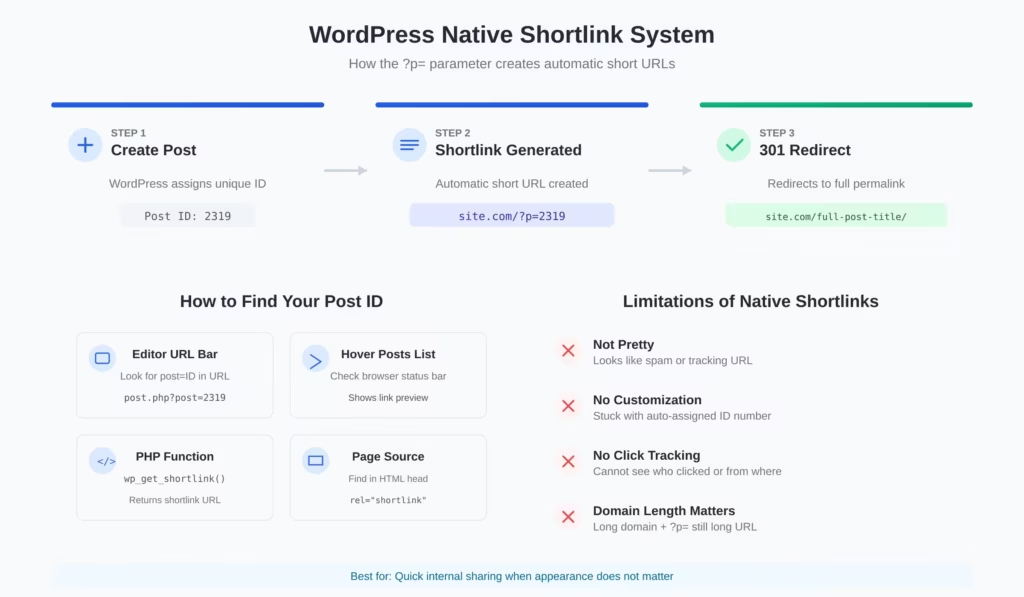
WordPress has built-in URL shortening that almost nobody uses. Every post and page gets assigned a numeric ID when you create it. WordPress then supports a query-string format that redirects to the full permalink.
For example, if your post has ID 2319, the shortlink is:
https://yoursite.com/?p=2319
That’s it. This URL will always redirect to the canonical permalink, regardless of whether you change your permalink structure later.
How to Find Your Post ID
Three ways to get the post ID:
From the editor: Look at your browser’s address bar while editing a post. You’ll see something like wp-admin/post.php?post=2319&action=edit. The number after post= is your ID.
From the posts list: Hover over any post title in your Posts list. Look at the bottom of your browser window where the URL preview appears. Same format: the number after post= is what you need.
With code: The wp_get_shortlink() function returns the shortlink for any post. WordPress also adds a <link rel="shortlink"> tag to your page headers automatically.
The Get Shortlink Button
WordPress used to have a “Get Shortlink” button right next to the permalink field in the classic editor. It was removed in WordPress 4.4, but the functionality still exists. The button was taken out because most people never used it. If you want it back, there are plugins that restore it, though I’d argue there are better solutions now.
Limitations of Native Shortlinks
The ?p= format works, but it has problems:
It’s not pretty. Nobody trusts a link with random query parameters. It looks like a tracking URL or spam.
No customization. You’re stuck with whatever ID WordPress assigns. No way to create memorable slugs like /sale or /podcast.
No tracking. You can’t see how many people clicked the link or where they came from.
Domain length matters. If your domain is already long, adding ?p=2319 doesn’t help much.
For quick internal sharing, native shortlinks work fine. For anything public-facing or marketing-related, you need something better.
WordPress URL Guessing: The Hidden Feature
Here’s something most WordPress users don’t know: WordPress has intelligent URL guessing built into its core. If you type a partial URL that’s close enough to an actual post slug, WordPress redirects you to the correct page instead of showing a 404.
I discovered this years ago while testing broken links. I accidentally typed a truncated URL and ended up on the right post anyway. Turns out this behavior is intentional.
How URL Guessing Works
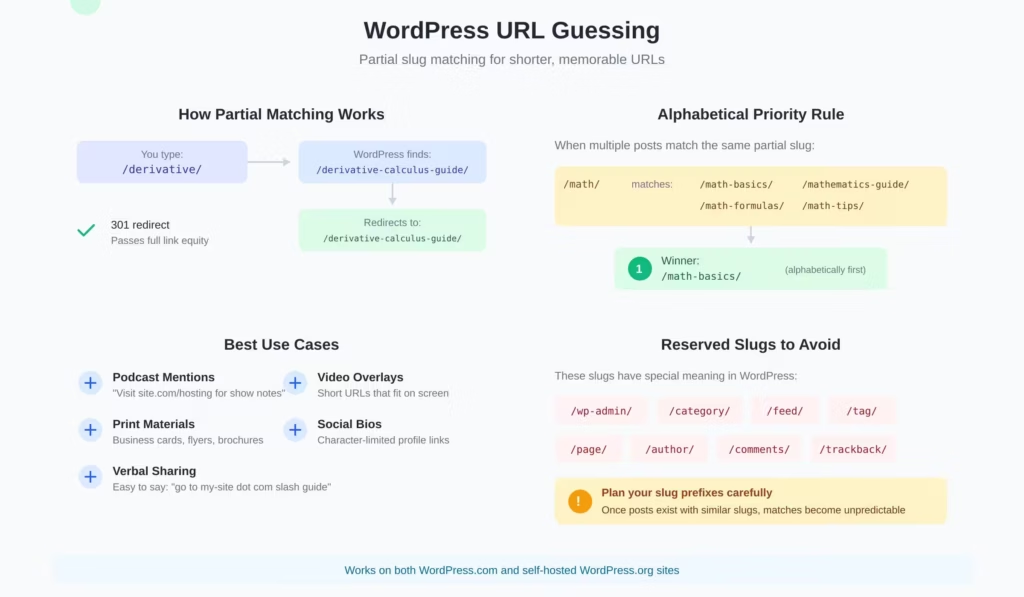
WordPress performs partial matching on slugs. If you have a post at:
https://yoursite.com/derivative-of-x-squared-is-2x-or-x-where-is-the-fallacy/
These shorter versions all redirect to the same post:
https://yoursite.com/derivative-of-x-squared-is-2x-or-x-where-is/https://yoursite.com/derivative-of-x-squared-is-2x/https://yoursite.com/derivative-of-x/https://yoursite.com/derivative/https://yoursite.com/deri/
WordPress looks at what you typed, searches for slugs that start with those characters, and redirects to the best match.
The Alphabetical Priority Rule
When multiple posts could match your partial URL, WordPress picks alphabetically. If you have two posts with slugs starting with “d”:
/d-alemberts-test-of-convergence//derivative-of-x-squared/
Then yoursite.com/d/ goes to the d’Alembert post because “d-a” comes before “de” alphabetically.
For identical slugs (which WordPress normally prevents, but can happen with custom post types), the older post wins.
Date Stamps Are Optional
If you use a permalink structure with dates like /2024/03/15/post-title/, you can still access posts without the date portion. WordPress ignores the missing date and finds the post anyway.
So yoursite.com/post-title/ works even if the canonical URL includes /2024/03/15/.
Reserved Slugs
Some slugs are protected and can’t be used for posts:
/feed/(RSS feeds)/comments//wp-admin//wp-content//category/and/tag/(or whatever you’ve set as taxonomy bases)/activate//signup/
If you try to create a post with these slugs, WordPress blocks you or appends a number.
Practical Uses for URL Guessing
This trick is useful when you:
- Need to share a link verbally (podcast, presentation, phone call)
- Want cleaner URLs for print materials
- Can’t remember the exact slug but know the first word
The downside? You have zero control over which post gets matched, and you can’t track clicks. For serious link management, plugins are the way to go.
Third-Party URL Shortening Plugins
This is where most WordPress users should focus their attention. Plugins give you branded short URLs, click tracking, and centralized link management. The big players are Pretty Links, ThirstyAffiliates, URL Shortify, and BetterLinks.
Pretty Links
Pretty Links is the most popular URL shortener plugin for WordPress. It’s been around since the early days and does one thing well: creates short, branded links using your own domain.
What it does:
- Creates links like
yoursite.com/go/product-name - Tracks clicks with detailed reports (browser, location, referrer)
- Supports 301, 302, and 307 redirects
- Works with any URL, internal or external
- Integrates with Google Analytics via MonsterInsights
The free version handles basic link creation and click counting. You can create unlimited links and organize them by category.
The Pro version ($99.50/year for one site) adds:
- Automatic keyword linking (mention “hosting” and it auto-links to your affiliate URL)
- Link categories and tags
- Advanced reporting
- Auto-linking in RSS feeds
- Redirect types including JavaScript and cloaked
My take: Pretty Links is the best option for general URL shortening and affiliate link management. The free version is genuinely useful, not crippled. The Pro version makes sense if you’re managing dozens of affiliate partnerships and want auto-linking.
ThirstyAffiliates
ThirstyAffiliates focuses specifically on affiliate marketers. If your primary use case is managing affiliate links, this might be a better fit than Pretty Links.
Core features:
- Link cloaking with 301 redirects
- Categories for organizing links by program or topic
- Smart uncloaking for programs that don’t allow cloaking (like Amazon)
- Click tracking and reports
- Google Analytics integration via MonsterInsights
The Pro version ($99.60/year for Basic) adds:
- Automatic keyword linking
- Amazon API integration for easy product imports
- Geolocation targeting (redirect US visitors to Amazon.com, UK visitors to Amazon.co.uk)
- Link scheduling and expiration
- CSV import/export for bulk management
The key difference from Pretty Links: ThirstyAffiliates was built specifically for affiliate marketers. The Amazon integration and geolocation features reflect that focus. Pretty Links is more general-purpose.
When to choose ThirstyAffiliates: You’re doing serious affiliate marketing, especially with Amazon Associates or programs in multiple countries. The geo-targeting alone can significantly boost conversions.
ClickWhale
ClickWhale comes from the team behind AAWP (Amazon Affiliates WordPress Plugin), which tells you something about their affiliate marketing DNA. The free version launched in late 2022, with Pro following in October 2024.
What sets ClickWhale apart is the generous free tier. You get unlimited link shortening, click tracking, link categories, and one link page (their Linktree alternative) without paying anything. Most competitors lock tracking behind a paywall.
Core features:
The link management basics are solid. Custom slugs, 301/302/307/308 redirect options, nofollow and sponsored attributes, and link categories for organization. Nothing revolutionary, but it works reliably.
The link pages feature is where ClickWhale gets interesting. Instead of paying Linktree $5/month for a bio link page, you can build one directly in WordPress. Customize colors, add your logo, include social profiles, and keep everything on your domain. The Pro version removes ClickWhale branding and adds more customization options.
Pro adds UTM parameter support, detailed statistics with date filtering, auto-linking keywords across your content, WooCommerce conversion tracking, and unlimited link pages.
Pricing:
- Free: Unlimited links, basic tracking, 1 link page
- Pro: $49/year (1 site), $99/year (3 sites), $199/year (10 sites)
- Lifetime options available: $149, $299, $599 respectively
That’s roughly half what Pretty Links Pro charges for comparable features.
Migration:
ClickWhale can import links from Pretty Links, ThirstyAffiliates, and other plugins via CSV. If you’re switching from another solution, you won’t have to rebuild your link library manually.
The honest take:
ClickWhale is the newer player trying to unseat Pretty Links and ThirstyAffiliates. The interface feels more modern, the free version is genuinely useful (not just a demo), and the link pages feature is a nice bonus if you need a Linktree alternative.
The downside: smaller user base means fewer tutorials and community resources when you hit a problem. Support is good but response times can be 24-48 hours.
Best for: Affiliate marketers who want a modern interface, anyone needing link pages for social media, and users who want solid tracking without paying for it.
URL Shortify
URL Shortify is a newer player that’s gained traction as a self-hosted alternative to external services like Bitly.
What sets it apart:
- Uses your domain
- One-click import from Pretty Links, ThirstyAffiliates, and other plugins
- Password protection for links
- Link expiration dates
- Real-time click analytics
Free version includes basic shortening with 7 days of click history. The Pro version unlocks full history, custom domains, and advanced features.
My take: URL Shortify is a solid middle-ground option. It’s simpler than Pretty Links but more capable than the native WordPress system. Good choice if you want basic link management without the complexity of affiliate-focused plugins.
BetterLinks
BetterLinks comes from WPDeveloper, the team behind popular plugins like Essential Addons for Elementor. It’s a drag-and-drop link manager with a clean interface.
Notable features:
- Visual drag-and-drop link organization
- One-click link creation
- Broken link detection
- Import from other plugins
- UTM builder
Pricing: Free version on WordPress.org. Pro plans start around $39/year.
My take: If you value interface design and ease of use over raw features, BetterLinks is worth considering. The drag-and-drop organization is genuinely useful for managing large link libraries.
Choosing Between Plugins
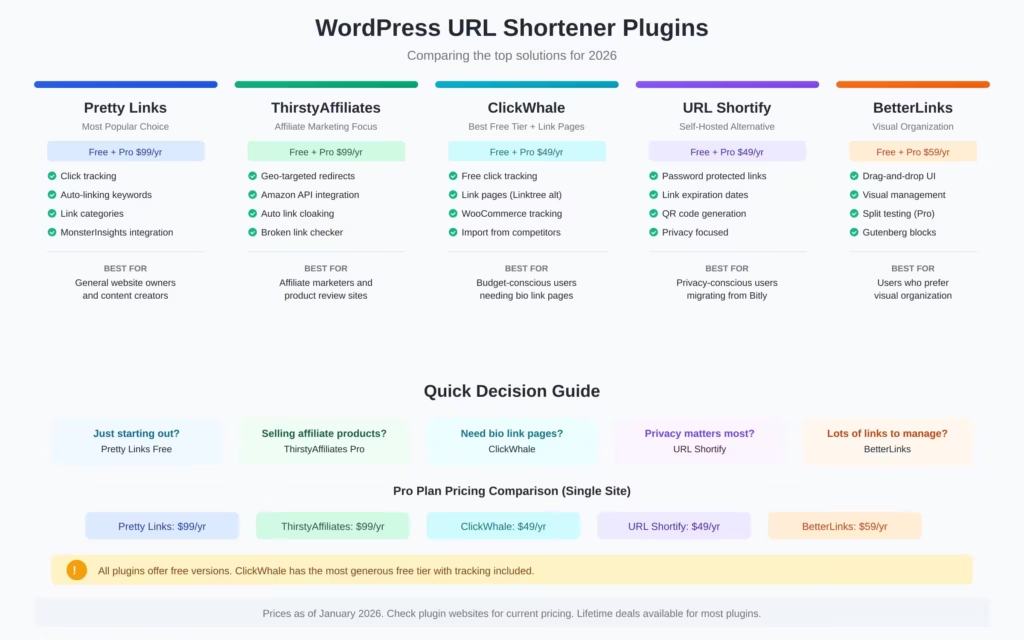
Here’s my framework:
| Use Case | Best Plugin |
|---|---|
| General URL shortening | Pretty Links (free) |
| Serious affiliate marketing | ThirstyAffiliates Pro |
| Simple, clean link management | ClickWhale |
| Visual organization priority | BetterLinks |
| Budget-conscious | Any free version works |
All these plugins use proper 301 redirects, so SEO impact is neutral. Pick based on features you’ll actually use, not theoretical capabilities.
External URL Shortening Services
Sometimes you need links that work outside WordPress. Maybe you’re shortening URLs from other sites, or you need QR code generation, or your company requires a centralized link management platform.
Bitly
Bitly is the most recognized URL shortener. It’s what people mean when they say “URL shortener” in a generic sense.
Free plan includes:
- 10 short links per month
- Basic click analytics
- QR code generation
- Browser extension
Paid plans:
- Core: $10/month (100 links, custom back-half)
- Growth: $29/month (500 links, custom domain)
- Premium: $199/month (3,000 links, advanced analytics)
The reality: Bitly has gutted its free tier. They used to be generous. Now you can barely do anything without paying. Existing free users have complained that old links now show ads or interstitials.
When Bitly makes sense: You’re a business that needs a recognized, enterprise-grade platform with compliance features, team collaboration, and detailed analytics. The cost is justified at scale.
When to skip Bitly: You’re an individual or small business. The free tier is too limited, and cheaper alternatives exist.
Rebrandly
Rebrandly focuses on branded links. Their pitch is that yourbrand.link/sale is more trustworthy than bit.ly/x7Kj2.
Key features:
- Custom domain support on all plans
- Team workspaces
- API access
- UTM builder
- QR codes
Pricing: Free plan with 10 links/month. Paid plans start at $13/month.
My take: If brand consistency matters and you’re willing to set up a custom short domain, Rebrandly is worth evaluating. The custom domain feature works on the free plan, which Bitly doesn’t offer.
TinyURL
TinyURL is the original URL shortener. It’s been around since 2002 and still works.
Free features:
- Unlimited link shortening
- No account required for basic use
- Custom aliases (if available)
Pro plan: $12.99/month adds analytics, branded domains, and link editing.
The appeal: TinyURL is simple and free for basic use. No account needed. Just paste a URL and get a short link. The tradeoff is minimal features and no tracking unless you pay.
Short.io
Short.io is a solid Bitly alternative with better free tier limits.
Free plan includes:
- 1,000 links
- Basic analytics
- Custom domain support
Paid plans start at $20/month for more links and advanced features.
My take: If Bitly’s free tier is too restrictive, Short.io is a reasonable alternative. The free tier is genuinely usable.
The Problem with External Shorteners
External services have fundamental issues:
Dependency risk. If the service shuts down, your links break. Google shut down goo.gl in 2019. Links stopped working.
Trust issues. Generic short domains (bit.ly, tinyurl.com) look suspicious. Users don’t know where they’re going.
No SEO benefit. Links through external shorteners don’t build your domain authority. You’re sending traffic through someone else’s domain first.
Cost at scale. Free tiers have strict limits. Meaningful use requires paid plans.
For WordPress users, plugins that create links on your own domain are almost always the better choice. External shorteners make sense when you need to shorten URLs from sites you don’t control.
Self-Hosted Solutions: YOURLS
YOURLS (Your Own URL Shortener) is an open-source PHP application that lets you run a complete URL shortening service on your own server.
What YOURLS Does
- Creates short links on any domain you own
- Provides detailed click statistics
- Offers a full API for automation
- Supports plugins for extended functionality
- Works independently or integrated with WordPress
Setting Up YOURLS
Requirements:
- PHP 7.4+
- MySQL/MariaDB
- A short domain (optional but recommended)
Installation:
- Download YOURLS from yourls.org or GitHub
- Upload to your server (subdirectory or subdomain)
- Create a MySQL database
- Configure
config.phpwith your database credentials - Run the install script
YOURLS can’t share a directory with WordPress. Use a subdirectory like /s/ or a separate subdomain like go.yoursite.com.
YOURLS WordPress Integration
There’s an official WordPress plugin that connects YOURLS to your blog:
- Automatically generates short URLs when you publish posts
- Adds a shortlink meta tag to your pages
- Can auto-tweet new posts with shortened URLs
The integration is stable but the plugin hasn’t been updated in years. It still works on current WordPress versions.
When YOURLS Makes Sense
YOURLS is ideal if you:
- Want complete control over your data
- Need a shortener for multiple properties (not just WordPress)
- Have technical skills to maintain a PHP/MySQL application
- Don’t want recurring SaaS costs
When YOURLS Doesn’t Make Sense
Skip YOURLS if you:
- Just need link management within WordPress (use a plugin)
- Don’t want server maintenance responsibilities
- Need a polished interface (YOURLS is functional, not pretty)
- Require enterprise support
For most WordPress users, plugins like Pretty Links are simpler. YOURLS is for people who specifically want to run their own URL shortening infrastructure.
SEO Implications of URL Shortening
This is where people get confused. Let me clear it up.
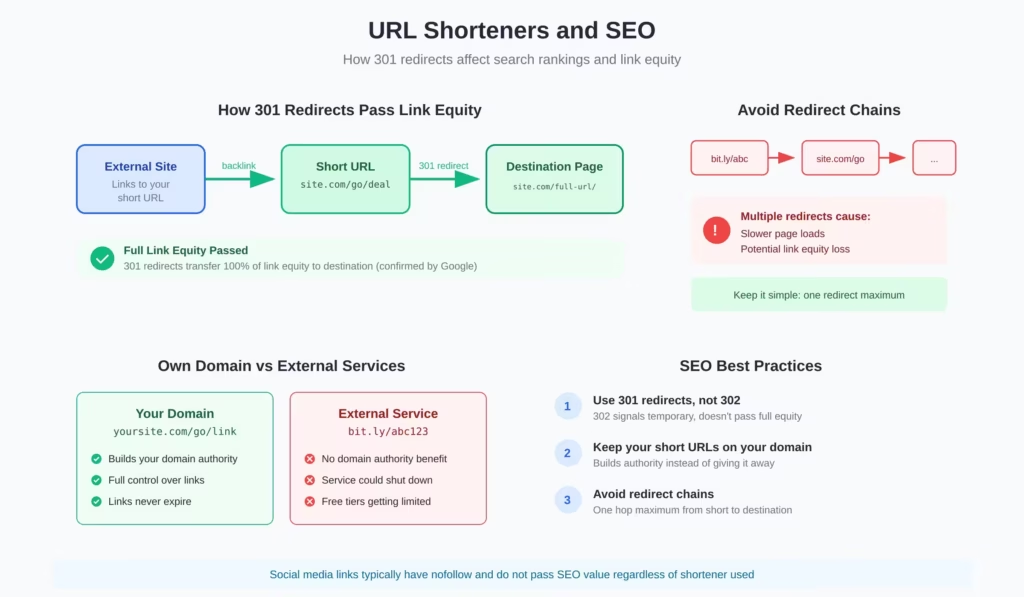
301 Redirects Pass Link Equity
All reputable URL shorteners use 301 redirects. Google confirmed years ago that 301s pass full “link juice” to the destination URL. There’s no penalty or ranking loss from using short URLs that properly redirect.
Matt Cutts (former head of Google’s webspam team) addressed this directly: URL shorteners using 301 redirects don’t hurt your SEO.
The caveat: the shortener must function correctly. If a service uses 302 redirects (temporary) or JavaScript redirects, that’s a problem. Stick with established services and plugins that use proper 301s.
Redirect Chains Can Be Problematic
If a short URL redirects to another short URL that redirects to your page, that’s a redirect chain. Each hop theoretically loses a small amount of link equity.
Best practice: avoid chaining. Your short URL should go directly to the final destination.
Your Domain vs External Domains
When you use a plugin like Pretty Links, the short URL is on your domain. The redirect happens internally. This keeps all link equity within your site.
When you use an external service like Bitly, the short URL is on their domain. Technically, the link goes bit.ly > your site. This adds a hop but doesn’t significantly hurt SEO for well-known shorteners.
For backlinks and link building, using your own domain is preferable. For social sharing and convenience, external shorteners are fine.
Social Links and nofollow
Most social media platforms add rel="nofollow" to links. This means social links don’t pass SEO value regardless of whether they’re shortened.
URL shortening on social platforms is about click-through rates, not SEO. A clean yoursite.com/offer looks better than a long URL with UTM parameters.
Best Practices for SEO
- Use 301 redirects. All major plugins and services do this by default.
- Avoid redirect chains. Short URL > final destination, nothing in between.
- Prefer your own domain. Plugins beat external services for SEO purposes.
- Don’t over-optimize. Short URLs are for convenience, not manipulation.
Practical Recommendations
After 16 years of managing WordPress sites, here’s my actual advice:
For Personal Blogs
Use WordPress’ native ?p= shortlinks for quick sharing. They’re free, always work, and don’t require any setup.
If you want nicer URLs, install Pretty Links (free version). Create branded links for your important posts.
For Business Sites
Install Pretty Links or URL Shortify. Create consistent short URLs for:
- Marketing campaigns (track click performance)
- Print materials (memorable URLs people can type)
- Email signatures
- Social media bios
Use your domain, not external services.
For Affiliate Marketers
ThirstyAffiliates is worth the investment. The geo-targeting and auto-linking features pay for themselves quickly. The Amazon integration is particularly valuable if that’s a major revenue source.
Pretty Links Pro is a solid alternative if you want more general-purpose features.
For Podcasters and Content Creators
Memorable URLs matter when you’re speaking to an audience. Create short URLs like:
yoursite.com/sponsor(for sponsorship inquiries)yoursite.com/listen(for podcast platforms)yoursite.com/episode100(for specific episodes)
Pretty Links handles this perfectly. Set up links before you record so you can mention them naturally.
For Agencies and Enterprises
Consider YOURLS if you need a centralized shortening service across multiple client properties. Otherwise, deploy plugins on individual sites.
Bitly or Rebrandly make sense only if you need team collaboration features, compliance requirements, or integration with enterprise marketing stacks.
What to Avoid
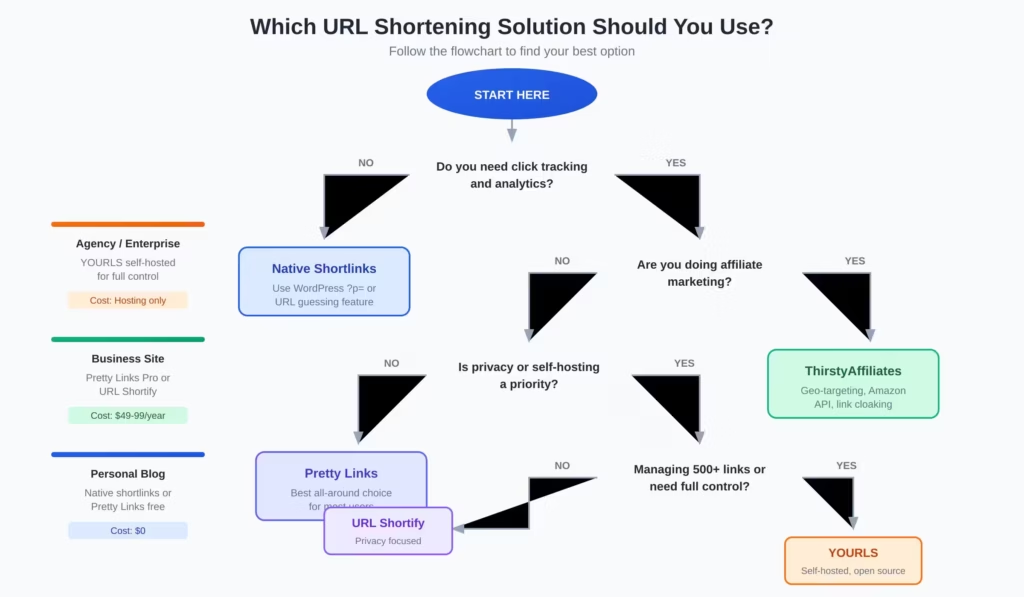
A few things I’ve learned not to do:
Don’t use obscure shortening services. Stick with established options. Unknown services can disappear, get flagged as spam, or inject malware.
Don’t shorten already-short URLs. If your permalink is yoursite.com/contact/, shortening it is pointless.
Don’t create redirect chains. bit.ly > tinyurl > yoursite.com is three hops when one would do.
Don’t ignore broken link monitoring. If destination URLs change, update your short links. Dead links damage user trust and waste clicks.
Don’t overthink SEO. URL shortening is a convenience feature, not an SEO strategy. Proper 301 redirects are fine. Move on.
FAQs
What is WordPress native URL shortening?
WordPress has a built-in shortlink system using the ?p= parameter followed by your post ID. For example, yoursite.com/?p=2319 automatically redirects to the full permalink. Every post and page gets this shortlink automatically. You can find it in the editor or by using the wp_get_shortlink() function.
How does WordPress URL guessing work?
WordPress can match partial slugs to full URLs. If you type site.com/derivative/ and you have a post with the slug /derivative-calculus-guide/, WordPress will redirect to the full URL. When multiple posts match the same partial slug, WordPress picks alphabetically. This feature works on both WordPress.com and self-hosted sites.
Do URL shorteners hurt SEO?
No, properly configured URL shorteners do not hurt SEO. When you use 301 redirects, Google passes full link equity to the destination URL. The key is using 301 (permanent) redirects instead of 302 (temporary) redirects, and avoiding redirect chains where one short URL redirects to another short URL before reaching the destination.
Which WordPress URL shortener plugin is best?
It depends on your needs. Pretty Links is best for general use with click tracking and auto-linking. ThirstyAffiliates is ideal for affiliate marketers with geo-targeting and Amazon API integration. URL Shortify works well for privacy-conscious users migrating from Bitly. BetterLinks offers the best visual interface for managing large numbers of links.
Should I use Bitly or a WordPress plugin for short URLs?
A WordPress plugin is usually the better choice. Bitly has gutted its free tier to just 10 links per month, and using external services means your backlinks build their domain authority instead of yours. With a plugin like Pretty Links or URL Shortify, your short URLs stay on your domain, you have full control, and your links never expire if the service shuts down.
What is YOURLS and when should I use it?
YOURLS (Your Own URL Shortener) is a free, open-source PHP application that lets you run your own URL shortening service. It requires a server with PHP and MySQL. YOURLS makes sense for agencies managing multiple client sites, enterprises needing complete data control, or anyone managing thousands of links who wants to avoid per-link pricing from commercial services.
How do I find my WordPress post ID for native shortlinks?
There are four easy methods: Check the URL while editing a post (look for post=ID in the address bar). Hover over the post title in the Posts list and check your browser status bar. Use the PHP function wp_get_shortlink() in your theme. Or view the page source and look for the rel=u0022shortlinku0022 tag in the HTML head section.
What are reserved slugs I should avoid in WordPress?
WordPress reserves certain slugs for core functionality. Avoid using these as short URL prefixes: /wp-admin/, /wp-content/, /wp-includes/, /category/, /tag/, /author/, /feed/, /page/, /comments/, and /trackback/. Using these can cause conflicts with WordPress core features or break your site navigation.
Summary
WordPress offers native shortlinks via the ?p= parameter and URL guessing through partial slug matching. These are free and work without plugins, but they’re limited.
For most WordPress users, a plugin like Pretty Links (free) provides the best balance of features and simplicity. Create branded short URLs on your own domain with click tracking.
Affiliate marketers should look at ThirstyAffiliates for its specialized features. The geo-targeting and Amazon integration justify the cost.
External services like Bitly are best reserved for enterprise use cases or when you need to shorten URLs from sites you don’t control.
YOURLS is the power-user option for running your own infrastructure.
The SEO impact is negligible with proper 301 redirects. Focus on what makes links easier to share and track, not theoretical ranking implications.
Pick one solution. Set it up. Use it consistently. The best URL shortening strategy is the one you actually implement.
Disclaimer: This site is reader-supported. If you buy through some links, I may earn a small commission at no extra cost to you. I only recommend tools I trust and would use myself. Your support helps keep gauravtiwari.org free and focused on real-world advice. Thanks. - Gaurav Tiwari

Thanks For Such nice information sir, i will follow it
You are welcome, Ankur! Leave another comment if you have any questions or troubles.
Good job Gaurav. I didn’t think we could get rid of the date in the slug, so that is interesting – I’ll have to try that!
Hi Robyn! Thanks for liking the post. Eliminating date is a good idea for all WordPress.com blogs but looks awesome to those who have own top-level-domain like you and TT. teamoyeniyi.com/something for any post!!— Looks great in my view.
@Gaurav Tiwari
Thanks so much for this useful tutorial. I have done a Press This so my regular readers like Team Oyeniyi will click through and find it.
Thank you very much TimeThief, for your support in both preparation and promotion of this post! (BTW PressThis links to homepage, not to the permalink.)
Thanks for detailing this so clearly, nice work! I have often wondered what a slug was. I remember that thing about the dates, and that you are supposed to take them out if you link to old posts in a new post as well, but I don’t always remember to do it. I am very grateful to you :)
I am also grateful to you that you gave your precious time to this post. :)
Thats a great tip Gaurav. I found a url shortining service that you and your readers might find useful as well for link shortning at http://www.dot.tk where you can setup an unlimited amount of url’s, associate an email address with them, setup email only addresses and much much more.
If you have a blogpost you really want to highlight, promote and make easy to remember you might give them a look as well, I’ve been using there service for a long time now and have found it to be a reliable and useful service.
cheers.
Completely amazing Gaurav! Its like WordPress just got better for me :)
BTW – PressThis links to whatever post or page you Press it on ;)
Thanks for your Reply Manveet. WordPress is great and its pseudo-features are amazing. :) More you use them—the more you discover.
just put ?p=123 (123 being the post id).
On WordPress.com and if you wrote thousands of posts, it becomes complicated to remember the post IDs.
Interesting post. Me, a beginner, I don’t really understand “slugs.” By eliminating the date on wp.com links, I can see that it makes it easier to tell others how to find a specific post. So making the link even shorter and simpler makes it easier to tell someone how to find one of your posts?
I write about Japanese cooking and most of my friends can’t even remember the link to my blog unless I email it to them. Sorry if I’m being dense here. (I know I am…)