


2.18.0 is out, and the big change is payments. GT Extensions now has its own Stripe and PayPal gateways, so you can take cards and PayPal with your own keys instead of going through FluentCart’s Connect relay.
Both stay off until you turn them on, so updating changes nothing at your checkout.
GT Stripe
- Cards, Apple Pay, Google Pay and Link with your own Stripe keys.
- Apple Pay, Google Pay and Link buttons on product pages, the cart and the checkout, for carts without shipping.
- Your domain is registered for Apple Pay when you save the settings.
GT PayPal
- Smart Buttons with Pay Later, using your own PayPal REST app. It sits beside FluentCart’s own PayPal.
- Capture right away, or authorize first and capture when the order moves to Processing.
What both of them do
- Subscriptions renew on the saved card or PayPal account, including after a free trial. FluentCart charges each renewal through store-managed billing, so you don’t need FluentCart Pro for it.
- Refunds go back from the order screen. A refund you make in Stripe or PayPal shows up in FluentCart too.
- The webhook is created when you save the settings on a public HTTPS site, and every delivery is checked. A payment for the wrong amount or currency is held instead of confirmed.
- You can duplicate either one for a second account, the same way Polar, GT Paddle and Dodo Payments work. Each copy keeps its own keys, webhook, customers, saved cards and payments.
Every GT gateway also has a logo with its name in it now. Some of the old icons didn’t mean much if you hadn’t seen them before. GT gateways carry a GTFC badge, and FluentCart’s own Stripe, PayPal and Paddle get a “FluentCart” badge, so you can tell them apart on the Payments screen.
Also in 2.18.0
- Staging guard. A staging, local or migrated copy of your store no longer emails customers or acts at your payment providers until you confirm it’s the live store. A site set to production, which is WordPress’s default, records itself as live when it updates, so nothing changes there.
- Buy Links. Signed links put up to 20 products and coupons in a fresh cart and open checkout. They can expire, and you can revoke them all at once. You’ll find them under FluentCart → Buy Links.
- FluentCRM. Triggers for invoices, quotes, affiliates and back-in-stock alerts, smart codes such as
{{gtfc.invoice_url}}and a GT Extensions panel on each contact. - Recurring invoices. An invoice that fails to save, issue or email now retries instead of losing its billing period, and the same invoice is never emailed twice.
Setting up the new gateways
- Update GT Extensions from your Plugins screen.
- Go to FluentCart → GT Extensions → Payment Gateways and tick GT Stripe or GT PayPal.
- Connect it under FluentCart → Settings → Payments, with your test keys first.
I’d run a few test-mode orders, including a renewal, before you switch your live checkout over. If anything looks off, post it here with the gateway name and what you saw.
The full changelog is on the GT Extensions for FluentCart page.
Checkout Enhancements: shorter checkout for free and digital orders
(Everything is configurable)
Free digital products no longer ask for the business checkbox, VAT number, country, state or currency. Paid digital products skip the country and state. Both stay visible while FluentCart's own tax is on, because tax is worked out from them. A cart with anything that ships, physical products, keeps every field. The country is still saved on every order: the one already in the cart, then the buyer's location from Cloudflare, then FluentCart's own value, then your store country. If none is known, the country field shows as usual. The coupon box is hidden when the products in the cart are free. When the order total is zero, the Place order button reads "Get it for free". The text is editable. Each of these has its own switch under FluentCart → Checkout enhancements → Shorter checkout for free and digital orders. All are on by default wherever Checkout Enhancements is enabled.
Sold Count Display
New Count multiplier: the badge shows the real count times the multiplier, rounded up (12 sold × 6.32 shows 76), up to 100×. It stays at 1 until you change it. Use it wisely. It maybe illegal but who knows. 😉
Admin
The Modules list can be sorted by name, A to Z or Z to A.
Developers
gtfc/multi_currency/checkout_selectorhides the checkout currency picker for a cart.gtfc/extra/hidden_countrychanges the country sent for a hidden country field.
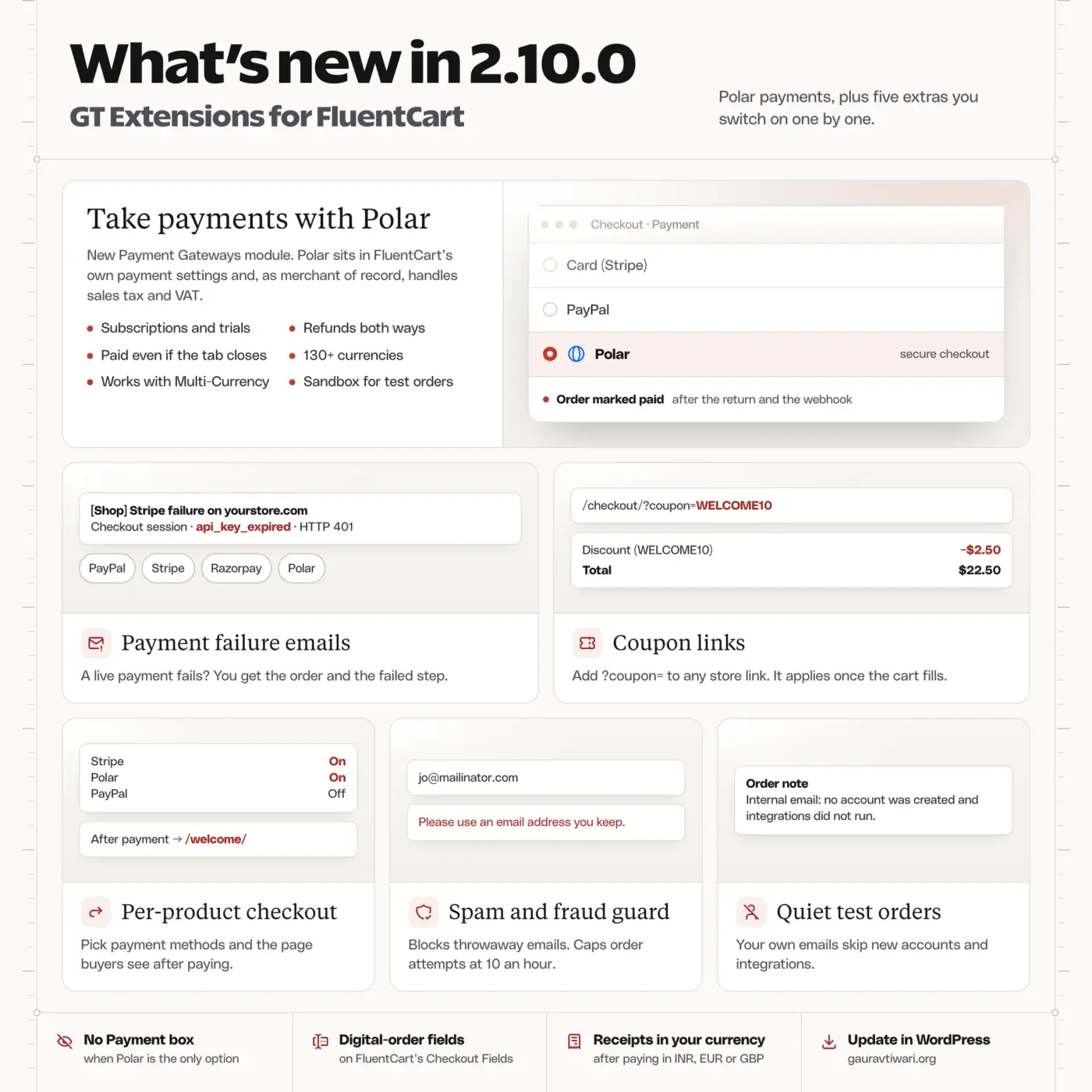
GT Extensions for FluentCart 2.10.0 released. It adds three new modules with dozens of new features and improvements to Checkout Enhancements module.
NEW:
- Payment Gateways module. Adds Polar for now. Working on DodoPayments next. Completely native experience.
- Payment failures notices - so that you know when a payment provider cheats on you due to some HTTP or API error.
- Coupon links → add coupon=COUPON_CODE in URL to automatically apply the coupon. Big for affiliate marketers and Black Friday sales. No more copying and pasting the coupon codes
- Per product checkout modules lets you redirect users to certain page after checkout. Create for selling community memberships, digital assets, and courses.
- Spam and Fraud Guard lets you block temporary and spammy emails from checkout. Totally configurable.
- Don't create new accounts for certain emails or domain names. Great for testing and personal needs.
GT Extensions for WooCommerce is coming soon.
GT Extensions for FluentCart 2.9.0 is out, and the big one is recurring invoices. Issue an invoice once, choose Repeat this invoice, and it bills your client every week, month or year with its own number and payment link each time. No more remembering the retainer invoice on the 1st.
What's new
- Recurring invoices. Every 1 to 12 weeks, months or years, ending never, after a number of invoices or on a date. Each new invoice is emailed, or saved as a draft if you'd rather check it first. A schedule on the 31st falls on the last day of shorter months. Invoices → Recurring lists them all, with pause, resume and stop.
- Deposits. Ask for a percentage or a fixed amount first on digital and service invoices and quote proposals. Once the deposit is paid, the balance invoice is issued and emailed on its own. Deposit plus balance always add up to the full total and tax.
- Reminders from the due date. Up to four automatic reminders before, on and after the due date, with a separate overdue message. You can switch them off for one client. Proposals can also get one reminder before they expire.
- A /store skill for AI agents. Through Site Agent, an agent can now report sales per currency, look up orders, check who's waiting on a back-in-stock item, update product details and manage page access. It asks before it changes anything.
- Dark mode now reads properly on the Product details card, the invoice and quote screens and the order view.
One fix you should know about
In 2.8.x, if you had automatic reminders on, only one unpaid invoice at a time actually got its reminder. Back-in-stock emails for several products could also queue just the first product. Both are fixed for everything you issue from now on. If a client should have had a reminder before the update and didn't, use Send reminder on that invoice.
New lessons
- Send Automatic Invoice Reminders
- Bill Clients on a Schedule with Recurring Invoices
- Take a Deposit Before the Full Invoice
- Run Invoices, Quotes and Your Store with AI Agents
Update from Plugins → Installed Plugins, or download it from your account. Recurring invoices and deposits need FluentCart 1.6.4 or later.
If something breaks, or a schedule does something you didn't expect, reply here with what you saw. I'd rather hear it today than find out on the 1st.
I've released GT Extensions for FluentCart 2.8.0 on October 5 with two new modules, Checkout Enhancements and Product Enhancements. The first one gives every order a record of the consents the customer accepted and puts their checkout answers back in front of you after the purchase. The second adds a product details table that fills itself in from what FluentCart already knows about the product.
You can update right away. Both modules stay off until you turn them on, so the update changes nothing on your storefront except a Checkout Builder fix for ticked checkboxes.
Checkout Enhancements
FluentCart's checkout gives you one terms checkbox and applies the same address fields to a download as to a parcel. Custom checkout answers also disappear from view once the order is placed. This module handles all of that from one screen. Turn it on under FluentCart → GT Extensions, then set it up under FluentCart → Checkout enhancements.
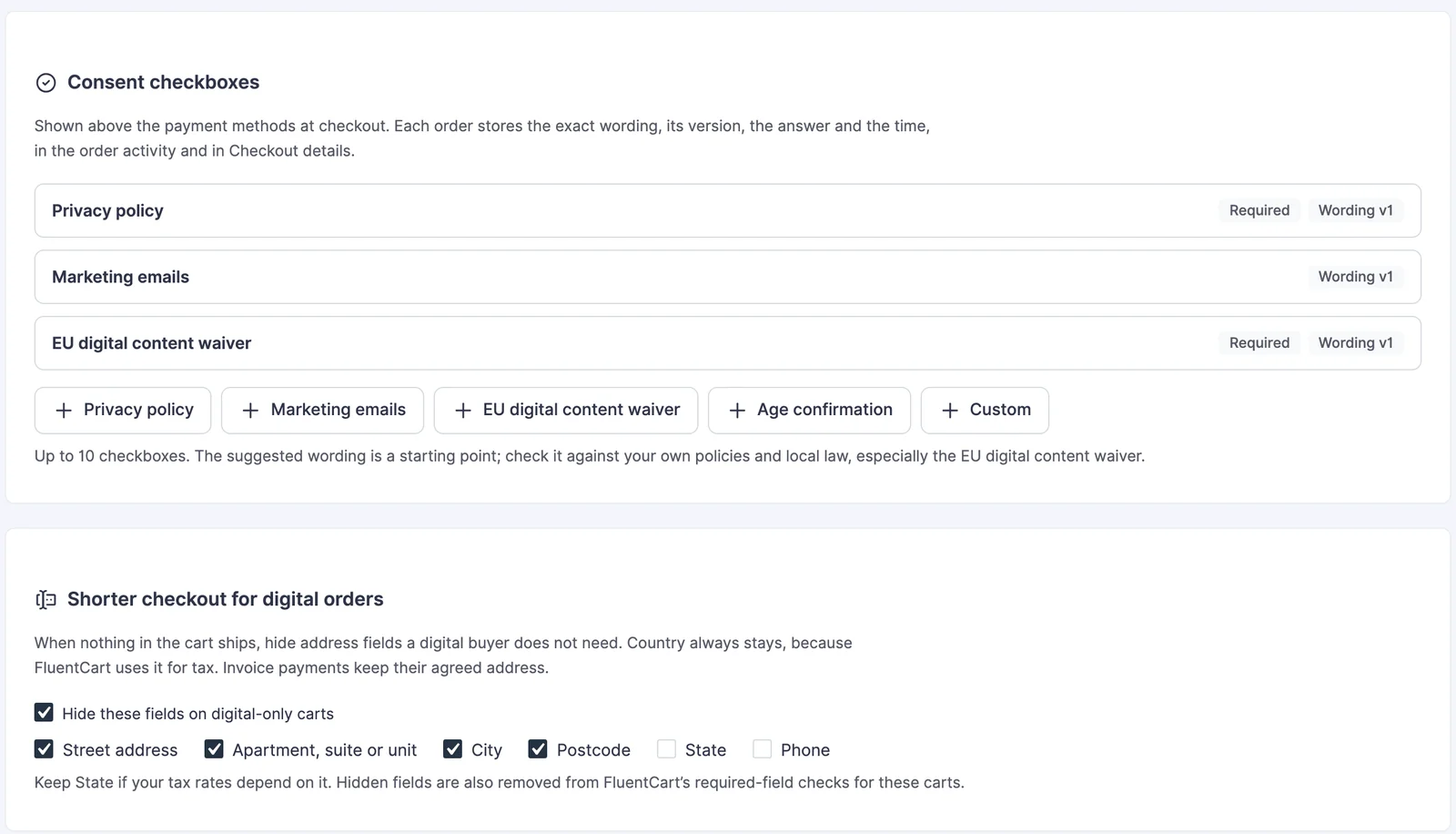
Consent Checkboxes
You can add up to 10 checkboxes above the payment methods. Each type starts with suggested wording that you can edit:
- Privacy policy: required, linked to your policy page.
- Marketing emails: optional and never ticked in advance.
- EU digital content waiver: required on digital-only carts. The buyer agrees that the download starts now and that they give up the 14-day withdrawal right.
- Age confirmation: required.
- Custom: your own wording, with links, bold and italic.
Every checkbox can be required or optional, and you choose where it shows: all carts, carts with physical items, digital-only carts or carts with one specific product.
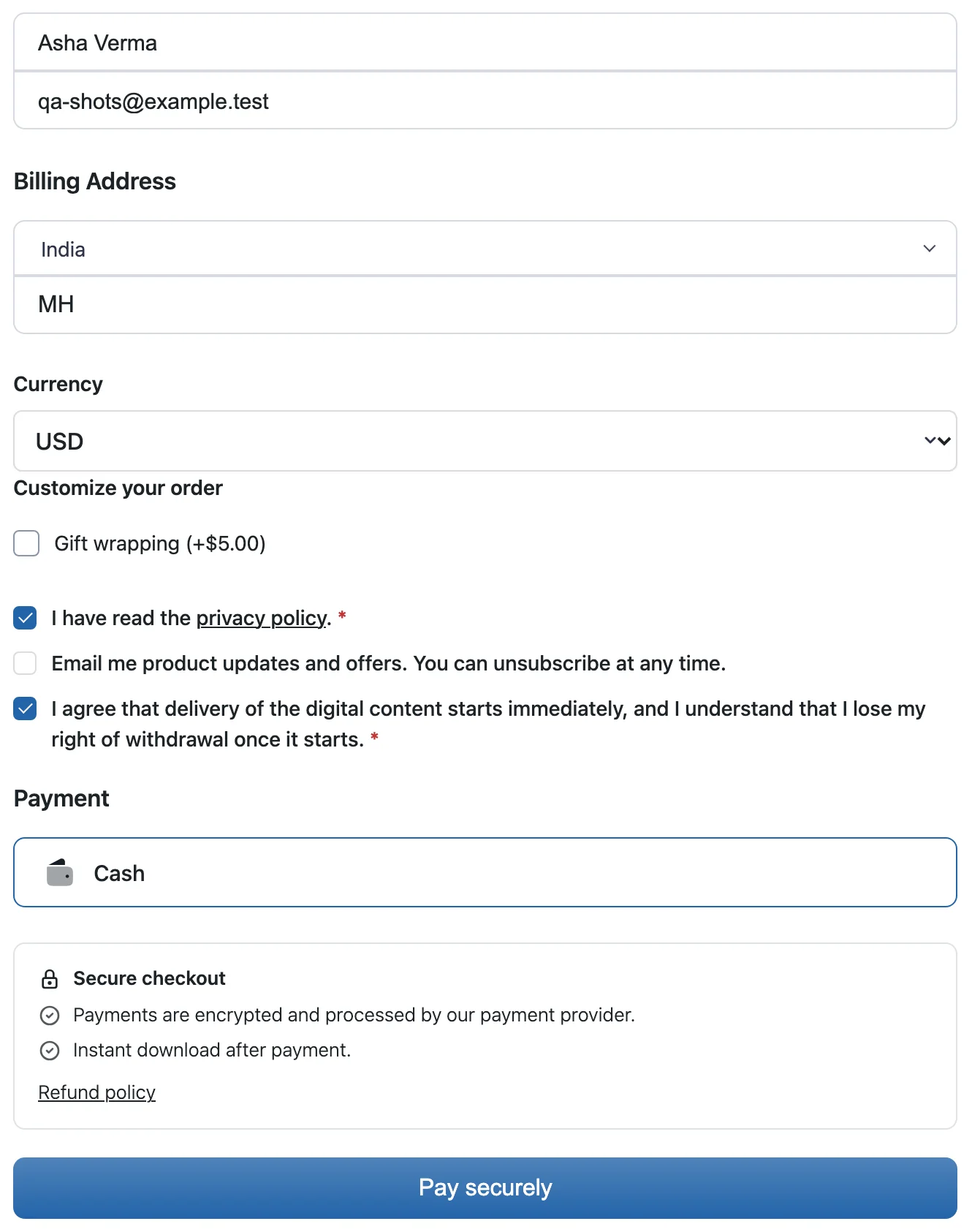
The part I care about most is the record. Every order keeps the exact wording the customer saw, its version, whether the box was ticked and the time, both in the order activity and in the order's checkout details. When you edit the wording later, it becomes a new version, so older orders still show the text their customers actually agreed to.
A missed required box shows a message right under it. The server refuses the order as well, so a browser that skips the page's script can't skip the consent.
Shorter Checkout for Digital Orders
When nothing in the cart ships, you can hide any of these fields:
- street address
- apartment, suite or unit
- city
- postcode
- state
- phone
Country always stays, because FluentCart uses it for tax, and so do the name and email fields. The hidden fields also drop out of FluentCart's required-field checks for those carts, so a field you marked required for parcels doesn't block an ebook order.
Keep State visible if your tax rates depend on it. Invoice payments always show every field, since an invoice can carry an agreed address.
Checkout Wording
You can rename:
- the checkout fields, from name and email to postcode and phone
- the billing and shipping address headings
- the create account and different shipping address checkboxes
- the order note heading and its placeholder
- the Place order button
A renamed field keeps its new name in the required-field error too. A store that calls Postcode "PIN code" gets "PIN code is required." instead of a message that mixes both names. The button also keeps your text after a failed payment attempt, where FluentCart would otherwise switch it back to Place Order.
Trust Block
The trust block sits below the payment methods, where people decide whether to pay. It takes:
- a heading
- up to 6 short lines
- an image of the payment methods you accept
- a link to your refund policy page
Keep every line true for your store. A logo for a gateway you don't offer misleads the customer at the exact moment they are about to pay.
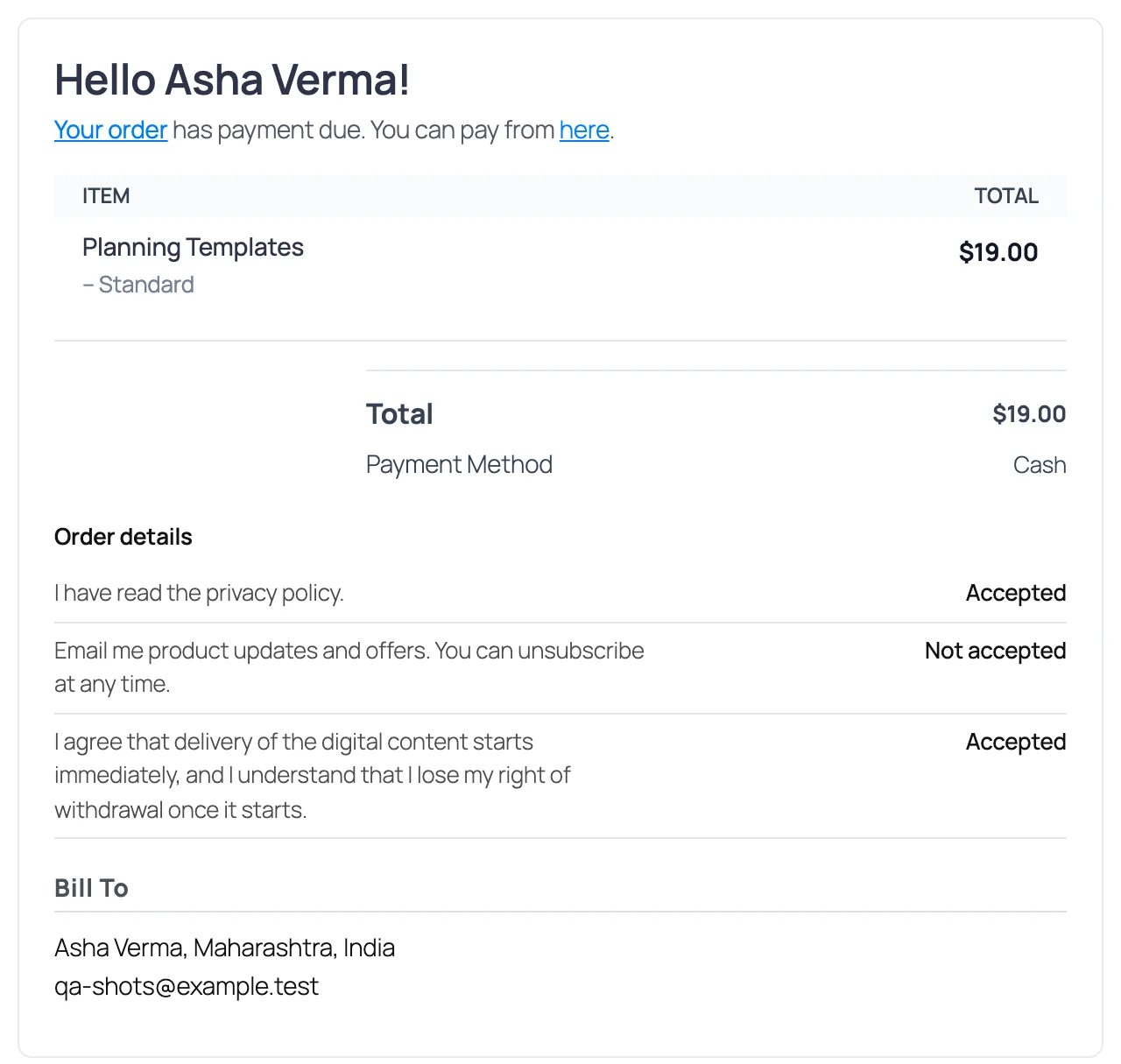
Checkout Details After Purchase
These checkout answers now show up again after the purchase:
- the order note
- Fields & add-ons answers
- the delivery or pickup slot
- the consents, as Accepted or Not accepted
You'll find them in 4 places:
- on the thank-you page
- on the customer's order page in their account
- in a Checkout details panel on the admin order screen
- in any FluentCart email where you add
{{order.gtfc_checkout_details}}
This part is on by default. Without it, custom field answers and the delivery slot lived only in the order activity, where customers never saw them again.
Product Enhancements
Shoppers want the plain facts before they buy, like the weight of a parcel or the file format of a template pack. FluentCart has no place for those, so they usually end up buried somewhere in the description. Product Enhancements adds a Product details card to the product editor and prints a clean specifications table after the description.
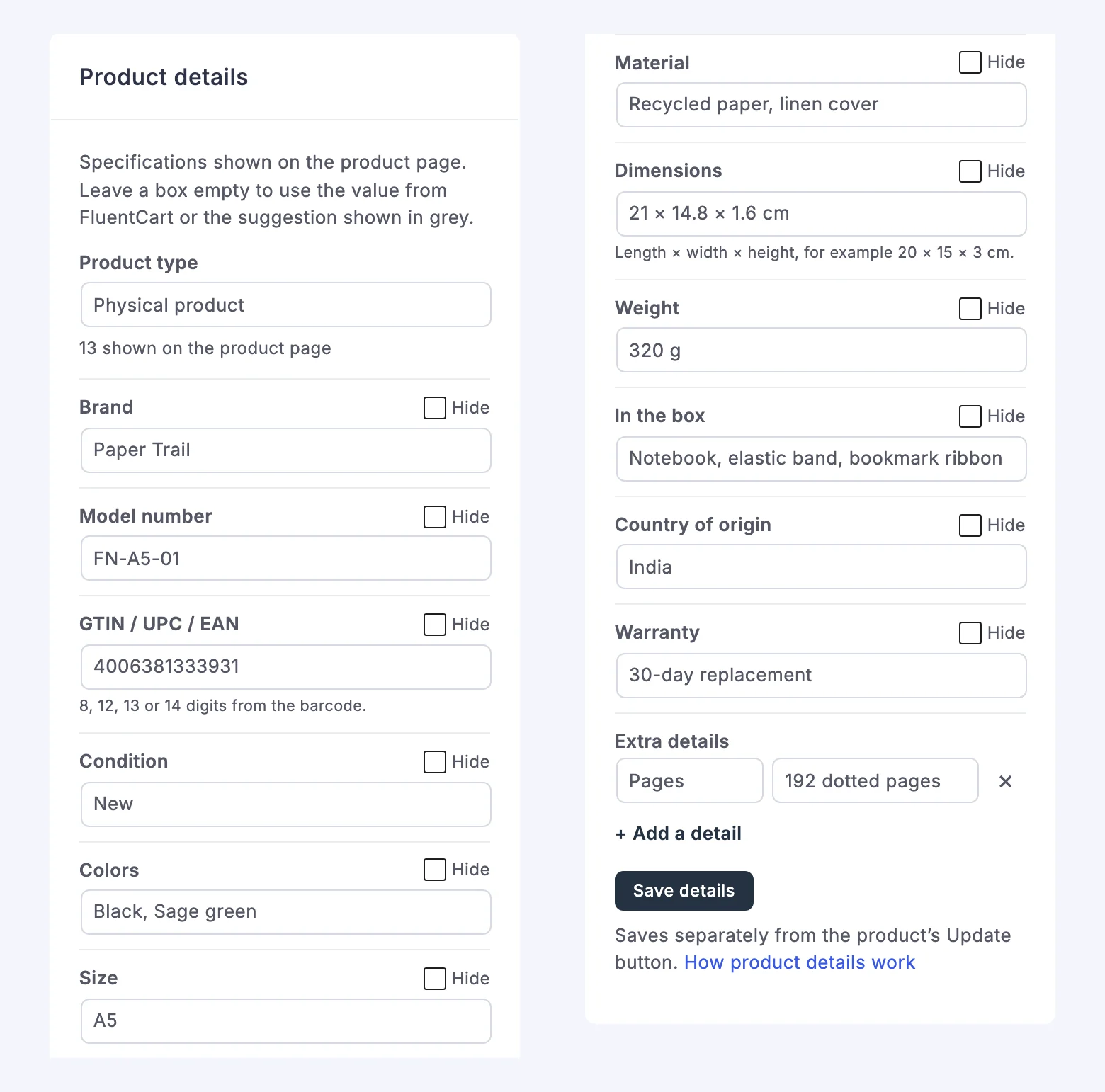
Product Types
Pick a product type and the card shows the fields that fit it:
- Physical product: brand, model number, GTIN, condition, colors, size, material, dimensions, weight, what's in the box, country of origin and warranty.
- Digital download: file type, file size, files included, pages, version, last updated, requirements, license and delivery.
- Book or ebook: author, publisher, publication date, edition, language, pages, format, ISBN-13 and ISBN-10, plus file and shipping details.
- Software or plugin: version, last updated, requirements, what it works with, license, sites or devices, support, updates, documentation and a live demo link.
- Course or service: duration, format, level, language, what's included, access, delivery time and location.
- Custom details only: no preset fields, just your own rows.
The card suggests a type from the product itself, so a service product opens as Course or service and a download opens as Digital download. You can add up to 20 extra rows with your own labels on any type.
Values Filled In From FluentCart
Fields marked From FluentCart fill themselves in:
- the brand, from the product's brand
- weight and dimensions, from each option's shipping details
- file type, file size, number of files and last updated date, from the product's downloads
- language, from your site language
You can type over any of them or keep one off the page with its Hide toggle. Barcodes and ISBNs are checked before they save. Enter either ISBN and the other one is worked out for you, except for ISBNs starting with 979, which have no ISBN-10.
Different Details for Each Option
Tick Different for each option under any field to give every option its own value. The table starts on the option FluentCart selects by default and switches when the customer picks another one.
Where the Table Shows
The table goes after the product description on both classic and block themes. If you'd rather place it yourself, choose the block-and-shortcode placement in the module settings and use the Product Details block or [gtfc_product_details]. Either way, it never prints twice on one page.
The same details go into FluentCart's product structured data:
- brand, GTIN, model number, color, material, size, country of origin, weight, dimensions and condition use their own properties
- every other detail becomes an additional property
- hidden details and per-option values stay out
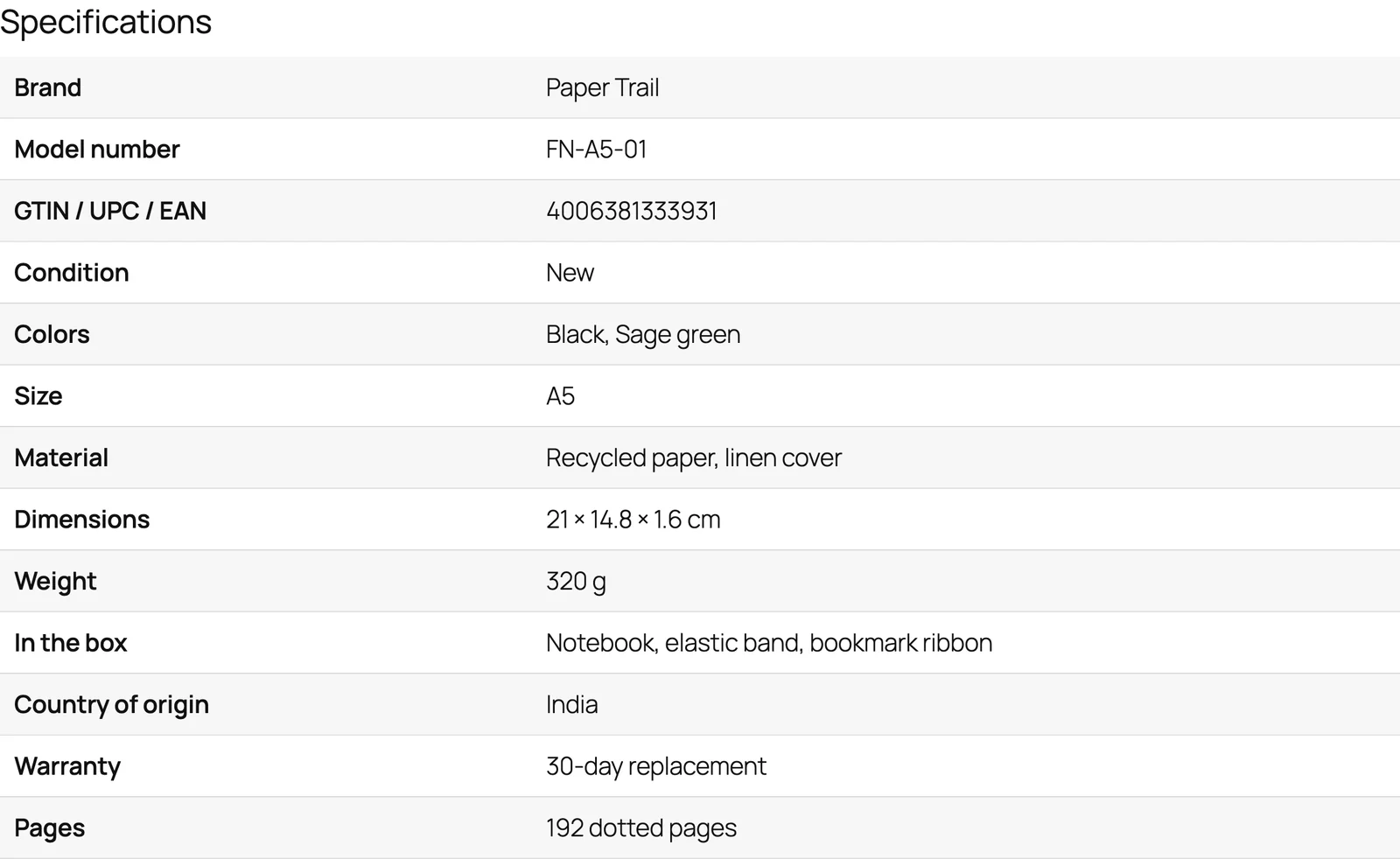
Tables Show Only After You Save
I changed this one after testing on this store. The first build showed a table on every product, filled from FluentCart's data, the moment the module was turned on. On gauravtiwari.org that meant all 75 published products would get a table at once, and some of the filled-in values were wrong for the context. GT Extensions itself would have said "Files included: 6", because every older version's ZIP still sits in its downloads.
So a product now shows its table only after you save its details once. Until then the card says the details are not on the product page yet, which gives you a chance to check what FluentCart filled in before customers see it.
Tested on gauravtiwari.org
Before releasing, I ran 2.8.0 on gauravtiwari.org, and my own theme found two problems that the test store didn't:
- Invisible ticks: my theme sets the background of every checkout input with
!important, which hides FluentCart's drawn checkmark. Consent checkboxes now use a native checkbox in your checkout's accent color, so a ticked box stays visible on themes like mine. - Consents at the top of the form: my block checkout orders its sections with CSS, and the consents jumped above everything else. The consents and the trust block now take the payment block's position, so they sit right beside the payment methods.
The privacy policy checkbox is live on this store's checkout now. Product Enhancements is on too, but no product here shows a table yet, because I haven't saved details on any of them.
Other Fixes
- Checkout Builder: ticked checkboxes, the selected shipping method and saved address labels were white on white in every Checkout Builder layout since 2.6.0, and that included FluentCart's own terms checkbox. They now use the layout's accent color.
- Documentation: both modules link to their new course lessons from inside the plugin.
The Limits
- The marketing checkbox records the answer but subscribes nobody. A developer can pass it to an email tool through the
gtfc/checkout_consentsaction. - The suggested consent wording is only a starting point. Have the waiver and privacy wording checked for your store.
- The email smartcode shows up only in templates where you add it. Existing emails don't change on their own.
- File counts and sizes come from every download attached to the product, older versions included, so review them before the first save.
- Book details such as author and pages go into structured data as product properties. There is no separate Book schema yet.
- I've tested the consents on the full checkout page and on Checkout Builder layouts. The modal checkout uses the same hooks, but I haven't checked it on a live store yet.
How to Update
You can update from WordPress Dashboard → Updates with your GT Extensions license active. Both modules need FluentCart 1.6.4 or later and stay off after the update, so turn them on under FluentCart → GT Extensions when you're ready.
The two new lessons walk through every setting:
If something looks off on your theme after you turn them on, reply here with a screenshot of the checkout or product page and I'll look into it.
Pushed a quality‑of‑life improvement update to GT extensions for FluentCart. It fixes the hide‑price‑until‑login module improvements.
Nothing big in it for now, but I will be releasing 2.7.0 when Fluent Cart 1.7.0 releases to maybe make their reviews experience better.
Please update to 2.6.5. It is available now. Also check for new videos on my YouTube channel.
I've released GT Extensions for FluentCart 2.6.3 to fix an admin currency mix-up. If your store currency was USD and your browser had an INR visitor cookie, FluentCart's settings screen could show INR after you saved USD. The admin screen now reads the store currency while visitors can still select a storefront currency.
The recent 2.6 releases also added 6 invoice layouts, editable unpaid invoices and more useful back-in-stock filters. If you issue invoices, you can preview a layout before creating one and choose a different layout for an individual invoice.
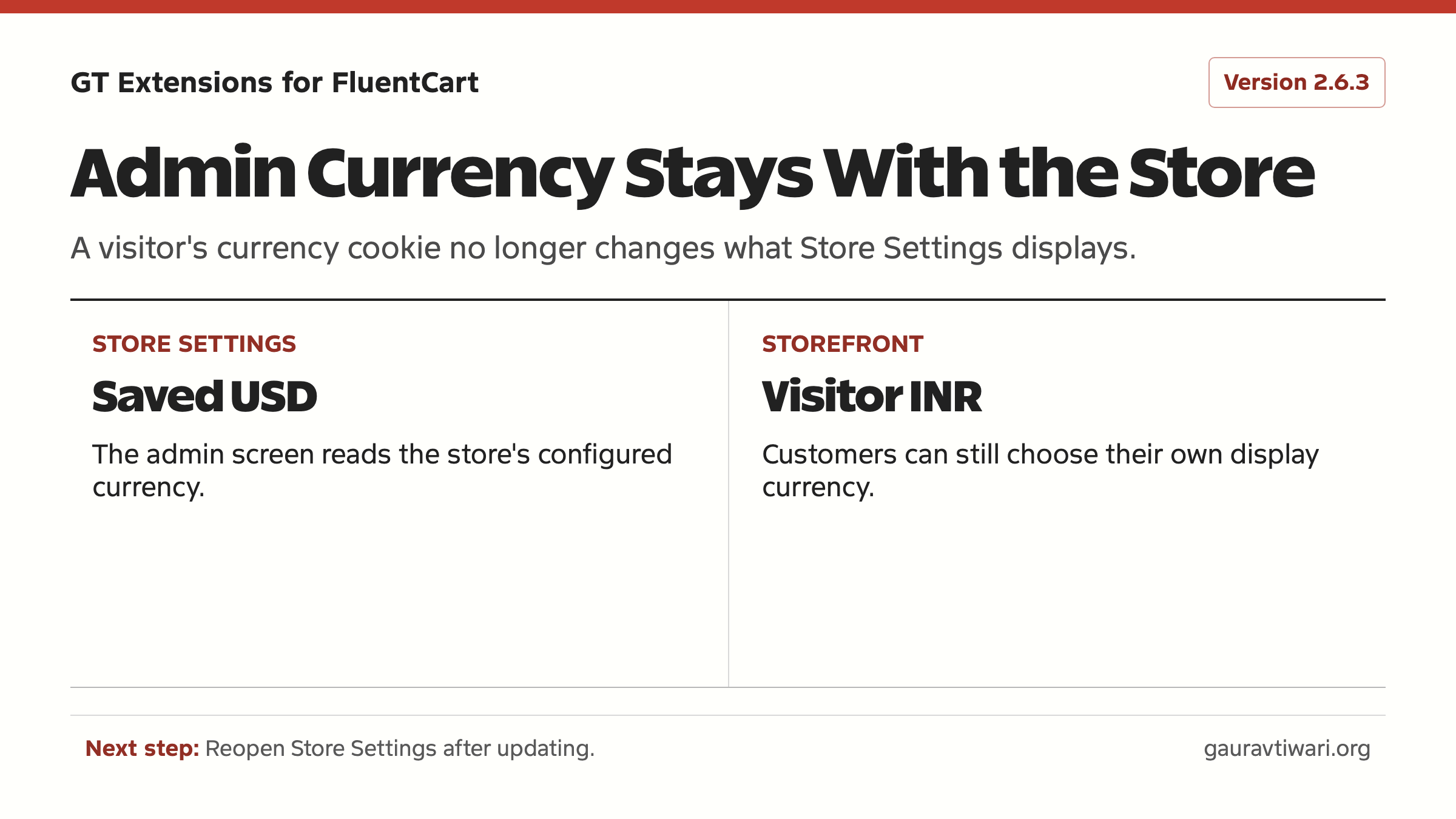
Update through the licensed plugin updater, then reopen Store Settings to check your saved currency. The public changelog has the 2.6.3 details. Tell me if your admin screen still shows the wrong value.