


MailerHive turns a MailerPress newsletter into a publication on your own WordPress site. MailerPress keeps sending the emails and holding your contacts, and MailerHive gives every issue a page, an archive, a proper newsletter page and, if you want to charge for it, paid tiers that live as MailerPress lists.
I built it while moving my own newsletter, From the Workbench, from Substack to MailerPress. MailerPress is a very good sender but it has no public archive, no reading page and nothing for paid subscribers. MailerHive fills that gap, and every issue I had sent on Substack now lives on gauravtiwari.org.
MailerHive is free. You can get it, with a free license for automatic updates, from the MailerHive product page, and the code is on GitHub. This space is where updates, questions and setup help for it will live.
Your Issues, Published on Your Site
Every issue gets its own page at /newsletter/issue/{slug}/, with an archive grouped by year and an RSS feed. The reading page is designed to look like the email it was:
- its own header and footer, with your logo or avatar, byline and accent colors
- light and dark mode that follows the reader's system, with a toggle
- reading time, date and previous and next issue links
- a signup box under every issue
Your theme's styles and scripts stay off these pages, so a heavy theme can't get in the way of reading. Rank Math, your form plugin and the rest of your plugins keep working on them.
The newsletter page itself gets the same treatment. It shows your signup form, your recent issues and then whatever you write on that page in the block editor, including FAQ accordions. MailerPress's unsubscribe and manage-subscription pages render in the same design, so a reader never lands on a page that looks like a different site.
A few smaller things that I wanted for my own newsletter:
[mailerhive_issues]lists your recent issues anywhere on the site.- External links inside issues can get
nofollowautomatically. - Rybbit analytics can run on these pages, and there's a box for extra CSS.
Writing and Sending
There are two ways to write an issue, and MailerHive handles both.
You can write it in WordPress, like a post. When you publish, MailerHive creates a draft campaign in MailerPress, addressed to the lists you choose, with the Unsubscribe and Manage subscription links already in it. You review it in MailerPress and send it from there.
Or, you can write it directly in MailerPress. Once it's sent, MailerHive publishes it as an issue page, and the "View in browser" link in the email opens that page.
I kept sending inside MailerPress on purpose. MailerHive never schedules or sends a newsletter. MailerPress already handles unsubscribes, List-Unsubscribe headers and deliverability, and a second plugin sending mail is how people end up emailing someone who had already unsubscribed.
If you're coming from Substack, MailerHive imports your old issues with their images copied into your media library.
Paid Tiers
This is the part that makes MailerHive more than an archive. You turn it on in Newsletter → Settings → Modules → Paid tiers, and you start with two tiers:
- Free: your existing lists and signup form, exactly as they were.
- Paid: its own MailerPress list called "Paid subscribers".
You can add higher tiers, and a reader on a higher tier can read every issue of the tiers below it.
The MailerPress side is where most of the work happens:
- A paying reader is added to the list of their highest tier and tagged Paid: {tier name}.
- When their access ends, MailerHive takes them off that list and tags them Paid: Lapsed. That tag is a clean starting point for a MailerPress Automation if you want to send a win-back email.
- Paying readers are also added to your free lists, so they keep getting the free issues even after a paid plan ends.
- When you publish a paid issue, its MailerPress draft goes only to the paid lists that can read it.
- A campaign you write in MailerPress and send only to a paid list becomes a paid issue on the site.
On the site, you mark an issue as paid from the issue sidebar. Readers who haven't paid see the part above the More block, or the first few blocks, and then the plans. Members read the full issue when they're signed in, or through a one-time reading link MailerHive emails them. The RSS feed and the REST API only ever carry the preview.
Payments Through FluentCart
MailerPress can't take money, so payments run through FluentCart. Each paid tier has a Create FluentCart product button: you type a monthly price, a yearly price and, if you like, a lifetime price, and one click creates the published product and connects those prices to the tier.
How long access lasts depends on the kind of price:
- Subscription: access follows FluentCart, so renewals extend it, a failed payment gets a grace period and a cancellation runs to the end of the period the reader already paid for.
- One-time with a term (say 12 months): buying again adds the new term to the end instead of overlapping it.
- One-time without a term: lifetime access.
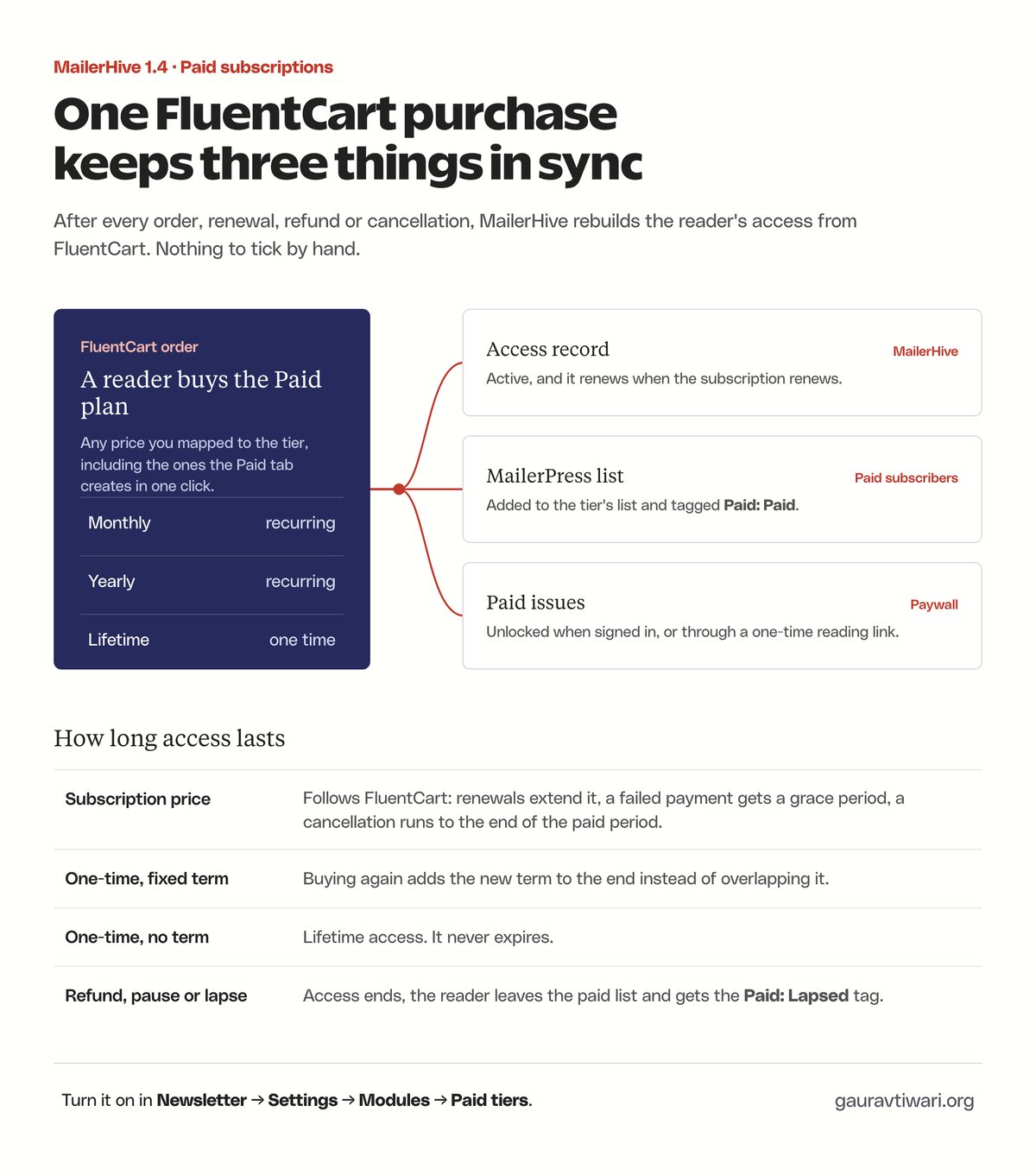
MailerHive rebuilds a reader's access from FluentCart after every order, renewal, refund and cancellation, and checks expiring access every hour. If a FluentCart webhook ever goes missing, the hourly check still ends access on time, and Re-check all purchases rebuilds everyone from FluentCart in one click. The Paid members screen shows everyone, and lets you give access by hand for gifts and comps.
Prices in Each Reader's Currency
If you use GT Extensions for FluentCart with its multi-currency module, the plans show each reader their own currency. A regional price you set for that currency comes first, then the exchange rate, so the price on the plans matches what checkout charges.
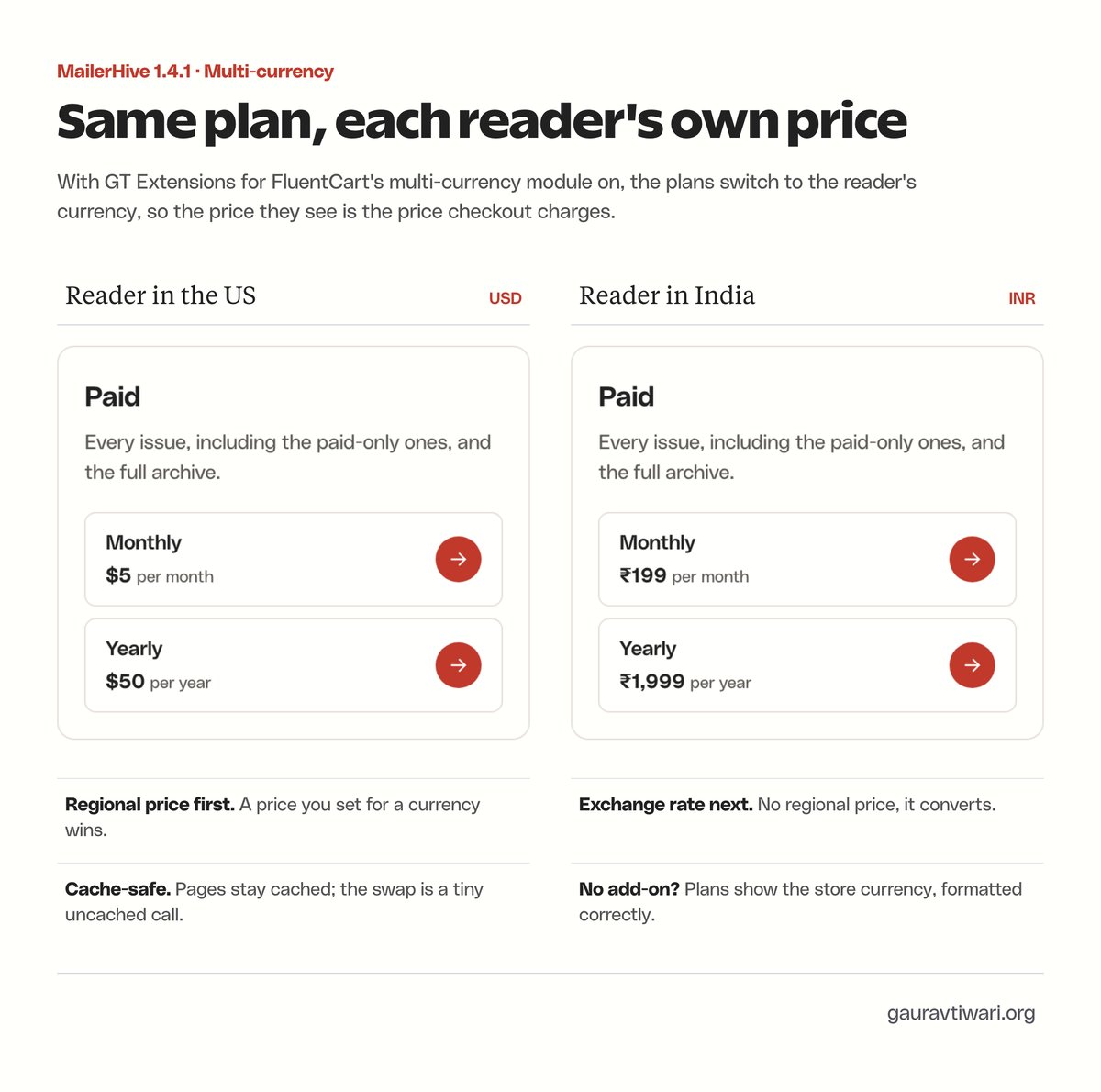
The page stays cached and identical for everyone. Only the prices switch, through a small uncached request after the page loads.
[mailerhive_plans] puts the plans anywhere on your site, and [mailerhive_account] shows a reader their access or emails them a reading link.
Signups and Consent
Three optional modules sit around MailerPress, each off until you turn it on:
- Consent policy: only signup forms you've reviewed can add contacts to MailerPress, the consent checkbox has to carry the exact wording you approved, and the consent record is saved on the contact. It works with MailerPress's Sign-up confirmation (double opt-in), so new signups stay pending until they click the link, while bounced and complaint contacts are never touched.
- FluentCart lifecycle tags: purchase, refund and abandoned-checkout tags on your MailerPress contacts, plus tags by product category.
- Rich paste: Google Docs and block-editor content pasted into the MailerPress editor arrive as proper email blocks.
The consent module is built for Core Forms. If you use a different form plugin, the rest of MailerHive works the same.
The Limits
- Paid tiers need FluentCart for payments.
- Prices in the reader's currency need GT Extensions for FluentCart. Without it, the plans show your store currency.
- A reader who isn't signed in stays recognized on one browser for 60 days by default, after which they ask for a new reading link.
- MailerHive isn't on WordPress.org. Updates come through the free license.
Getting Started
Install MailerHive, activate the free license under Newsletter → Settings → License, and set your newsletter name, sender, signup form and lists on the General and MailerPress tabs. The paid module ships switched off, so nothing about paid tiers touches your site until you turn it on.
If something breaks or doesn't make sense, post it here with what you clicked and what you saw, and I'll fix it.